Loading
Get Ken Segall Colgate
How it works
-

Open form follow the instructions
-

Easily sign the form with your finger
-

Send filled & signed form or save
How to fill out the Ken Segall Colgate online
This guide provides users with a clear and structured approach to completing the Ken Segall Colgate form online. Each section is broken down into manageable steps to ensure that everyone, regardless of their experience level, can successfully fill out the document.
Follow the steps to complete your form accurately and efficiently.
- Click the ‘Get Form’ button to obtain the form and open it for editing. This action will allow you to access the online document directly.
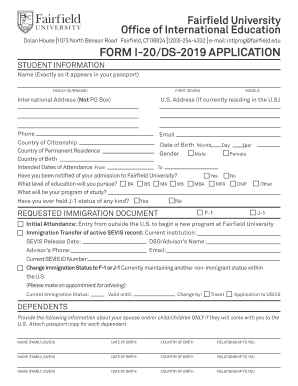
- Begin by entering your personal information in the student information section. Provide your name exactly as it appears in your passport, including your family name, first name, and middle name if applicable. Fill in your international and U.S. addresses, phone number, and email address.
- Indicate your country of citizenship, country of permanent residence, and country of birth. Also, provide your date of birth by selecting the appropriate month, day, and year.
- Select your gender and indicate whether you have been notified of your admission to Fairfield University by choosing 'Yes' or 'No'.
- Specify the level of education you intend to pursue by selecting options such as BA, BS, MA, etc. Additionally, provide the name of your program of study.
- If applicable, indicate whether you have ever held J-1 status. Choose 'Yes' or 'No', and provide any other relevant information.
- Choose the requested immigration document type. You may select F-1 or J-1 based on your situation. Specify if this is initial attendance or a transfer of your SEVIS record and provide the required details in the designated fields.
- If you have dependents accompanying you, complete the dependent information section by providing their names, dates of birth, countries of birth, and their relationship to you.
- Fill out the proof of financial support section by providing original documentation of finances. List all sources of support and ensure the total funding is complete and accurate.
- Review your certifications and delivery instructions. Indicate how you would like to receive your Form I-20/DS-2019 by selecting either mail to your international address, U.S. address, or hold for pick-up.
- Once all sections are complete, save your changes. You can then download, print, or share your completed form as necessary.
Complete your Ken Segall Colgate form online today to stay on track with your educational journey.
Related links form
Around 70% of the Colgate student body identifies as white. While this reflects the current demographics, the university is actively working to improve diversity and inclusivity on campus. Initiatives associated with Ken Segall Colgate aim to foster a more equitable community by engaging underrepresented groups and promoting broader representation.
Industry-leading security and compliance
US Legal Forms protects your data by complying with industry-specific security standards.
-
In businnes since 199725+ years providing professional legal documents.
-
Accredited businessGuarantees that a business meets BBB accreditation standards in the US and Canada.
-
Secured by BraintreeValidated Level 1 PCI DSS compliant payment gateway that accepts most major credit and debit card brands from across the globe.