Loading
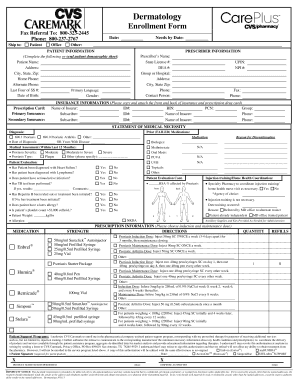
Get Cvs Caremark Dermatology Enrollment Form
How it works
-

Open form follow the instructions
-

Easily sign the form with your finger
-

Send filled & signed form or save
How to fill out the Cvs Caremark Dermatology Enrollment Form online
This guide provides clear and supportive instructions on how to complete the Cvs Caremark Dermatology Enrollment Form online. By following these steps, you can ensure that all necessary information is accurately submitted for your dermatology treatment.
Follow the steps to complete the enrollment form effectively.
- Click ‘Get Form’ button to obtain the form and open it in the online editor.
- Begin by providing the patient information. Fill in the patient’s name, address, city, state, zip code, home phone number, alternate phone number, primary language, last four digits of social security number, date of birth, gender, prescription card, and primary insurance details.
- Next, complete the prescriber information section. Enter the prescriber’s name, state license number, DEA number, group or hospital affiliation, address, city, state zip, phone number, and contact person details.
- In the insurance information segment, input details for both primary and secondary insurance. Be sure to copy and attach the front and back of the insurance and prescription drug card.
- Proceed to the statement of medical necessity. Indicate the diagnosis, including options like psoriasis or psoriatic arthritis, and provide the date of diagnosis or duration of the disease. Fill in the medical assessment information, including psoriasis severity and type.
- Detail prior medications that have failed, including a list of biologics and oral medications. Document any patient evaluations and reasons for discontinuation of past treatments.
- Respond to additional medical questions, such as evaluations concerning heart failure, lymphoma, and existing infections. Provide relevant information regarding injection training and home health coordination, if applicable.
- Complete the prescription information section. Choose the appropriate induction and maintenance dose and enter the quantity and refills.
- Finally, sign the authorization for patient support programs and date the form. Ensure that all required fields have been filled out accurately.
- Once all sections are complete, save changes, download, or print the form as needed before submission.
Complete your Cvs Caremark Dermatology Enrollment Form online today for a streamlined enrollment process.
To get your CVS Caremark member ID, log in to your account on the CVS Caremark website. If you do not have an account yet, you can obtain your member ID through your health plan provider. This ID is essential for accessing benefits like the CVS Caremark Dermatology Enrollment Form and tracking your prescriptions.