Loading
Get Dhhr A1000
How it works
-

Open form follow the instructions
-

Easily sign the form with your finger
-

Send filled & signed form or save
How to fill out the Dhhr A1000 online
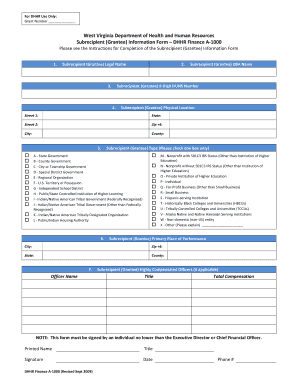
The Dhhr A1000, or Subrecipient (Grantee) Information Form, is a crucial document required by the West Virginia Department of Health and Human Resources. This guide will provide you with detailed, step-by-step instructions to complete the form accurately online.
Follow the steps to successfully complete the Dhhr A1000 form online.
- Press the ‘Get Form’ button to access the Dhhr A1000 form and open it in your chosen document editor.
- In the first section, provide the legal name of the subrecipient (grantee). Make sure to enter the name as registered with the appropriate authorities.
- Next, enter the 9-digit DUNS number assigned to the subrecipient. This number is necessary for identification purposes.
- Fill in the physical location of the subrecipient. Include the street address, city, state, county, and ZIP+4 code. Ensure all information is accurate and up-to-date.
- Select the type of subrecipient by checking one box from the provided options, such as state government, nonprofit, or private institution. Make sure to only choose one category.
- For the primary place of performance, similar to step 4, provide the city, state, county, and ZIP+4 code where the subrecipient operates predominately.
- Complete the officer name section by entering the name of the individual authorized to submit this form on behalf of the subrecipient.
- If applicable, provide the doing business as (DBA) name for the subrecipient, if it differs from the legal name.
- If there are highly compensated officers, list their titles and total compensations in the designated fields.
- The form must be signed by an authorized individual, either the Executive Director or Chief Financial Officer. Include their printed name, title, signature, and the date of submission.
- Once you have filled out the form, you can save your changes, download it for offline use, print it out for physical submission, or share it with others as necessary.
Complete your Dhhr A1000 form online today for efficient processing.
How do I report changes to Customer Services? By phone: 1-877-716-1212; e-mail: dhhrbcfchangectr@wv.gov; fax: 304-558-1869; and U.S. Postal Service: P.O. Box 1668, Charleston, WV 25326-1668. You can also report changes, apply for benefits and complete reviews at .wvpath.org.
Industry-leading security and compliance
US Legal Forms protects your data by complying with industry-specific security standards.
-
In businnes since 199725+ years providing professional legal documents.
-
Accredited businessGuarantees that a business meets BBB accreditation standards in the US and Canada.
-
Secured by BraintreeValidated Level 1 PCI DSS compliant payment gateway that accepts most major credit and debit card brands from across the globe.