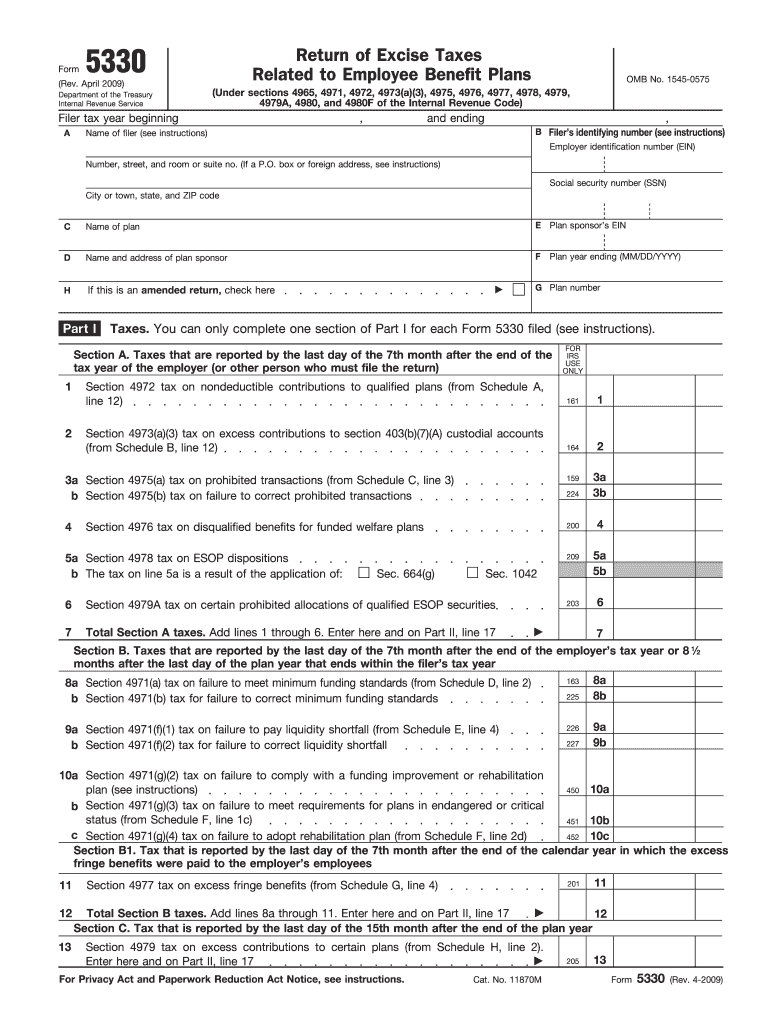
Cat. No. 11870M Rev. 4-2009 Form 5330 Rev. 4-2009 Page Name of Filer 14 Section 4980 tax on reversion of qualified plan assets to an employer from Schedule I line 3. Form Return of Excise Taxes Related to Employee Benefit Plans Rev. April 2009 Department of the Treasury Internal Revenue Service Filer tax year beginning A OMB No. 1545-0575 Under sections 4965 4971 4972 4973 a 3 4975 4976 4977 4978 4979 4979A 4980 and 4980F of the Internal Revenue .
Loading

Open form follow the instructions

Easily sign the form with your finger

Send filled & signed form or save
How to fill out the Form 5330 online
Filling out Form 5330 is essential for reporting excise taxes related to employee benefit plans. This guide provides a comprehensive overview of how to complete this form online, ensuring accuracy and compliance.
Follow the steps to successfully complete the Form 5330 online.
- Press the ‘Get Form’ button to access the Form 5330 and open it in your preferred online document editor.
- Begin with section A, where you will need to enter the filer tax year. Indicate the start and end dates of the tax year relevant to the submission.
- In section B, provide the filer’s identifying number along with the name and employer identification number (EIN) of the filer.
- Complete section C by filling in the name of the plan and the plan sponsor’s EIN, as well as the plan number and address details.
- If applicable, indicate if this is an amended return by checking the designated box in section D.
- Fill in Part I, where you'll report specific taxes. Choose the appropriate section relevant to the excise taxes applicable to your situation. Complete the lines as necessary, ensuring you refer to any schedules mentioned.
- Transition to Part II, where you will calculate the tax due. Enter the total from the applicable lines of Part I into line 17, adjust for any payments made prior to filing on line 18, and compute the final amount owed for line 19.
- Sign and date the form in the designated areas, ensuring that all information is accurate to the best of your knowledge.
- Once all fields are filled, save your changes to allow for future edits. You may also choose to download, print, or share the completed Form 5330 as needed.
Complete your forms online with confidence and accuracy.
Experience a faster way to fill out and sign forms on the web. Access the most extensive library of templates available.
Related content
Sep 19, 2020 — This form used to report and pay the excise tax related to employee...
The annual return on Form 5330 shall be filed with respect to each prohibited transaction...
No part of this document can be reproduced or transmitted in any form or by any means...
Get answers to your most pressing questions about US Legal Forms API.
What tax forms cannot be electronically filed?
Certain tax forms cannot be filed electronically, including Form 5330, which necessitates paper filing. Other forms might include specific schedules or information returns subject to unique IRS rules. Always check the IRS website for the latest updates, or consider using platforms like US Legal Forms to stay current with filing requirements. This approach can significantly simplify your tax filing experience.
What is the due date for form 5330?
The due date for Form 5330 typically falls on the 15th day of the 7th month after the end of the plan year for which you are filing. If this date is on a weekend or holiday, the due date usually shifts to the next business day. Staying informed about these deadlines is crucial for avoiding penalties. US Legal Forms can provide reminders and resources to help keep you on track.
How do I download tax forms?
To download tax forms, including Form 5330, you can visit the IRS website or use trusted platforms like US Legal Forms. Simply search for the specific form you need, and select the option to download it in a suitable format. Ensure you have the latest version to stay compliant with current regulations. Utilizing a reliable source can make this process easier and more efficient.
Can form 5330 be filed electronically?
Unfortunately, Form 5330 cannot be filed electronically as of current IRS guidelines. Typically, this form must be submitted by mail, which means preparing a paper return. It is essential to ensure all information is accurate before mailing to avoid processing delays. Platforms like US Legal Forms can provide templates to simplify your preparation of Form 5330.
Why won't the IRS let me file electronically?
The IRS may not allow electronic filing for several reasons, including not meeting eligibility criteria or filing certain forms like Form 5330 that are restricted. If you encounter issues, you might have to resort to filing a paper form instead. It's essential to verify all rules surrounding electronic filing to prevent any filing delays. Resources like US Legal Forms can help clarify these restrictions.
Which IRS forms can be filed electronically?
Many IRS forms can be filed electronically, including those for individual income tax returns and certain information returns. However, Form 5330 is not typically included in this list, so be sure to confirm before attempting to file electronically. You can check the IRS website or consult with a professional for the most accurate information. Using platforms like US Legal Forms can guide you through the forms that can be filed electronically.
Can I file electronically after October 15th?
You cannot file Form 5330 electronically after October 15th. The IRS has set specific deadlines for electronic filing, and if you miss this date, you will need to file a paper return. Plan ahead to ensure you meet all filing requirements for Form 5330. Consider using a reliable platform like US Legal Forms for comprehensive filing assistance.
How to file form cmp 02?
Filing Form CMP 02 requires careful preparation of the information requested, typically concerning compliance violations. Always double-check the requirements and specific details needed for submission. Knowing how Form 5330 interfaces with compliance can also guide you in this process. To simplify filing tasks, consider utilizing platforms like US Legal Forms that provide step-by-step assistance.
Where to file form 5500?
You should file Form 5500 with the Department of Labor, but the exact location can depend on various factors, such as the type of plan you have. Timely filing helps you avoid penalties related to non-compliance. While this form does not directly relate to Form 5330, understanding the overall compliance framework can provide beneficial insights. Seeking advice from professionals can also help ensure correct submissions.
When to file a 5330?
Filing a 5330 must be timely, typically within a specific time frame after your tax return is due. If you've had an excise tax issue or other related concerns, you'll need to file Form 5330 promptly to avoid penalties. Being proactive about your filing not only helps you meet compliance but also allows you to manage potential liabilities effectively. Consider using US Legal Forms for guidance in the filing process.
Use professional pre-built templates to fill in and sign documents online faster. Get access to thousands of forms.
If you believe that this page should be taken down, please follow our DMCA take down process here.