Loading
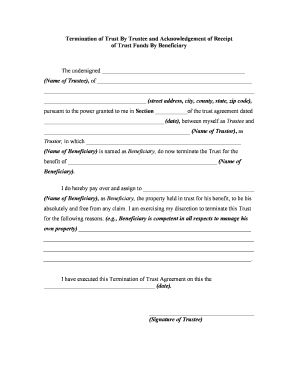
Get Termination Form
How it works
-

Open form follow the instructions
-

Easily sign the form with your finger
-

Send filled & signed form or save
How to fill out the Termination Form online
Filling out the Termination Form online can seem challenging, but with a clear understanding of each section, you can complete it efficiently. This guide provides step-by-step instructions to help you navigate the process with ease.
Follow the steps to complete the Termination Form successfully.
- Click ‘Get Form’ button to obtain the form and open it in the editor.
- In the first section, enter the name of the Trustee in the designated field. Ensure that the name matches the official documentation.
- Next, provide the complete street address, including the city, county, state, and zip code of the Trustee.
- Indicate the section of the trust agreement that grants the Trustee the power to terminate the trust. Enter this section number accurately.
- Input the date of the trust agreement in the specified format. This date is crucial for record-keeping.
- Enter the name of the Trustor in the next field. Confirm that this name aligns with the trust agreement.
- Fill in the name of the Beneficiary as specified in the trust documents.
- In the section explaining the reason for termination, provide a clear and concise explanation of why the trust is being terminated, ensuring it reflects valid and accurate reasons.
- On the designated line, write the date on which you execute the Termination of Trust Agreement, following the specified format.
- The Trustee must sign the form in the designated space to validate the termination.
- The form requires notarization. Ensure the Trustee appears before a notary public to complete this section officially.
- In the Acknowledgment of Receipt section, the Beneficiary must provide their name and address similarly to the Trustee.
- The Beneficiary must confirm their age, providing documentation if necessary, and acknowledge the termination by signing the form.
- Finally, save any changes made to the form, and you can choose to download, print, or share the completed Termination Form online.
Complete your Termination Form online today for a seamless process.
Companies should avoid including harsh language, jokes, emotional statements or too much detail in the termination letter. The tone should be respectful and direct. "Stick to the facts," Dresnin said.