Get Pur522
How it works
-

Open form follow the instructions
-

Easily sign the form with your finger
-

Send filled & signed form or save
How to fill out the Pur522 online
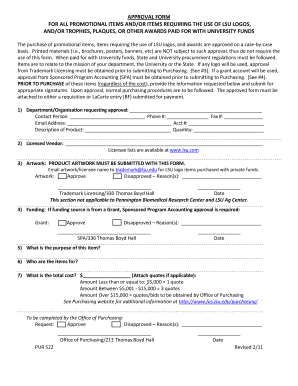
Filling out the Pur522 form is essential for obtaining approval for promotional items or awards requiring the use of LSU logos. This guide will provide clear, step-by-step instructions to ensure that your form is completed accurately and efficiently.
Follow the steps to complete the Pur522 form correctly
- Click ‘Get Form’ button to access the Pur522 form and open it in your browser.
- In the first section, enter the name of the department or organization requesting approval along with the contact person's name, phone number, fax number, and email address. Make sure to also include the account number if applicable.
- Provide a detailed description of the product you wish to purchase and the desired quantity.
- Identify the licensed vendor from which you will be purchasing. If you are unsure, you can find the licensee lists at the official LSU website.
- Ensure that the required product artwork is submitted alongside this form. For LSU logo items obtained with private funds, email the artwork and licensee name to the designated trademark licensing email address.
- Select whether the artwork is approved or disapproved, and provide any reasons for disapproval if necessary. This section requires a signature and date from Trademark Licensing.
- If funding for the purchase is sourced from a grant, then you will need approval from Sponsored Program Accounting. Indicate if approval is granted or not and provide any reasons for disapproval.
- Clearly state the purpose of the item and name the intended recipients of the items.
- Fill in the total cost of the item. If applicable, attach quotes according to the specified guidelines based on the total amount. Make sure to follow the quote requirements for differing price ranges.
- Finally, the Office of Purchasing will review your request. Indicate if it is approved or disapproved and any reasons for disapproval, along with the authorized signature and date.
- After completing and reviewing the form, you can save the changes, download the form, print it for submission, or share it as needed.
Complete your Pur522 form online today to ensure timely approval for your promotional items.
Whether you claim 0 or 1 on your W4 for 2025 depends on your financial situation. Claiming 0 typically results in higher withholding, which may provide a refund when you file your taxes. If you think you will owe less tax, claiming 1 might be a better option. To make the right choice, consider reviewing how Pur522 relates to your tax situation, and utilize US Legal Forms to find a calculator or additional resources to help you decide.
Industry-leading security and compliance
-
In businnes since 199725+ years providing professional legal documents.
-
Accredited businessGuarantees that a business meets BBB accreditation standards in the US and Canada.
-
Secured by BraintreeValidated Level 1 PCI DSS compliant payment gateway that accepts most major credit and debit card brands from across the globe.