Loading
Get Certified Payroll
How it works
-

Open form follow the instructions
-

Easily sign the form with your finger
-

Send filled & signed form or save
How to fill out the Certified Payroll online
The Certified Payroll report is a crucial document used to verify that workers are compensated according to prevailing wage laws. This guide provides clear, step-by-step instructions on how to accurately complete the Certified Payroll form online.
Follow the steps to fill out the Certified Payroll form accurately.
- Click ‘Get Form’ button to obtain the form and open it in the editor.
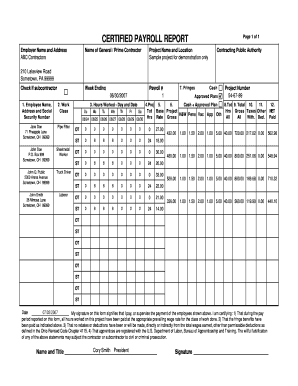
- Begin by entering the 'Employer Name and Address' at the top of the form. This should reflect the company responsible for the payroll, in this case, ABC Contractors.
- Next, fill in the 'Name of General / Prime Contractor' and the 'Project Name and Location'. These details provide context about the work being reported.
- Indicate the 'Week Ending' date. This will define the payroll period for which you are reporting. Make sure this date matches the week you are calculating.
- Enter the 'Payroll #' which helps in tracking and referencing payroll reports. Here, it is noted as 1.
- Provide the 'Contracting Public Authority' address to identify the government entity overseeing the project. For this example, it's noted as 210 Lakeview Road, Sometown, PA 99999.
- If applicable, check the box that indicates if this payroll report is submitted by a subcontractor.
- For each employee, complete the sections for 'Employee Name', 'Address', 'Social Security Number', and 'Work Class'. Ensure all details are accurate and correspond to the actual pay period.
- Fill out 'Hours Worked - Day and Date' for each employee across the specified week. Input the hours worked daily, marking standard time (ST), overtime (OT), or any other categorization as required.
- Calculate the 'Gross Rate' and 'Gross' for each employee. This will total the earnings for the hours recorded.
- Document any deductions or fringe benefits in their respective sections. The totals for these should reflect accurate calculations and be justified by appropriate records.
- Finally, include your signature and the date to certify the accuracy of the report. You will confirm compliance with wage laws and the correct payment of fringe benefits.
- Once all fields are properly filled, you can save the changes, download the document, print it for physical records, or share it as necessary.
Complete your Certified Payroll online today to ensure compliance and accuracy.
Related links form
To run certified payroll in QuickBooks, start by enabling the Certified Payroll feature in your account settings. Then, input accurate employee information, including classifications and hours worked, to ensure compliance with relevant wage laws. Finally, generate certified payroll reports directly within QuickBooks for submission, making the process efficient and straightforward for your business.
Industry-leading security and compliance
US Legal Forms protects your data by complying with industry-specific security standards.
-
In businnes since 199725+ years providing professional legal documents.
-
Accredited businessGuarantees that a business meets BBB accreditation standards in the US and Canada.
-
Secured by BraintreeValidated Level 1 PCI DSS compliant payment gateway that accepts most major credit and debit card brands from across the globe.