Loading
Form preview
  • US Legal Forms
  • Form Library
  • More Forms
  • More Uncategorized Forms
  • Pakistani Passport Application Form

Get Pakistani Passport Application Form

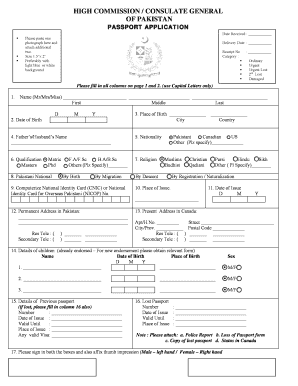
Ssport or travel document noted in Column 15, which is attached, I have made no other no other applications for a passport since the attached passport or travel document was issued to me. Note : If applicant had a passport which had a passport which has been lost, he/ she should furnish particulars in columns 16, in the event of its coming again into possession, the applicant undertakes to return it to the Regional Passport Office Consulate General of Pakistan, Toronto. 4. 5. 6. 7. 8. I have ne.

How it works

  1. Open form

    Open form follow the instructions

  2. Easily sign form

    Easily sign the form with your finger

  3. Share form

    Send filled & signed form or save

How to fill out the Pakistani Passport Application Form online

Filling out the Pakistani Passport Application Form online is a straightforward process that requires careful attention to detail. This guide provides step-by-step instructions to help users navigate the form with ease and confidence.

Follow the steps to complete your passport application form online.

  1. Click ‘Get Form’ button to access the application form and open it in your document editor.
  2. Begin by entering your name in the specified fields using capital letters only. Fill in your first, middle, and last names as requested.
  3. Provide your date of birth by selecting the day, month, and year from the date fields.
  4. Indicate your place of birth by filling in the city and country where you were born.
  5. Next, enter your father’s or partner’s name as required in the designated field.
  6. Specify your nationality from the available options provided in the form.
  7. Select your qualification by marking the appropriate checkbox from the list of educational backgrounds.
  8. Identify your religion by choosing the relevant option from the options provided.
  9. Indicate your connection to Pakistan by selecting the appropriate checkbox for nationality.
  10. Enter your Computerized National Identity Card (CNIC) or National Identity Card for Overseas Pakistani (NICOP) number.
  11. Fill in the place and date of issue for your CNIC or NICOP.
  12. Provide your permanent address in Pakistan, including telephone numbers for both residence and secondary contact.
  13. Input your present address in Canada by filling out the apartment number, street, city, province, and postal code.
  14. List the details of your children in the designated section if applicable, marking their names, dates of birth, and places of birth.
  15. If you have a previous passport, fill in the details about it, including number, date of issue, and valid until information.
  16. If your passport is lost, complete the relevant section with the passport number, date of issue, valid until, and place of issue.
  17. Sign in the indicated boxes and provide your thumb impression as per gender specification.
  18. Read the declaration carefully and affirm that all the information provided is correct before signing.
  19. Ensure you have attached all required documents, including photographs and copies of identification.
  20. Finally, save the form, download it, print it, or share it as needed before submission.

Complete your Pakistani Passport Application Form online today to ensure a smooth application process!

Get form

Experience a faster way to fill out and sign forms on the web. Access the most extensive library of templates available.
Get form

Related content

Passport Services - Use our new wizard!
Visit Forms to find the form you need and begin the process of completing and submitting...
Learn more
Fees for Visa Services - Travel.gov
This webpage lists visa application fees and other visa related fees collected by...
Learn more
Doc 10140
The document is divided into ten Parts, and within seven of these Parts there are several...
Learn more

Related links form

Employment Certificate Consumerdirectfl Illinois Withholding Allowance Worksheet 2020 Sample 7149895600

Questions & Answers

Get answers to your most pressing questions about US Legal Forms API.

Contact support

The processing time for a Pakistani passport can vary based on several factors, including the method of application and the volume of requests. Typically, you can expect to receive your passport within a few weeks after submission. For urgent cases, express services may be available.

Requirements for a Pakistani passport generally include a valid National Identity Card, completed Pakistani Passport Application Form, and recent photographs. Additionally, proof of residence may be needed. Always ensure you meet these requirements prior to your application process.

To download the Pakistani Passport Application Form online, visit the official government website for passport services. There, you can find a link to the application form in PDF format. Print the form, fill it out carefully, and gather the necessary documents for submission.

The required documents for a Pakistani passport include a completed Pakistani Passport Application Form, proof of identity, and passport-sized photographs. Ensure your application form is correctly filled to avoid delays. Always check for any additional requirements that may apply to your specific situation.

To apply for a Pakistani passport, you will need several documents. These typically include your National Identity Card, recent passport-sized photographs, and proof of address. Additionally, if you are applying on behalf of a minor, you will also need the child’s birth certificate.

To fill a passport application form, like the Pakistani Passport Application Form, begin with clear identification of sections that require your input. Write all necessary information methodically and revise your entries for any potential errors. Utilizing platforms like uslegalforms can provide helpful guidance throughout this procedure, ensuring that you complete your application correctly.

When filling out the Pakistani Passport Application Form, you will need to provide personal details such as your full name, date of birth, and nationality. Additionally, include information about your parents and any previous passports. Make sure every piece of information is accurate to facilitate processing.

Filling out a form for a passport, specifically the Pakistani Passport Application Form, requires precise attention. To begin, provide all relevant personal information clearly. Review every section to confirm that everything is correct, as errors can lead to complications.

Completing your passport application is straightforward. Use the Pakistani Passport Application Form, ensuring that all segments are filled out. Double-check your information for accuracy before submitting the form to avoid any delays.

To apply for a Pakistani passport, you need to fill out the Pakistani Passport Application Form accurately. After completing the form, submit it along with the required documents to your nearest passport office. If you need help navigating the application process, consider US Legal Forms as a reliable resource for forms and guidance.

Get This Form Now!

Use professional pre-built templates to fill in and sign documents online faster. Get access to thousands of forms.
Get form
If you believe that this page should be taken down, please follow our DMCA take down processhere.

Industry-leading security and compliance

US Legal Forms protects your data by complying with industry-specific security standards.
  • In businnes since 1997
    25+ years providing professional legal documents.
  • Accredited business
    Guarantees that a business meets BBB accreditation standards in the US and Canada.
  • Secured by Braintree
    Validated Level 1 PCI DSS compliant payment gateway that accepts most major credit and debit card brands from across the globe.
Get Pakistani Passport Application Form
Get form
  • Adoption
  • Bankruptcy
  • Contractors
  • Divorce
  • Home Sales
  • Employment
  • Identity Theft
  • Incorporation
  • Landlord Tenant
  • Living Trust
  • Name Change
  • Personal Planning
  • Small Business
  • Wills & Estates
  • Packages A-Z
  • Affidavits
  • Bankruptcy
  • Bill of Sale
  • Corporate - LLC
  • Divorce
  • Employment
  • Identity Theft
  • Internet Technology
  • Landlord Tenant
  • Living Wills
  • Name Change
  • Power of Attorney
  • Real Estate
  • Small Estates
  • Wills
  • All Forms
  • Forms A-Z
  • Form Library
  • Legal Hub
  • About Us
  • Help Portal
  • Legal Resources
  • Blog
  • Affiliates
  • Contact Us
  • Delete My Account
  • Site Map
  • Industries
  • Forms in Spanish
  • Localized Forms
  • State-specific Forms
  • Forms Kit
  • Real Estate Handbook
  • All Guides
  • Notarize
  • Incorporation services
  • For Consumers
  • For Small Business
  • For Attorneys
  • USLegal
  • FormsPass
  • pdfFiller
  • signNow
  • altaFlow
  • DocHub
  • Instapage
Form Packages
  • Adoption
  • Bankruptcy
  • Contractors
  • Divorce
  • Home Sales
  • Employment
  • Identity Theft
  • Incorporation
  • Landlord Tenant
  • Living Trust
  • Name Change
  • Personal Planning
  • Small Business
  • Wills & Estates
  • Packages A-Z
Form Categories
  • Affidavits
  • Bankruptcy
  • Bill of Sale
  • Corporate - LLC
  • Divorce
  • Employment
  • Identity Theft
  • Internet Technology
  • Landlord Tenant
  • Living Wills
  • Name Change
  • Power of Attorney
  • Real Estate
  • Small Estates
  • Wills
  • All Forms
  • Forms A-Z
  • Form Library
Customer Service
  • Legal Hub
  • About Us
  • Help Portal
  • Legal Resources
  • Blog
  • Affiliates
  • Contact Us
  • Delete My Account
  • Site Map
  • Industries
  • Forms in Spanish
  • Localized Forms
  • State-specific Forms
  • Forms Kit
Legal Guides
  • Real Estate Handbook
  • All Guides
Prepared for you
  • Notarize
  • Incorporation services
Our Customers
  • For Consumers
  • For Small Business
  • For Attorneys
Our Sites
  • USLegal
  • FormsPass
  • pdfFiller
  • signNow
  • altaFlow
  • DocHub
  • Instapage
Social Media
Call us now toll free:
+1 833 426 79 33
As seen in:
© Copyright 1999-2026 airSlate Legal Forms, Inc. 3720 Flowood Dr, Flowood, Mississippi 39232
  • Your Privacy Choices
  • Terms of Service
  • Privacy Notice
  • Content Takedown Policy
  • Bug Bounty Program