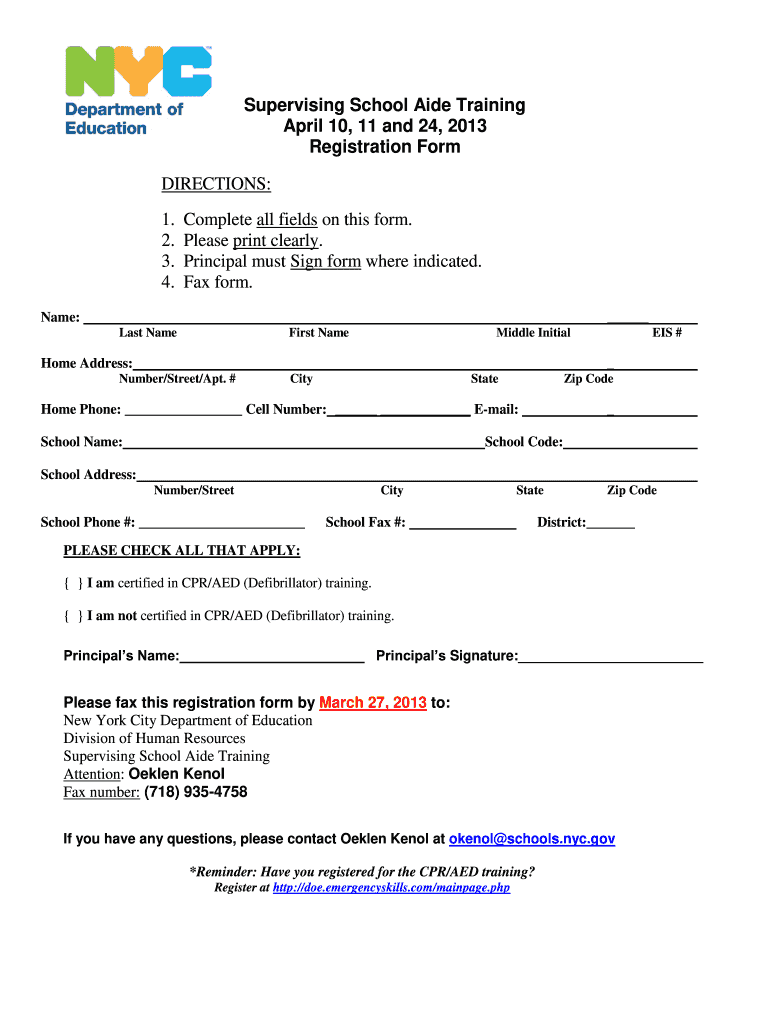
Supervising School Aide Training April 10, 11 and 24, 2013 Registration Form DIRECTIONS: 1. 2. 3. 4. Complete all fields on this form. Please print clearly. Principal must Sign form where indicated.
Loading

Open form follow the instructions

Easily sign the form with your finger

Send filled & signed form or save
How to fill out the Nyc Doe Letterhead online
Filling out the Nyc Doe Letterhead online can seem challenging, but this guide will walk you through each step to ensure that you complete it accurately and efficiently. Follow the instructions carefully to prepare your document.
Follow the steps to fill out the form successfully
- Click ‘Get Form’ button to obtain the form and open it in the editor.
- Begin by entering your personal details in the 'Name' section. Input your last name, first name, and middle initial clearly.
- In the 'Home Address' section, fill in your number, street, apartment number (if applicable), city, state, and zip code. Make sure these details are accurate.
- Provide your home phone number, cell number, and email in the designated fields. Ensure all contact information is valid and up-to-date.
- In the 'School Name' field, specify the name of the institution you are associated with, followed by the school code and school address.
- For the 'School Phone' number, enter the main contact number for the school, and complete the city, state, and zip code for the school address.
- Indicate your district by entering the relevant information in the ‘District’ section.
- Check the box next to your CPR/AED certification status, indicating whether you are certified or not certified.
- Have the principal sign in the designated area and ensure their name is filled out clearly.
- Once you have completed all fields, review the form for accuracy. You can then save changes, download, print, or share the form as required.
Complete your documents online with ease and efficiency today!
Experience a faster way to fill out and sign forms on the web. Access the most extensive library of templates available.
Related content
Sep 8, 2022 — Welcome to the 2022–2023 school year! As the father of four children, I...
September 26, 2024. Dear Families,. First and foremost, I want to thank you for entrusting...
Get answers to your most pressing questions about US Legal Forms API.
How do I complain to NYC DOE?
To complain to the NYC DOE, clearly outline your issues in a written format and specify the resolution you seek. You can submit this complaint via email or through official complaint forms provided by the NYC DOE. Including your complaint on NYC DOE letterhead adds a level of formality that can be beneficial in getting your message across effectively.
What is the best way to file a complaint?
The best way to file a complaint is to provide a clear, detailed account of your issue. Use official channels or the complaint forms available on the NYC DOE website, as this ensures that your submission is recorded and reviewed. When possible, submit your complaint on NYC DOE letterhead, as it may lend authority to your concerns.
How to file a complaint to the NYC DOE?
Filing a complaint to the NYC DOE can be done online or by reaching out directly to your school. Ensure you have all necessary details, such as names, dates, and specific events. Use NYC DOE letterhead to clearly communicate your issue, making it easier for them to address your concerns promptly.
How do I email the NYC Department of Education?
To email the NYC Department of Education, visit their official website to find the correct contact information based on your location or issue. Use the provided email addresses for specific departments to ensure your message reaches the intended recipient. Including your details on NYC DOE letterhead can add professionalism to your inquiries.
Is working for the NYC DOE worth it?
Working for the NYC DOE can be very rewarding, especially if you are passionate about education and youth development. Employees often report job satisfaction, opportunities for advancement, and the impact they have on communities. By becoming part of an organization that affects countless lives, you can find immense personal fulfillment in your career.
What is the most common complaint about school?
The most common complaint about school often revolves around issues like inadequate communication between parents and teachers or concerns about school safety. Many parents also express frustration regarding special education services or the lack of individualized attention for students. Utilizing NYC DOE letterhead when submitting formal complaints can emphasize your concerns and ensure they are taken seriously.
How to find NYC DOE file number?
To find your NYC DOE file number, you may start by entering your information on the NYC Department of Education’s official website. Look for sections related to student records or resources for families. Additionally, contacting your child's school directly can provide quick assistance. Always keep a copy of any correspondences, especially if they come on NYC DOE letterhead.
What is Melissa Aviles-Ramos's nationality?
Melissa Aviles-Ramos, in her role within the NYC Department of Education, brings a diverse perspective to her work. Her contributions to the educational community are invaluable, and she has made an impact in various initiatives. While the NYC DOE Letterhead represents official communications, her nationality may not directly influence her professional qualifications.
Who is the head of the DOE in NYC?
The head of the DOE in NYC is the Chancellor, who is currently responsible for overseeing all educational policies and operations. This individual plays a pivotal role in shaping educational initiatives and ensuring adherence to state and city regulations. Communications from the Chancellor often include the NYC DOE Letterhead, reinforcing their authority in the educational system.
How to get NYC DOE transcript?
To obtain a NYC DOE transcript, you must submit a request through the online portal or contact your school's administration. Make sure to provide the necessary personal information, such as your name and date of birth. Using official NYC DOE Letterhead for this process may help ensure that your request is taken seriously and processed efficiently.
Use professional pre-built templates to fill in and sign documents online faster. Get access to thousands of forms.
If you believe that this page should be taken down, please follow our DMCA take down process here.