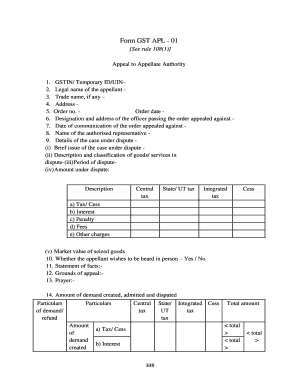
Form GST APL 01 See rule 108(1) Appeal to Appellate Authority 1. GSTIN/ Temporary ID/UIN 2. Legal name of the appellant 3. Trade name, if any 4. Address 5. Order no. Order date 6. Designation and.

How it works
  • Open form

    Open form follow the instructions

  • Easily sign form

    Easily sign the form with your finger

  • Share form

    Send filled & signed form or save

How to fill out the Form Gst Apl 01 In Word Format Download online

Filling out the Form Gst Apl 01 is an important step for individuals seeking to appeal to the Appellate Authority. This guide provides clear, step-by-step instructions to help users complete the form with confidence, ensuring all necessary information is provided accurately.

Follow the steps to fill out the Form Gst Apl 01 successfully.

  1. Click the ‘Get Form’ button to obtain the form and open it in your word processor.
  2. Begin filling in 'GSTIN/Temporary ID/UIN,' ensuring that you enter your identification number accurately.
  3. Provide the 'Legal name of the appellant' and the 'Trade name, if any,' in the respective fields.
  4. Input your 'Address,' ensuring correct formatting and completeness.
  5. Enter the 'Order number' and 'Order date' as mentioned in the communication from the authority.
  6. Fill in the 'Designation and address of the officer' who passed the order appealed against.
  7. Specify the 'Date of communication of the order appealed against' for clarity on the timeline.
  8. Complete the section for 'Name of the authorised representative,' if applicable.
  9. Detail the 'Case under dispute,' providing a 'Brief issue' and classification of goods/services involved.
  10. Fill in the 'Period of dispute' followed by the total 'Amount under dispute,' detailing Central tax, State/UT tax, Integrated tax, and any Cess.
  11. Indicate whether you wish to be heard in person by selecting 'Yes' or 'No' in the appropriate section.
  12. Provide a comprehensive 'Statement of facts,' outlining important details relevant to your case.
  13. Outline your 'Grounds of appeal' clearly and concisely.
  14. Complete the 'Prayer' for what you wish the authority to consider or grant.
  15. Finalise the details of the demand created, admitted, and disputed, ensuring all amounts are accounted for.
  16. Review your completed form thoroughly for any errors or omissions.
  17. Save your changes, then download, print, or share the completed form as needed.

Begin filling out the Form Gst Apl 01 online today for a seamless appeal process.

Get form

Experience a faster way to fill out and sign forms on the web. Access the most extensive library of templates available.

Related content

Registration Statement on Form S-1 - SEC.gov

If this Form is filed to register additional securities for an offering pursuant...

Learn more
NEWSLETTER - ICSI

Jan 31, 2020 — GST forms available for Taxpayers on. 19-24 the GST Common Portal...

Learn more
List of airline codes - Wikipedia

IATAICAOCall signCountry/RegionEVYAustraliaGNLGENERALUnited States1An/an/aGlobalView 1019...

Learn more
Questions & Answers

Get answers to your most pressing questions about US Legal Forms API.

Contact support

How do I appeal a DRC 07?

By submitting DRC-07 to GSTN, liability against the tax payer will be created in part B {other than return related liability} of the Liability Ledger. You can appeal against this order u/s 107 of the Act, within three months from the date on which the said decision or order is communicated you.

FORM GST DRC-07 shall be issued by the PO online, where the taxpayer does not file FORM GST DRC-03 and intends to file an appeal against the order issued by the PO.

The GST APL-01: Appeal to Appellate Authority page is displayed. Select the Order Type as Demand Order from the drop-down list.

Step 1: Log in to the GST portal. On the 'My Applications' page, select application type as 'Appeal to Appellate Authority' and then click on 'New Application'. The 'GST APL-01-Appeal to Appellate Authority' page will be displayed.

Step 1: Log in to the GST portal. On the 'My Applications' page, select application type as 'Appeal to Appellate Authority' and then click on 'New Application'. The 'GST APL-01-Appeal to Appellate Authority' page will be displayed. Step 3: Select the order type as 'Demand Order' and enter the order number.

After successfully logging in to GST Portal, click on “RETURN DASHBOARD” button. On RETURN DASHBOARD, Select the month for which you wish to file GST returns and Click on the “SEARCH” button. It will display all GST returns for the selected month. Select any pending GST return, you wish to file.

the demand made in DRC 07 Go to the Services Module – Click on Tax Payer details – Cash Ledger (which will now reflect the tax, penalty, interest deposited in Bank) – Quick Link (found at middle of the right scrolling bar) – click on payment towards demand – Enter the demand of tax, interest and penalty raised under ...

By submitting DRC-07 to GSTN, liability against the tax payer will be created in part B {other than return related liability} of the Liability Ledger. The same can be viewed from the GST back end by verifying the ''other than return liability' of the tax payer in the liability ledger.

Get This Form Now!

Use professional pre-built templates to fill in and sign documents online faster. Get access to thousands of forms.

If you believe that this page should be taken down, please follow our DMCA take down process here.

Get Form Gst Apl 01 In Word Format Download