Loading
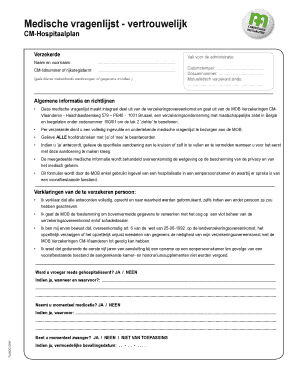
Get Medische Vragenlijst - Vertrouwelijk - Cm
How it works
-

Open form follow the instructions
-

Easily sign the form with your finger
-

Send filled & signed form or save
How to fill out the Medische Vragenlijst - Vertrouwelijk - CM online
Filling out the Medische Vragenlijst - Vertrouwelijk - CM online is a crucial step in managing your health insurance needs. This guide will provide you with step-by-step instructions to complete the form accurately and efficiently.
Follow the steps to successfully complete the medical questionnaire.
- Press the ‘Get Form’ button to access the medical questionnaire in an online editor.
- Begin by entering your full name in the designated field labeled ‘Naam en voornaam.’ Ensure that spelling is correct for identification purposes.
- Provide your CM membership number or national register number in the field labeled ‘CM-lidnummer of rijksregisternr.’ If applicable, attach the yellow sticker from your health insurance.
- Fill in the timestamp and folder number in the spaces provided under the administrative section if required.
- Carefully read the instructions about completing the form. Respond to each primary question with a ‘yes’ or ‘no.’ Remember, a complete response is necessary for each insured person.
- For each question where you answer ‘yes,’ detail the specific condition by checking the appropriate box or writing it in. Note the first occurrence date of the condition.
- Proceed through the sections, answering questions regarding previous hospitalizations, current medications, and pregnancy status. Provide the necessary dates and details where required.
- When addressing the specific medical conditions listed (e.g., blood disorders, nervous system diseases, etc.), indicate if you have experienced any conditions by checking ‘yes’ or ‘no’ and provide additional details when applicable.
- Complete the declaration section by confirming that all your answers are truthful and accurate. Sign where indicated to authenticate your responses.
- Once you have filled out the entire form, save changes to your document. You can then download, print, or share the completed form as necessary.
Start completing your Medische Vragenlijst - Vertrouwelijk - CM online to ensure your health insurance needs are managed effectively.
Om je ziekte aan te geven bij CM, volg je de stappen op hun online platform of bel je hun klantenservice. Het is belangrijk om dit zo snel mogelijk te doen, zodat je recht hebt op de benodigde ondersteuning. Gebruik hiervoor de Medische Vragenlijst - Vertrouwelijk - CM om je informatie precies te documenteren.