Loading
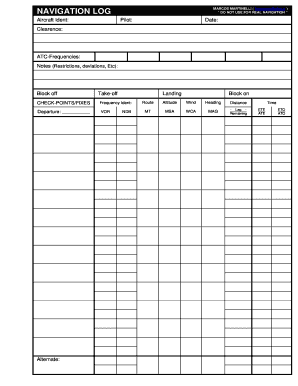
Get Navigation Log Marcos Martinelli Do Not Use For Real
How it works
-

Open form follow the instructions
-

Easily sign the form with your finger
-

Send filled & signed form or save
How to fill out the NAVIGATION LOG MARCOS MARTINELLI DO NOT USE FOR REAL online
Filling out the NAVIGATION LOG is essential for documenting critical flight information. This guide will provide step-by-step instructions to help you complete the form accurately and efficiently.
Follow the steps to successfully complete the navigation log.
- Press the ‘Get Form’ button to access the navigation log and open it in your preferred digital editor.
- Enter the aircraft identification number in the 'Aircraft Ident' field to specify the aircraft you are using.
- Fill in the 'Pilot' section with your name or the name of the person piloting the aircraft.
- Record the date of the flight in the designated 'Date' section. Ensure the format is consistent with the rest of the log.
- In the 'Clearance' field, document any flight clearances received from air traffic control.
- List the ATC frequencies being used in the 'ATC-Frequencies' section to ensure correct communication during the flight.
- Provide any relevant notes in the 'Notes (Restrictions, deviations, etc)' field, which may include operational restrictions or deviations.
- Fill out the 'Block off', 'Take-off', and 'Landing' times as required for accurate timing documentation.
- Under 'CHECK-POINTS/FIXES', indicate frequency identifiers along with departure and alternate airports. This section ensures proper navigation during the flight.
- Complete the 'Route', 'Altitude', 'Wind', 'Heading', and 'Distance' fields for clear flight planning.
- Detail any additional parameters like 'MT', 'MSA', 'WCA', and 'MAG' where applicable.
- Fill in time estimates (ETE, ATE, ETO, ATO) to manage flight timing accurately.
- Provide 'TAKE-OFF DATA', including runway details, transition level, wind conditions, and visibility.
- Record 'LANDING DATA' including visibility and alternate airports if applicable.
- Calculate fuel requirements during various flight phases (Climb, Cruise, Descent, Holding) and record in the respective sections.
- Review all entries for accuracy, then proceed to save your changes, download, print, or share the completed navigation log.
Complete your flight documentation online with confidence and accuracy.