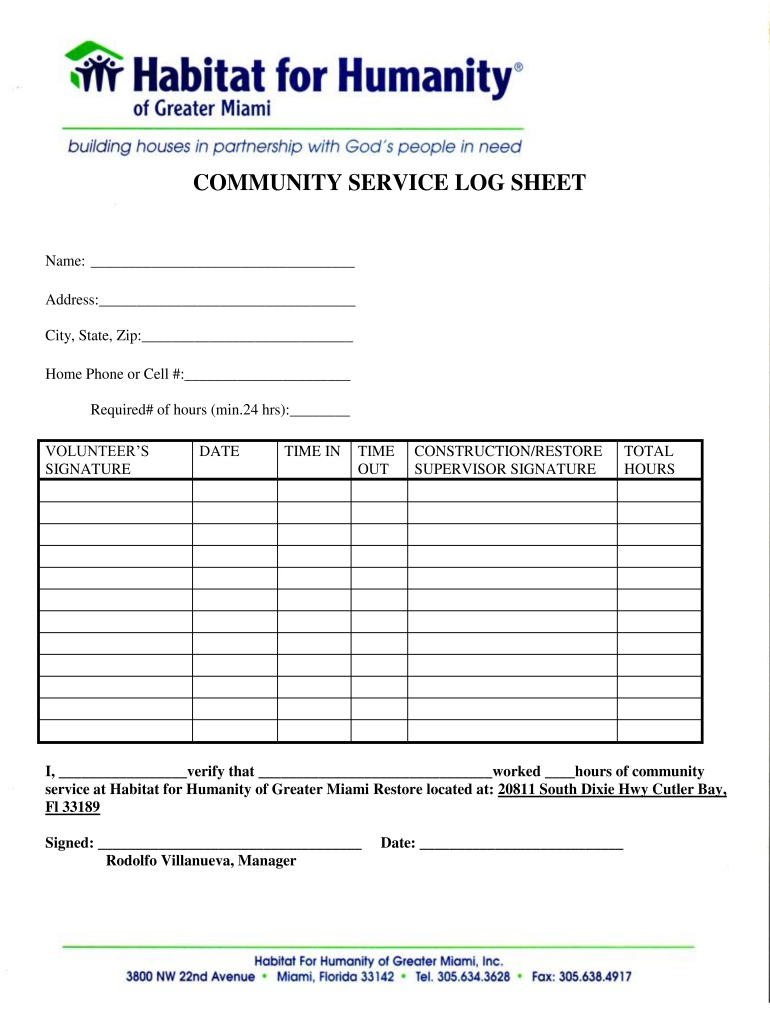
Required# of hours (min.24 hrs): VOLUNTEER S SIGNATURE DATE TIME IN TIME OUT CONSTRUCTION/RESTORE SUPERVISOR SIGNATURE TOTAL HOURS I, verify that worked hours of community service at Habitat for Humanity of Greater Miami Restore located at: 20811 South Dixie Hwy Cutler Bay, Fl 33189 Signed: Rodolfo Villanueva, Manager Date:.

Open form follow the instructions

Easily sign the form with your finger

Send filled & signed form or save
How to fill out the Community Service Log Sheet online
Filling out the Community Service Log Sheet is an essential step in documenting your volunteer efforts. This guide provides clear instructions for users to effectively complete the form online, ensuring that all necessary information is accurately recorded.
Follow the steps to complete your Community Service Log Sheet online.
- Click ‘Get Form’ button to access the Community Service Log Sheet and open it in your preferred editor.
- Begin by entering your name in the designated field at the top of the form. Ensure that your name is spelled correctly to avoid any processing issues.
- In the next fields, provide your address, including street, city, state, and zip code. This information is essential for record keeping.
- Enter your home phone number or cell number. This allows organizations to contact you if needed regarding your volunteer hours.
- Indicate the required number of community service hours, ensuring that it meets the minimum of 24 hours as specified.
- Sign the form in the Volunteer’s Signature section, confirming your participation and the validity of the information provided.
- Record the date when the hours were completed. This is important for tracking your community service timeline.
- Document the time you began (Time In) and the time you finished (Time Out) your volunteer work. Accurate time tracking is vital.
- In the Construction/Restore Supervisor Signature section, a supervisor must sign the form to verify the hours worked. Ensure that their signature is included for validation.
- Calculate and enter the total hours worked at the bottom of the form. Double-check your calculations to ensure accuracy.
- Finally, review all information entered for correctness. Once satisfied, save changes, download, print, or share the completed form as necessary.
Start filling out your Community Service Log Sheet online today to keep your volunteer efforts documented.
Experience a faster way to fill out and sign forms on the web. Access the most extensive library of templates available.
Related content
Community Service is defined as volunteer service for an approved Non-Profit Organization...
Page 1. Volunteer Hour Log. Student Name (Please Print). L#. Date. Agency Name...
The ICS Form 215, Operational Planning Work- sheet, is used to document the tactics...
Get answers to your most pressing questions about US Legal Forms API.
How to provide proof of volunteer hours?
To provide proof of your volunteer hours, request a verification letter or certificate from the organization where you volunteered. In addition, using a Community Service Log Sheet ensures you have a personal record of your hours, activities, and contributions, which can serve as supplemental documentation to the official proof.
What's the fastest way to get community service hours?
To quickly accumulate community service hours, look for local organizations that have immediate needs for volunteers. Engaging in short-term events or activities, such as community clean-up or food distribution, can help. Keeping a record with a Community Service Log Sheet will help you track these hours and demonstrate your commitment efficiently.
How to write a community service report?
To write an effective community service report, begin by summarizing your experiences, activities, and the impact of your work. Include specific details, such as the number of hours volunteered and any significant outcomes. Utilizing a Community Service Log Sheet will help you gather this information and create a comprehensive overview of your contributions.
How do I record my volunteer hours?
Start by choosing a method that works best for you—whether digital or paper. A Community Service Log Sheet is an excellent option for tracking hours, where you can jot down your activities, dates, and total hours volunteered each week. Consistency is key, so remember to update it regularly to ensure you don’t miss any contributions.
What is the best way to document volunteer hours?
The most effective way to document your volunteer hours is to maintain a detailed log. Use a Community Service Log Sheet to record the date, duration, and type of service you provided. This structured approach not only helps in keeping accurate records but also simplifies the process when you need to demonstrate your volunteer efforts.
How to prove volunteering?
Proving your volunteer work often involves collecting documentation from the organization where you served. Obtain a signed letter or certificate acknowledging your hours and tasks. Additionally, a Community Service Log Sheet serves as a reliable tool to track your activities and validate your contributions.
What is an example of a volunteer statement?
A volunteer statement should clearly outline the nature of your service, the organization you supported, and the duration of your commitment. For instance, you might say, 'I volunteered at the local food bank for three months, contributing over 50 hours of service to help distribute meals.' Using a Community Service Log Sheet can help you organize and present this information accurately.
How do you write a service report?
To write a service report, start by stating the purpose of the report and providing context about the service conducted. Include a section detailing each task completed, the duration, and personal insights. Using a Community Service Log Sheet can enhance the accuracy of your tracking, making your report more reliable.
How to write a community report?
Writing a community report involves summarizing the activities you participated in, the outcomes, and your personal reflections. Start with an overview, followed by detailed descriptions of each event. Don’t forget to refer back to your Community Service Log Sheet for accurate tracking of hours and contributions.
What to write for community service hours?
When documenting community service hours, detail the date, organization name, description of tasks, and total hours worked. Make sure your entries are clear and concise. A Community Service Log Sheet can help you maintain accurate records and ensure that each hour is accounted for correctly.
Use professional pre-built templates to fill in and sign documents online faster. Get access to thousands of forms.
If you believe that this page should be taken down, please follow our DMCA take down process here.