Loading
Get Form 8841
How it works
-

Open form follow the instructions
-

Easily sign the form with your finger
-

Send filled & signed form or save
How to fill out the Form 8841 online
Filling out Form 8841 online can streamline your tax preparation process. This guide provides clear and concise instructions on how to complete each section of the form to ensure accurate filing.
Follow the steps to successfully fill out the Form 8841.
- Click ‘Get Form’ button to obtain the form and open it in your editor.
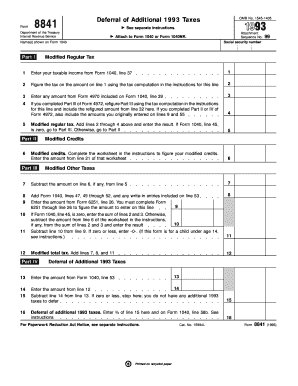
- Begin by entering your name(s) as indicated on Form 1040 at the top of the form. Ensure your name is correctly spelled and matches your tax documents.
- Proceed to Part I. Enter your taxable income from Form 1040, line 37 in line 1 of Part I.
- Calculate the tax on the amount entered in line 1 using the tax computation provided in the form instructions. Enter this amount in line 2.
- If applicable, enter any amounts from Form 4970 included on Form 1040, line 39 in line 3.
- If you have completed Part III of Form 4972, refigure it using the provided tax computation instructions and input the new amount in line 4. If you completed Parts II or IV of Form 4972, include relevant amounts from those lines.
- In line 5, add lines 2 through 4 together to find your modified regular tax and enter that total. If Form 1040, line 45, equals zero, skip to Part III. Otherwise, continue to Part II.
- Complete the worksheet in the instructions to determine your modified credits and enter the resulting amount from line 21 of that worksheet in Part II.
- In Part III, line 7, subtract any modified credits entered from line 6 from the amount on line 5.
- Continue in Part III by adding the appropriate lines from your Form 1040 as instructed and enter these in line 8.
- If Form 1040, line 45 is not zero, you will also need to perform additional calculations as specified in lines 9 through 12.
- Finally, save changes made to the form. You can download, print, or share the completed form as needed.
Complete your documents online now for an efficient filing experience.
To download a tax form from Shopify, navigate to the 'Settings' section, and click on 'Taxes.' You will find various options for generating and downloading tax forms relevant to your sales activity. Make sure you have your records organized to complement your tax documentation, including Form 8841 if applicable. For further assistance, Shopify’s help center offers resources to help you through the process.