Loading
Form preview
  • US Legal Forms
  • Form Library
  • More Forms
  • More Multi-State Forms
  • Centurylink Lifeline

Get Centurylink Lifeline

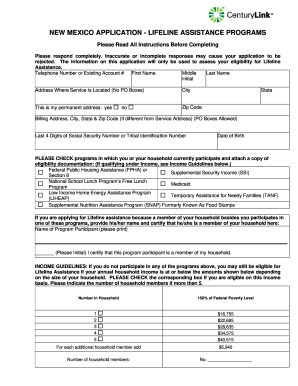
Inaccurate or incomplete responses may cause your application to be rejected. The information on this application will only be used to assess your eligibility for Lifeline Assistance. Telephone Number or Existing Account # First Name Middle Last Name Initial Address Where Service Is Located (No PO Boxes) City State This is my permanent address: yes no Zip Code Billing Address, City, State & Zip Code (If different from Service Address) (PO Boxes Allowed) Last 4 Digits of Social Securi.

How it works

  1. Open form

    Open form follow the instructions

  2. Easily sign form

    Easily sign the form with your finger

  3. Share form

    Send filled & signed form or save

How to fill out the Centurylink Lifeline online

Navigating the Centurylink Lifeline application process can seem daunting, but this guide is here to help you through each step. By providing clear and detailed instructions, you can complete the form with confidence and ease.

Follow the steps to complete your application successfully.

  1. Press the ‘Get Form’ button to access the application form and open it for editing.
  2. Fill in your telephone number or existing account number as the first entry. This information helps verify your account details.
  3. Provide your full name in the designated fields: first name, middle initial, and last name. Ensure these are spelled correctly.
  4. Enter the address where the service is located. Note that PO boxes are not accepted for this field; provide a physical address.
  5. Indicate whether this address is your permanent address by selecting 'yes' or 'no.'
  6. Input your billing address if it differs from your service address. PO boxes are permitted in this section.
  7. Fill in the last four digits of your social security number or tribal identification number, and enter your date of birth.
  8. Check all applicable programs in which you or a household member currently participates. Attach the required eligibility documentation.
  9. If another household member qualifies, provide their name and initial to confirm their participation.
  10. If you do not participate in any programs, indicate if your household income meets the specified guidelines and provide the number of household members.
  11. Review the important information about the Lifeline program, acknowledging the one-per-household rule and other stipulations.
  12. Read and initial to certify your understanding of the statements regarding eligibility and program rules.
  13. Sign and date the application form as the Lifeline assistance applicant, ensuring that the name matches what was entered earlier.
  14. Compile the completed application with any required supporting documents and prepare to submit your application by mail or fax.

Complete your Centurylink Lifeline application online today to ensure you receive the assistance you need.

Get form

Experience a faster way to fill out and sign forms on the web. Access the most extensive library of templates available.
Get form

Related content

CenturyLink Customer Letter [Dear Existing...
As an existing customer, if you qualified for Lifeline discounts through participation in...
Learn more
RESOURCES: Low or No-Cost Internet and Computer...
MIDCO Lifeline – Lifeline is a federal program intended to put a home phone and internet...
Learn more
PENNSYLVANIA APPLICATION - LIFELINE ASSISTANCE ...
The information on this application will only be used to assess your eligibility for...
Learn more

Related links form

5 Day Notice Arizona Legal Eviction Notice Idaho Lease Termination Letter Virginia Immediate Notice To Quit - Eviction Notices

Questions & Answers

Get answers to your most pressing questions about US Legal Forms API.

Contact support

The cheapest CenturyLink package typically includes basic internet service, allowing customers to access essential online functions. However, options may vary by location, so it’s worth checking for specific deals in your area related to Centurylink Lifeline. To find the best rates, visit their website or contact customer support for the most accurate information.

To setup a Centurylink Lifeline, start your application on the CenturyLink website. Ensure that you gather the required documentation that confirms your eligibility. Submit the application, and once you receive approval, CenturyLink will provide instructions on how to activate your discounted services. Utilize this program to enjoy affordable communication solutions.

Logging into your Centurylink Lifeline account is simple. Go to the CenturyLink website and click on the login section. Enter your username and password, then click submit. If you have forgotten your credentials, the site provides an option to recover your account information easily.

To set up a Centurylink Lifeline, you need to fill out the application form online. Make sure you provide all necessary documentation to prove your eligibility. Once submitted, CenturyLink will review your application. If approved, you will receive access to discounted services under the Centurylink Lifeline program.

Yes, the Centurylink Lifeline can work without a traditional landline. This program supports various communication methods, including mobile phones. If you qualify for the Lifeline service, you can still enjoy benefits even if you don't have a landline. Check with CenturyLink for specific eligibility criteria related to mobile services.

Setting up a Centurylink Lifeline involves completing an application form. You can do this online or by visiting a nearby CenturyLink store. After completing the application, you will receive a notification regarding your approval status. Once approved, you can enjoy reduced costs on your services.

If you want to lower your CenturyLink bill, consider contacting their customer service. They often provide options tailored for eligible customers, including discounts or promotional offers, like the Centurylink Lifeline. Additionally, review your current plan to see if changes might reduce costs. Always be proactive and ask about any available assistance.

To place a Centurylink Lifeline, start by visiting the official CenturyLink website. You will find the application form for the Lifeline program under the relevant section. Fill out the necessary details, submit the form, and wait for confirmation. This process ensures you receive the benefits associated with the Centurylink Lifeline.

No, they are different programs. Lifeline is a monthly discount on phone or broadband, or bundled voice/broadband services. The EBB was a separate benefit program that has been replaced with the ACP.

The Affordable Connectivity Program (ACP) is a U.S. government program that helps many low income households pay for broadband service and internet connected devices. The Affordable Connectivity Program is administered by USAC with oversight from the Federal Communications Commission (FCC).

Get This Form Now!

Use professional pre-built templates to fill in and sign documents online faster. Get access to thousands of forms.
Get form
If you believe that this page should be taken down, please follow our DMCA take down processhere.

Industry-leading security and compliance

US Legal Forms protects your data by complying with industry-specific security standards.
  • In businnes since 1997
    25+ years providing professional legal documents.
  • Accredited business
    Guarantees that a business meets BBB accreditation standards in the US and Canada.
  • Secured by Braintree
    Validated Level 1 PCI DSS compliant payment gateway that accepts most major credit and debit card brands from across the globe.
Get Centurylink Lifeline
Get form
  • Adoption
  • Bankruptcy
  • Contractors
  • Divorce
  • Home Sales
  • Employment
  • Identity Theft
  • Incorporation
  • Landlord Tenant
  • Living Trust
  • Name Change
  • Personal Planning
  • Small Business
  • Wills & Estates
  • Packages A-Z
  • Affidavits
  • Bankruptcy
  • Bill of Sale
  • Corporate - LLC
  • Divorce
  • Employment
  • Identity Theft
  • Internet Technology
  • Landlord Tenant
  • Living Wills
  • Name Change
  • Power of Attorney
  • Real Estate
  • Small Estates
  • Wills
  • All Forms
  • Forms A-Z
  • Form Library
  • Legal Hub
  • About Us
  • Help Portal
  • Legal Resources
  • Blog
  • Affiliates
  • Contact Us
  • Delete My Account
  • Site Map
  • Industries
  • Forms in Spanish
  • Localized Forms
  • State-specific Forms
  • Forms Kit
  • Real Estate Handbook
  • All Guides
  • Notarize
  • Incorporation services
  • For Consumers
  • For Small Business
  • For Attorneys
  • USLegal
  • FormsPass
  • pdfFiller
  • signNow
  • altaFlow
  • DocHub
  • Instapage
Form Packages
  • Adoption
  • Bankruptcy
  • Contractors
  • Divorce
  • Home Sales
  • Employment
  • Identity Theft
  • Incorporation
  • Landlord Tenant
  • Living Trust
  • Name Change
  • Personal Planning
  • Small Business
  • Wills & Estates
  • Packages A-Z
Form Categories
  • Affidavits
  • Bankruptcy
  • Bill of Sale
  • Corporate - LLC
  • Divorce
  • Employment
  • Identity Theft
  • Internet Technology
  • Landlord Tenant
  • Living Wills
  • Name Change
  • Power of Attorney
  • Real Estate
  • Small Estates
  • Wills
  • All Forms
  • Forms A-Z
  • Form Library
Customer Service
  • Legal Hub
  • About Us
  • Help Portal
  • Legal Resources
  • Blog
  • Affiliates
  • Contact Us
  • Delete My Account
  • Site Map
  • Industries
  • Forms in Spanish
  • Localized Forms
  • State-specific Forms
  • Forms Kit
Legal Guides
  • Real Estate Handbook
  • All Guides
Prepared for you
  • Notarize
  • Incorporation services
Our Customers
  • For Consumers
  • For Small Business
  • For Attorneys
Our Sites
  • USLegal
  • FormsPass
  • pdfFiller
  • signNow
  • altaFlow
  • DocHub
  • Instapage
Social Media
Call us now toll free:
+1 833 426 79 33
As seen in:
© Copyright 1999-2026 airSlate Legal Forms, Inc. 3720 Flowood Dr, Flowood, Mississippi 39232
  • Your Privacy Choices
  • Terms of Service
  • Privacy Notice
  • Content Takedown Policy
  • Bug Bounty Program