Loading
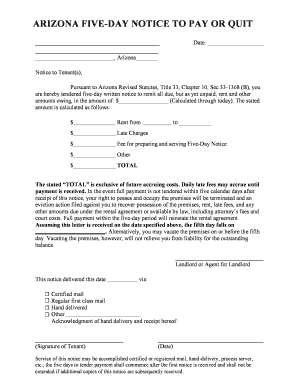
Get 5 Day Notice Arizona
How it works
-

Open form follow the instructions
-

Easily sign the form with your finger
-

Send filled & signed form or save
How to fill out the 5 Day Notice Arizona online
This guide provides clear and detailed instructions on completing the 5 Day Notice Arizona form online. Designed for individuals with various levels of legal knowledge, this guide supports users through each essential step of the process.
Follow the steps to complete the 5 Day Notice Arizona form online effectively.
- Press the ‘Get Form’ button to access the form and open it in your editor.
- Enter the date in the designated field at the top of the form.
- Fill in the property location details where indicated, specifying Arizona.
- List the tenant(s) receiving the notice in the provided section.
- State the total amount due in the corresponding field, ensuring all calculations are accurate for items including rent, late charges, and any additional fees.
- Provide a breakdown of the total within the specified sections, detailing rent due and any late charges or other amounts.
- Indicate the date on which the tenant must remit payment or vacate the premises.
- Select the method of delivery for the notice by checking the appropriate box (certified mail, regular mail, hand delivery, etc.).
- Ensure both the landlord or agent's name and signature are included at the end of the document.
- Review all entries for accuracy, then save changes, download, print, or share the completed form.
Start completing the 5 Day Notice Arizona online today!
The landlord must give the tenant written notice that rent is unpaid, and that the rental agreement will terminate if rent is not paid in 5 days. (ARS § 33-1368(B)). In an action for non-payment of rent, landlord cannot file the eviction action until after the final day of the notice.