Loading
Get Lease Termination Letter
How it works
-

Open form follow the instructions
-

Easily sign the form with your finger
-

Send filled & signed form or save
How to fill out the Lease Termination Letter online
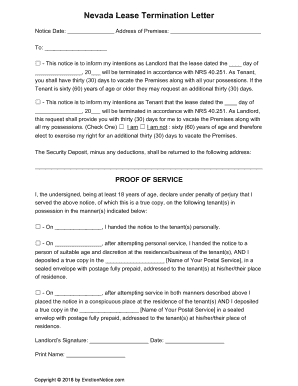
Filling out a lease termination letter online is an important step in formally notifying the other party of your intent to end a rental agreement. This guide will provide clear, step-by-step instructions to ensure you complete the form accurately and effectively.
Follow the steps to effectively complete your Lease Termination Letter online.
- Click the ‘Get Form’ button to access the Lease Termination Letter form and open it in your preferred online editor.
- Enter the notice date in the designated field to indicate when you are submitting the letter.
- Fill in the address of the premises where the lease is terminating.
- Identify the party to whom you are addressing the letter by entering their name in the appropriate field.
- Select whether you are acting as the landlord or the tenant by checking the corresponding box.
- Provide the date of the lease that you are terminating in the format of day, month, and year.
- Indicate if you or the other party qualifies for an additional thirty days to vacate if they are sixty years of age or older.
- Enter the address where the security deposit should be sent, ensuring all necessary details are included.
- Complete the proof of service section by indicating how you delivered the notice, selecting the appropriate method(s) and filling in required dates.
- Sign and date the letter in the designated fields, and print your name below the signature.
- Finally, save your changes, and you can choose to download, print, or share the completed form as needed.
Complete your lease termination letter online to ensure a smooth transition and proper documentation.
“I am giving 1 month's notice to end my tenancy, as required by law. I will be leaving the property on (date xx). I would like you to be at the property on the day I move out to check the premises and for me to return the keys. I also need you to return my tenancy deposit of (state amount).”