Loading
Get Canada Sc Nas5036 2014-2026
How it works
-

Open form follow the instructions
-

Easily sign the form with your finger
-

Send filled & signed form or save
How to fill out the Canada SC NAS5036 online
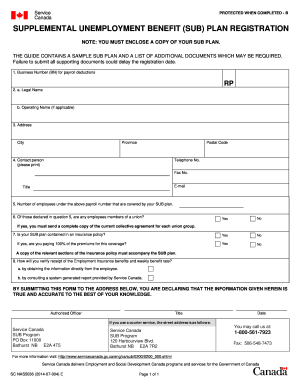
Filling out the Canada SC NAS5036 form online is an essential step for registering your Supplemental Unemployment Benefit plan. This guide will provide you with detailed instructions to ensure you complete the form accurately and efficiently.
Follow the steps to successfully fill out the form.
- Click ‘Get Form’ button to obtain the form and open it in the editor.
- Enter your Business Number (BN) designated for payroll deductions in the first section.
- Provide the legal name of your organization in the designated field. If you operate under a different name, fill in the operating name as well, if applicable.
- Complete your business address, including city, province, and postal code.
- Designate a contact person for this application and provide their telephone number, fax number, email address, and title.
- Indicate the number of employees covered by your SUB plan under the given payroll number.
- Address whether any of the employees listed are members of a union by checking 'Yes' or 'No'. If applicable, remember to send a complete copy of the current collective agreement for each union group.
- If your SUB plan is included in an insurance policy, state this and denote if you are paying 100% of the premiums for this coverage. Attach a copy of the relevant sections of the insurance policy.
- Explain how you will verify the receipt of Employment Insurance benefits and the weekly benefit rate by selecting the corresponding option.
- At the bottom of the form, an authorized officer must sign and date the form, confirming that the information is true and accurate.
- After reviewing all information for accuracy, you may save changes, download, print, or share the completed form as needed.
Complete your documents online for a smooth registration process.
At the Canada airport, filling out your declaration form involves providing accurate personal and contact information. Make sure to check the Canada SC NAS5036 for additional instructions specific to airport regulations. Completing this form accurately helps facilitate your transition into the country.