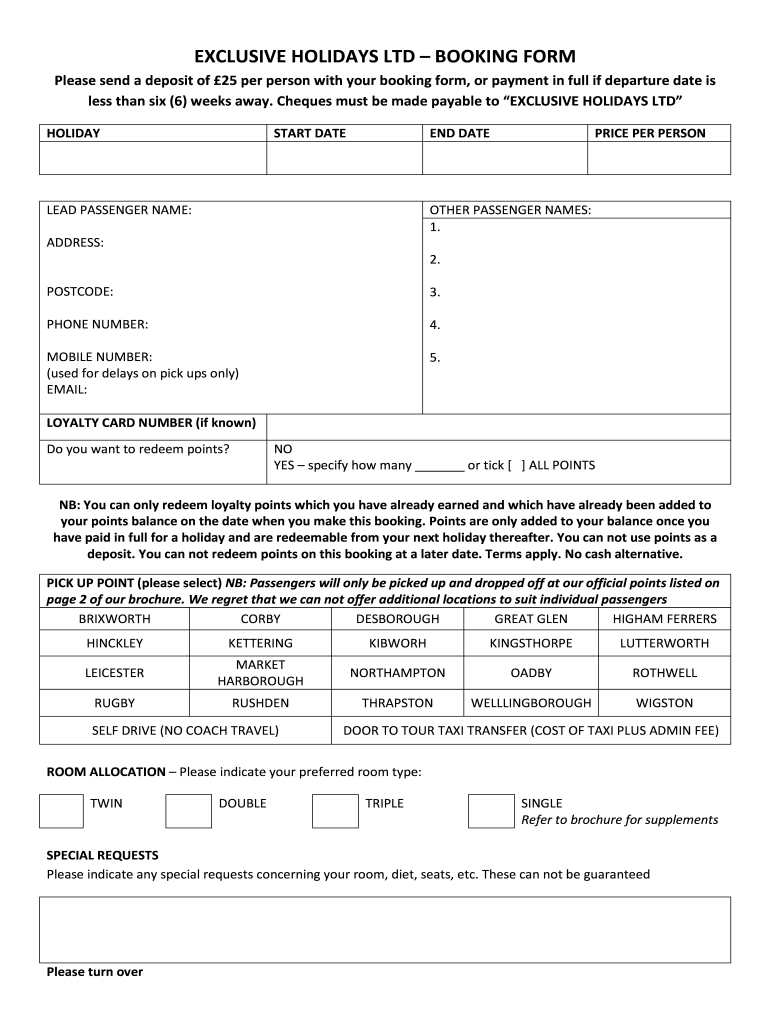
EXCLUSIVE HOLIDAYS LTD BOOKING FORM Please send a deposit of 25 per person with your booking form, or payment in full if departure date is less than six (6) weeks away. Checks must be made payable.
Loading

Open form follow the instructions

Easily sign the form with your finger

Send filled & signed form or save
How to fill out the UK Exclusive Holidays Booking Form online
Navigating the UK Exclusive Holidays Booking Form can seem daunting, but this comprehensive guide will support you through each step of the process. By following these clear instructions, you will ensure your booking is filled out accurately and efficiently.
Follow the steps to complete your booking form with ease.
- Press the ‘Get Form’ button to access the UK Exclusive Holidays Booking Form and open it in your preferred document editor.
- Enter your holiday start date and end date in the designated fields. Ensure these dates are accurate to avoid any booking complications.
- Provide the lead passenger's name. This person will be the main point of contact for the booking.
- Fill in the price per person for the holiday and list any other passenger names in the designated section.
- Include your address and postcode to ensure proper communication and documentation.
- Input your phone number and mobile number. Note that the mobile number will be used exclusively for notifications about any delays.
- Provide your email address for correspondence related to your booking.
- If applicable, enter your loyalty card number and specify the number of loyalty points you wish to redeem, or select the option to redeem all points available.
- Choose your preferred pick-up point from the list provided to ensure proper transportation arrangements.
- Specify your preferred room type by selecting from the available options: twin, double, triple, or single.
- Mention any special requests regarding your room preferences, dietary needs, or seating arrangements, acknowledging these cannot be guaranteed.
- Select your seat allocation by circling your chosen seats from the layout provided.
- Indicate if you would like to request a sole seat supplement for guaranteed single occupancy.
- Declare any bulky luggage items you intend to bring and provide necessary details for items like mobility scooters, if applicable.
- Select your preferred payment method, ensuring to comply with payment requirements for deposits or full payment, as appropriate.
- Decide whether you would like to join the mailing list and specify your preferred mailing method.
- Read the declaration carefully, ensure you meet age requirements, and confirm you understand the terms and conditions of booking. Sign and date the form.
- Finally, save your changes, download the completed form, and print it if needed. Return the form to the specified address.
Complete your UK Exclusive Holidays Booking Form online today to secure your holiday!
Experience a faster way to fill out and sign forms on the web. Access the most extensive library of templates available.
Related content
Nonimmigrant U.S. visa appointments cannot be scheduled by email. They can ONLY be made...
Covers a wide range of subjects including the legal systems of the United Kingdom...
... booking form. If you are unsure of any aspect of the above, you should contact us and...
Get answers to your most pressing questions about US Legal Forms API.
Can I book my 9.50 Sun holiday online?
Sign up at sunsavers.co.uk, then go to the Offers page and enter your code to unlock booking. You'll be able to search which holidays are available, get on-screen booking confirmation, and pay by credit/debit card. There's a £3 online booking fee.
Where do I start booking a holiday?
When you start to plan a holiday, it can tricky to know where to start. Getting recommendations from friends is a great place to start and finding a reputable company are important parts of the process. But you might first want to choose whether you're going for a package holiday or booking independently.
How do I get a Sun holiday code?
Simply collect the one code from The Sun newspaper each day in 2023. Or buy a newspaper each day and scan the unique Sun Savers code. While you collect the codes, make sure you check out our list of Sun holiday parks available.
How do Sun 9.50 holidays work?
£9.50 is the basic price per person, but this price per person only applies if there is a minimum of four people on the booking. So, in total, you will be paying a minimum of £38. So, if only two people are travelling, they will end up paying double £9.50vas you always need to pay the price of four people on a booking.
Use professional pre-built templates to fill in and sign documents online faster. Get access to thousands of forms.
If you believe that this page should be taken down, please follow our DMCA take down process here.