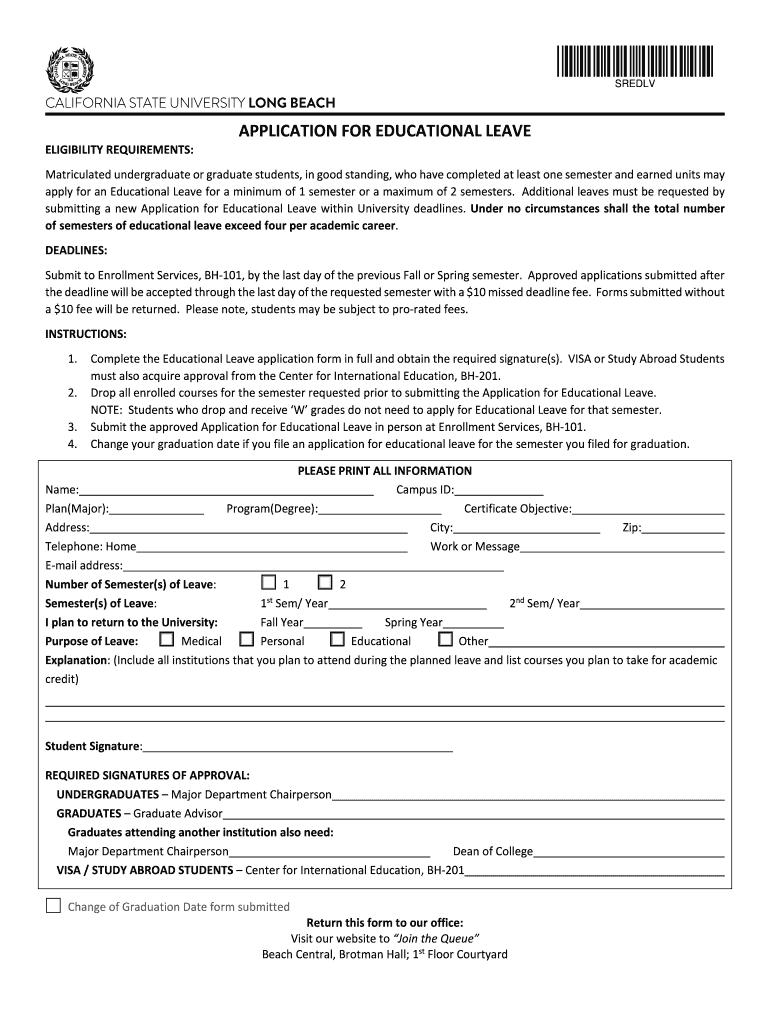
SREDLVCALIFORNIA STATE UNIVERSITY LONG BEACH ELIGIBILITY REQUIREMENTS:APPLICATION FOR EDUCATIONAL LEAVEMatriculated undergraduate or graduate students, in good standing, who have completed at least.

Open form follow the instructions

Easily sign the form with your finger

Send filled & signed form or save
How to fill out the SCULB Application for Educational Leave online
Completing the SCULB Application for Educational Leave online can streamline your process and ensure that all necessary information is submitted correctly. This guide provides clear, step-by-step instructions to help you navigate through the application efficiently.
Follow the steps to complete your application successfully.
- Press the ‘Get Form’ button to acquire the Application for Educational Leave and open it in an online editor.
- Provide your Campus ID, name, and contact information. Make sure to fill in all fields accurately, including your program and degree details.
- Indicate the number of semesters you are requesting leave for by selecting either '1' or '2.' Specify the corresponding semester and year.
- Select the purpose of your leave: Medical, Personal, Educational, or Other. Provide a detailed explanation outlining any institutions you plan to attend and courses you intend to take for academic credit during the leave.
- Obtain and include the necessary signatures of approval based on your classification. Undergraduate students require approval from the Major Department Chairperson, while graduate students need approval from the Graduate Advisor and possibly additional signatories.
- If applicable, ensure that you drop all enrolled courses for the requested semester prior to submitting your application for educational leave.
- Once all information is complete and signatures obtained, submit the form in person at Enrollment Services, BH-101. Be mindful of submission deadlines to avoid any late fees.
- Finally, save your changes, download a copy for your records, and consider printing the form if you wish to keep a physical copy or share it with advisors.
Start filling out your SCULB Application for Educational Leave online today and ensure a smooth process!
Experience a faster way to fill out and sign forms on the web. Access the most extensive library of templates available.
Related content
Education and Apprenticeship (Question 16). CSLB may grant up to three years of credit...
Select Create New Request to start a new request. · Review the information and then...
Sep 26, 2025 — It is a public university affiliated with the California State University...
Get answers to your most pressing questions about US Legal Forms API.
How to request educational leave CSULB?
Requesting educational leave at CSULB involves filling out the SCULB Application For Educational Leave and submitting it to the designated office. Make sure to explain your reasons clearly and include any necessary documentation to support your request. It's essential to stay organized and informed throughout the process to ensure you maintain your academic standing upon your return.
What is an exception to the academic policy at CSULB?
An exception to the academic policy at CSULB can occur under specific circumstances, such as personal hardship or significant academic challenges. These exceptions are usually addressed on a case-by-case basis and require appropriate documentation. If you find yourself in a unique situation, don't hesitate to reach out to the appropriate university department for guidance.
How to apply for educational leave CSULB?
To apply for educational leave at CSULB, begin by reviewing the specific requirements on the university's website. Fill out the SCULB Application For Educational Leave and gather any necessary supporting documents. Once your application is complete, submit it to the designated office to ensure a smooth transition during your leave.
What is the application process for CSULB?
The application process for CSULB involves completing an online application form, submitting required documents such as transcripts, and paying any associated fees. Familiarize yourself with specific deadlines and ensure you meet all the eligibility criteria. Furthermore, if you're interested in taking a pause for educational leave, understanding this process will benefit you.
What is an excused absence at CSULB?
An excused absence at CSULB typically refers to a situation where a student can miss class without academic penalty due to unavoidable circumstances, such as illness or family emergencies. You must provide documentation to support your reason for the absence. Understanding the policies surrounding this can help maintain your standing while ensuring that your education remains a priority.
How do I drop out of CSULB as a student?
To drop out of CSULB, you need to follow a structured process that involves formally notifying the university of your decision. It is advisable to consult with an academic advisor to understand the implications of your choice. Be sure to review your financial aid options to ensure you manage any potential repercussions associated with leaving.
Why am I not eligible for 1098-T CSULB?
You may not be eligible for the 1098-T from CSULB if you did not enroll in enough credit hours or if your tuition was covered by grants or scholarships. It's important to check your enrollment status and whether any financial aid impacts your eligibility. Also, ensure that your student records are up-to-date for accurate processing of any education-related forms.
What is an excused withdrawal from CSULB?
An excused withdrawal from CSULB allows students to withdraw from their classes without penalizing their academic record due to extenuating circumstances. This might include severe medical issues or family emergencies that require immediate attention. Students must provide adequate documentation to support their request, and the SCULB Application For Educational Leave can often help in this process by guiding students through their options.
What is academic probation CSULB?
Academic probation at CSULB occurs when a student's GPA falls below the required minimum standard. This status serves as a warning, prompting students to improve their academic performance. While on probation, students are encouraged to seek support and resources available at the university, including utilizing the SCULB Application For Educational Leave if they need to take a step back temporarily.
How many times can you fail a class CSULB?
At CSULB, students can fail a class multiple times; however, there are limits on how many times a course can be retaken for credit. Typically, repeated failures can impact your academic standing and may lead to probation status. If you are struggling academically, consider submitting the SCULB Application For Educational Leave as an option to regroup before retaking challenging courses.
Use professional pre-built templates to fill in and sign documents online faster. Get access to thousands of forms.
If you believe that this page should be taken down, please follow our DMCA take down process here.