Loading
Get Becu 6886 2014
How it works
-

Open form follow the instructions
-

Easily sign the form with your finger
-

Send filled & signed form or save
How to fill out the BECU 6886 online
This guide provides a comprehensive overview of how to accurately complete the BECU 6886 form online. Follow the detailed instructions for each section to ensure a smooth application process.
Follow the steps to confidently fill out the BECU 6886 online.
- Click 'Get Form' button to obtain the form and open it in the editor.
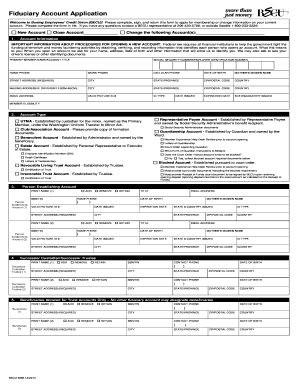
- Begin by reviewing the New Account section. Indicate whether you are applying for a new account or changing an existing account. Ensure you fill in the necessary account information including the account title, social security number or employer identification number, and contact details such as home, work, and cellular phone numbers.
- In the Account Information section, input your primary member name, address, date of birth, and valid picture ID details. Be prepared to provide any necessary identification documents as required by federal law.
- Select the appropriate account type from the available options, which include UTMA, Club/Association Account, Benevolent Account, Representative Payee Account, Guardianship Account, Estate Account, Revocable Living Trust Account, and Irrevocable Trust Account. Ensure that you provide any required documentation for the selected account type.
- Complete the Person Establishing Account section. Print the names and addresses of individuals establishing or managing the account, along with their identification numbers.
- If applicable, list the beneficiaries allowed for trust accounts. Provide their details as instructed.
- Indicate the products and services you wish to apply for. Choose from options such as ATM cards, debit cards, and checking accounts. Specify any additional information required for checks if applicable.
- In the Agreements and Signatures section, read the acknowledgments carefully. By signing, you verify that all provided information is accurate and agree to the terms outlined in the application.
- Finally, review your entries for accuracy. Save changes, download the completed application, print it for your records, and prepare to return the form to BECU.
Start completing your BECU 6886 application online today!
Get form
Experience a faster way to fill out and sign forms on the web. Access the most extensive library of templates available.
The ABA code for BECU 6886 is 325081255. This code is necessary for various transactions, including wire transfers and direct deposits. Always verify the code before proceeding with any banking transactions to ensure smooth processing.
Get This Form Now!
Use professional pre-built templates to fill in and sign documents online faster. Get access to thousands of forms.