Loading
Form preview
  • US Legal Forms
  • Form Library
  • More Forms
  • More Multi-State Forms
  • Temple Hospital Doctors Note

Get Temple Hospital Doctors Note

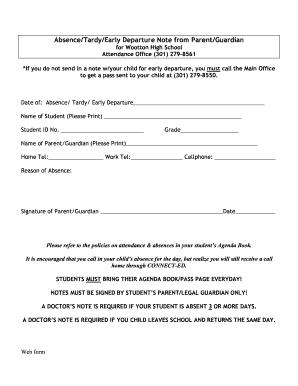
Absence/Tardy/Early Departure Note from Parent/Guardian for Wootton High School Attendance Office (301) 279-8561 *If you do not send in a note w/your child for early departure, you must call the Main.

How it works

  1. Open form

    Open form follow the instructions

  2. Easily sign form

    Easily sign the form with your finger

  3. Share form

    Send filled & signed form or save

How to fill out the Temple Hospital Doctors Note online

Filling out the Temple Hospital Doctors Note online is a straightforward process that allows users to efficiently submit necessary medical documentation. This guide provides step-by-step instructions to ensure a seamless experience in completing the form correctly.

Follow the steps to complete the Temple Hospital Doctors Note online.

  1. Click ‘Get Form’ button to access the Temple Hospital Doctors Note and open it in your editing tool.
  2. Enter the date of the absence, tardiness, or early departure in the designated field. Ensure that this date corresponds with the actual date of the event.
  3. Provide the student's name in the 'Name of Student' field. Be sure to print clearly to avoid any confusion.
  4. Input the student ID number in the appropriate section. This number may be found on identification documents or school records.
  5. Specify the student's grade level in the designated field. This information assists in properly categorizing the absence.
  6. Fill in the name of the parent or guardian in the 'Name of Parent/Guardian' section to indicate who is submitting the note.
  7. Enter the home telephone number, work telephone number, and cellphone number for the parent or guardian to ensure that communication is possible if needed.
  8. In the 'Reason of Absence' field, clearly state the reason for the absence, tardiness, or early departure. Providing detailed information may be helpful.
  9. Lastly, the parent or guardian should sign the note and input the date of signing in the provided sections. This signature confirms the authenticity of the note.
  10. Once all sections are completed, review the form for accuracy, then save changes, download a copy, and print or share the form as necessary.

Complete your documents online with ease and ensure timely submission.

Get form

Experience a faster way to fill out and sign forms on the web. Access the most extensive library of templates available.
Get form

Related content

Medical Records
A medical record shall include, but not be limited to, information sufficient to justify...
Learn more
Class Notes | Student Health Services - Temple...
Notes will not be given retrospectively. We can only note that the student was seen at...
Learn more
Aaron Yishmir
Apr 6, 2024 — Aaron is the doctor who originally saved Luke Pearce's life when Luke was...
Learn more

Related links form

Fair Trading Motor Vehicle Complaint Form Fda Form 3514 2015 Community Health Needs Assessment And Implementation Plan - Gcrmc Uc 018 Ff

Questions & Answers

Get answers to your most pressing questions about US Legal Forms API.

Contact support

Expressing gratitude to your doctor can be meaningful. A nice message could include words of appreciation for their care and compassion. You could say something like, 'Thank you for your dedication and support; your help means a lot, especially when I needed a Temple Hospital Doctors Note.' This can strengthen your relationship and show your respect.

When writing a doctor’s note for a patient, start with the date and your doctor's information. Include the patient's name, the reason for the note, and any relevant details like the diagnosis and recommended time off. This format ensures the note is taken seriously, especially if it is intended to serve as a Temple Hospital Doctors Note.

Starting a letter to a doctor requires a friendly yet respectful approach. Begin with 'Dear Dr. Last Name' followed by a comma. Introduce yourself briefly, including your full name and any relevant details about your relationship with the doctor, such as past visits or treatments, which is crucial for context, especially if you need a Temple Hospital Doctors Note.

Begin your email to the doctor with a respectful salutation, such as 'Dear Dr. Last Name.' Clearly outline the reason for your message in the first few sentences. Make sure to include your name, relevant health information, and any specific requests, like obtaining a Temple Hospital Doctors Note. Conclude with a polite closing and contact information.

To email Temple Student Health, locate their official website for the most current contact information. Compose a clear subject line that references your situation or inquiry. In the body of your email, provide your student ID, contact information, and questions or requests, such as needing a Temple Hospital Doctors Note.

Writing a note to your doctor should be straightforward. Start by clearly stating your purpose for writing the note. Include important details such as your symptoms or concerns, medication history, and any questions you might have. This clarity helps your doctor understand your situation, leading to better care and potentially a Temple Hospital Doctors Note if needed.

The easiest way to request medical records is by using the online form available on Temple University Hospital's website. Filling out the online request form is straightforward and usually requires basic information. Alternatively, if you prefer, you can also contact their records department via phone for assistance. Whether you need a Temple Hospital Doctors Note or other records, this method offers convenience and efficiency.

The fastest way to get medical records is by utilizing the online patient portal offered by Temple University Hospital. By logging into your account, you can access and request immediate copies of your records. Additionally, having all your information ready can expedite the process, including if you require a Temple Hospital Doctors Note. Efficient planning helps reduce waiting times significantly.

Getting information on a patient in the hospital can be sensitive due to privacy concerns. Generally, you may need to speak with the hospital staff, who can guide you on how to proceed. Keep in mind that they may require proof of relationship or consent from the patient. If you need specific details like a Temple Hospital Doctors Note, ensure that the necessary permissions are in place.

Temple University Hospital is known for its commitment to patient care, featuring a variety of specialized services and experienced medical staff. Patients have praised the hospital for its modern facilities and comprehensive treatment options. Furthermore, many find that the knowledgeable doctors often provide tailored advice for care, making it a reliable choice for obtaining services like a Temple Hospital Doctors Note. Always research to see if the services align with your needs.

Get This Form Now!

Use professional pre-built templates to fill in and sign documents online faster. Get access to thousands of forms.
Get form
If you believe that this page should be taken down, please follow our DMCA take down processhere.

Industry-leading security and compliance

US Legal Forms protects your data by complying with industry-specific security standards.
  • In businnes since 1997
    25+ years providing professional legal documents.
  • Accredited business
    Guarantees that a business meets BBB accreditation standards in the US and Canada.
  • Secured by Braintree
    Validated Level 1 PCI DSS compliant payment gateway that accepts most major credit and debit card brands from across the globe.
Get Temple Hospital Doctors Note
Get form
  • Adoption
  • Bankruptcy
  • Contractors
  • Divorce
  • Home Sales
  • Employment
  • Identity Theft
  • Incorporation
  • Landlord Tenant
  • Living Trust
  • Name Change
  • Personal Planning
  • Small Business
  • Wills & Estates
  • Packages A-Z
  • Affidavits
  • Bankruptcy
  • Bill of Sale
  • Corporate - LLC
  • Divorce
  • Employment
  • Identity Theft
  • Internet Technology
  • Landlord Tenant
  • Living Wills
  • Name Change
  • Power of Attorney
  • Real Estate
  • Small Estates
  • Wills
  • All Forms
  • Forms A-Z
  • Form Library
  • Legal Hub
  • About Us
  • Help Portal
  • Legal Resources
  • Blog
  • Affiliates
  • Contact Us
  • Delete My Account
  • Site Map
  • Industries
  • Forms in Spanish
  • Localized Forms
  • State-specific Forms
  • Forms Kit
  • Real Estate Handbook
  • All Guides
  • Notarize
  • Incorporation services
  • For Consumers
  • For Small Business
  • For Attorneys
  • USLegal
  • FormsPass
  • pdfFiller
  • signNow
  • altaFlow
  • DocHub
  • Instapage
Form Packages
  • Adoption
  • Bankruptcy
  • Contractors
  • Divorce
  • Home Sales
  • Employment
  • Identity Theft
  • Incorporation
  • Landlord Tenant
  • Living Trust
  • Name Change
  • Personal Planning
  • Small Business
  • Wills & Estates
  • Packages A-Z
Form Categories
  • Affidavits
  • Bankruptcy
  • Bill of Sale
  • Corporate - LLC
  • Divorce
  • Employment
  • Identity Theft
  • Internet Technology
  • Landlord Tenant
  • Living Wills
  • Name Change
  • Power of Attorney
  • Real Estate
  • Small Estates
  • Wills
  • All Forms
  • Forms A-Z
  • Form Library
Customer Service
  • Legal Hub
  • About Us
  • Help Portal
  • Legal Resources
  • Blog
  • Affiliates
  • Contact Us
  • Delete My Account
  • Site Map
  • Industries
  • Forms in Spanish
  • Localized Forms
  • State-specific Forms
  • Forms Kit
Legal Guides
  • Real Estate Handbook
  • All Guides
Prepared for you
  • Notarize
  • Incorporation services
Our Customers
  • For Consumers
  • For Small Business
  • For Attorneys
Our Sites
  • USLegal
  • FormsPass
  • pdfFiller
  • signNow
  • altaFlow
  • DocHub
  • Instapage
Social Media
Call us now toll free:
+1 833 426 79 33
As seen in:
© Copyright 1999-2026 airSlate Legal Forms, Inc. 3720 Flowood Dr, Flowood, Mississippi 39232
  • Your Privacy Choices
  • Terms of Service
  • Privacy Notice
  • Content Takedown Policy
  • Bug Bounty Program