Loading
Form preview
  • US Legal Forms
  • Other Templates
  • More Forms
  • More Uncategorized Forms
  • Anchorage Application Form - The Salvation Army Winnipeg Booth ... - Wpgboothcentre

Get Anchorage Application Form - The Salvation Army Winnipeg Booth ... - Wpgboothcentre

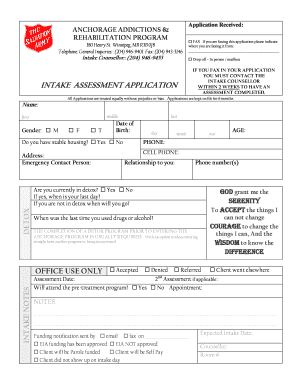
Application Received: ANCHORAGE ADDICTIONS & REHABILITATION PROGRAM 180 Henry St. Winnipeg, MB R3B 0J8 Telephone: General Inquiries:: (204) 946-9401 Fax: (204) 943-3146 Intake Counsellor:: (204).

How it works

  1. Open form

    Open form follow the instructions

  2. Easily sign form

    Easily sign the form with your finger

  3. Share form

    Send filled & signed form or save

How to fill out the Anchorage Application Form - The Salvation Army Winnipeg Booth Centre online

Filling out the Anchorage Application Form is an important step towards accessing the Anchorage Addictions and Rehabilitation Program. This guide provides clear, step-by-step instructions to help ensure that users can complete the form accurately and effectively, facilitating a smoother application process.

Follow the steps to successfully complete your application online.

  1. Click ‘Get Form’ button to acquire the application form and open it in your editor.
  2. Begin by entering your personal details in the designated fields, including your full name, gender, and date of birth. Make sure you fill in all parts of your name—first, middle, and last—correctly.
  3. Indicate whether you have stable housing by checking 'Yes' or 'No'. This information is essential for the assessment.
  4. Provide your contact information, including phone numbers and emergency contact person, to ensure the staff can reach you if needed.
  5. Answer questions regarding your usage of drugs or alcohol, including the date of your last use and if you are currently in detox. Be honest, as this information is crucial for your treatment.
  6. Complete the funding section by specifying whether you are on social assistance or if you will be self-paying for treatment. This will help determine eligibility for the program.
  7. Answer questions related to your legal background honestly, as this will not automatically disqualify you from entering the program, except for those currently on bail.
  8. Discuss your treatment history, detailing any previous programs you have attended and the reasons for seeking treatment now.
  9. Complete the medical history section by providing information about any doctors, medications, and other relevant medical concerns.
  10. Finally, read through the program agreement, sign, and date the form to indicate your commitment to the treatment program and its policies.
  11. Once you have filled out all sections, review your application for accuracy, save your changes, and prepare to submit it by faxing, dropping it off in person, or sending it digitally if instructed.

Take the next step towards recovery by completing your application for the Anchorage program online today.

Get form

Experience a faster way to fill out and sign forms on the web. Access the most extensive library of templates available.
Get form

Related content

Port Charlotte - UFDC Image Array 2
16 May 2018 — Trinity, Salvation Army in North Port and New Hope Church. “Normally...
Learn more

Related links form

Tsp101 Bemlab Forms Start Back Tool Youth Club Registration Form

Questions & Answers

Get answers to your most pressing questions about US Legal Forms API.

Contact support

Yes, non-Christians can join The Salvation Army. The organization serves individuals of all backgrounds and encourages community participation. By filling out the Anchorage Application Form - The Salvation Army Winnipeg Booth ... - Wpgboothcentre, anyone can become part of this inclusive community focused on service and support.

There are various ways to get involved with The Salvation Army, including volunteering, attending events, or becoming a member. Engage with your local chapter to learn about upcoming opportunities that pique your interest. When ready, you can fill out the Anchorage Application Form - The Salvation Army Winnipeg Booth ... - Wpgboothcentre to start your journey.

Joining The Salvation Army involves a few simple steps. First, explore the local programs and services available in your area. Once you feel ready, you can complete the Anchorage Application Form - The Salvation Army Winnipeg Booth ... - Wpgboothcentre, which will guide you through the membership process and help you get involved in meaningful activities.

To become a member of The Salvation Army, individuals usually begin by attending local worship services and participating in community programs. This connection allows potential members to understand the organization's mission. After this, they can fill out the Anchorage Application Form - The Salvation Army Winnipeg Booth ... - Wpgboothcentre to formalize their membership.

Salaries within The Salvation Army vary based on position and location. Generally, leadership roles may offer higher compensation. For detailed salary information, you can refer to their official resources or inquire during discussions after submitting the Anchorage Application Form - The Salvation Army Winnipeg Booth ... - Wpgboothcentre.

To join The Salvation Army, interested individuals can start by completing the Anchorage Application Form - The Salvation Army Winnipeg Booth ... - Wpgboothcentre. This form provides essential information about your interest and how you wish to get involved. After submission, you will be contacted to discuss your membership and involvement opportunities.

Get This Form Now!

Use professional pre-built templates to fill in and sign documents online faster. Get access to thousands of forms.
Get form
If you believe that this page should be taken down, please follow our DMCA take down processhere.
Get Anchorage Application Form - The Salvation Army Winnipeg Booth ... - Wpgboothcentre
Get form
  • Adoption
  • Bankruptcy
  • Contractors
  • Divorce
  • Home Sales
  • Employment
  • Identity Theft
  • Incorporation
  • Landlord Tenant
  • Living Trust
  • Name Change
  • Personal Planning
  • Small Business
  • Wills & Estates
  • Packages A-Z
  • Affidavits
  • Bankruptcy
  • Bill of Sale
  • Corporate - LLC
  • Divorce
  • Employment
  • Identity Theft
  • Internet Technology
  • Landlord Tenant
  • Living Wills
  • Name Change
  • Power of Attorney
  • Real Estate
  • Small Estates
  • Wills
  • All Forms
  • Forms A-Z
  • Other Templates
  • Legal Hub
  • About Us
  • Help Portal
  • Legal Resources
  • Blog
  • Affiliates
  • Contact Us
  • Delete My Account
  • Site Map
  • Industries
  • Forms in Spanish
  • Localized Forms
  • State-specific Forms
  • Forms Kit
  • Real Estate Handbook
  • All Guides
  • Notarize
  • Incorporation services
  • For Consumers
  • For Small Business
  • For Attorneys
  • USLegal
  • FormsPass
  • pdfFiller
  • signNow
  • altaFlow
  • DocHub
  • Instapage
Form Packages
  • Adoption
  • Bankruptcy
  • Contractors
  • Divorce
  • Home Sales
  • Employment
  • Identity Theft
  • Incorporation
  • Landlord Tenant
  • Living Trust
  • Name Change
  • Personal Planning
  • Small Business
  • Wills & Estates
  • Packages A-Z
Form Categories
  • Affidavits
  • Bankruptcy
  • Bill of Sale
  • Corporate - LLC
  • Divorce
  • Employment
  • Identity Theft
  • Internet Technology
  • Landlord Tenant
  • Living Wills
  • Name Change
  • Power of Attorney
  • Real Estate
  • Small Estates
  • Wills
  • All Forms
  • Forms A-Z
  • Other Templates
Customer Service
  • Legal Hub
  • About Us
  • Help Portal
  • Legal Resources
  • Blog
  • Affiliates
  • Contact Us
  • Delete My Account
  • Site Map
  • Industries
  • Forms in Spanish
  • Localized Forms
  • State-specific Forms
  • Forms Kit
Legal Guides
  • Real Estate Handbook
  • All Guides
Prepared for you
  • Notarize
  • Incorporation services
Our Customers
  • For Consumers
  • For Small Business
  • For Attorneys
Our Sites
  • USLegal
  • FormsPass
  • pdfFiller
  • signNow
  • altaFlow
  • DocHub
  • Instapage
Social Media
Call us now toll free:
+1 833 426 79 33
As seen in:
© Copyright 1999-2026 airSlate Legal Forms, Inc. 17 Station Street, Ste. 203, Brookline, MA 02445
  • Your Privacy Choices
  • Terms of Service
  • Privacy Notice
  • Content Takedown Policy
  • Bug Bounty Program