Loading
Get Youth Club Registration Form
How it works
-

Open form follow the instructions
-

Easily sign the form with your finger
-

Send filled & signed form or save
How to fill out the Youth Club Registration Form online
Completing the Youth Club Registration Form online is a straightforward process designed to streamline your registration as a young volunteer. This guide will walk you through each section of the form to ensure you provide all necessary information accurately and conveniently.
Follow the steps to complete your registration with ease.
- Click ‘Get Form’ button to access the registration form and open it in your preferred online editor.
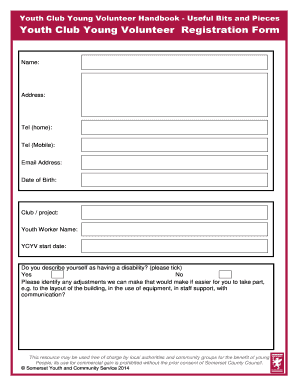
- Fill in your name in the designated field as it appears on your identification. This will help ensure that your registration is processed correctly.
- Input your address in the corresponding section. Be sure to include your full street address, city, state, and ZIP code.
- Provide your telephone numbers. Enter your home telephone number in the first field and your mobile number in the second. If you do not have a number for one of these options, you may leave it blank.
- Enter your email address to facilitate communication related to the club's activities and updates. Ensure accuracy to avoid any issues with contact.
- Indicate your date of birth by selecting the appropriate day, month, and year from the dropdown menus provided.
- Select the club or project that you are registering for from the available options. This helps your coordinators assign you to the correct group.
- Fill in the name of your youth worker, if applicable. This could be the person who is your direct contact within the club.
- Specify the start date for your involvement with the Youth Club or Youth Club Young Volunteer (YCYV). This gives an indication of when you intend to begin participating.
- Answer the section about disabilities. If you describe yourself as having a disability, please tick 'Yes'. If not, tick 'No'.
- If you indicated a disability, describe any adjustments required to help you participate effectively. This can include preferences for communication, layout, or support.
- Complete the section regarding ethnic background by selecting one of the given options. If your background is not listed, you can specify it in the provided field.
- Indicate your interest in various activities, events, and consultations by ticking the relevant boxes. You can choose as many options as you like.
- Review all your entries for accuracy. Once you are satisfied, you can choose to save your changes, download the form, print it, or share it as needed.
Start your registration process now by filling out the Youth Club Registration Form online.
This article will help you to understand the five steps required to found a youth club. Making Contact with the Council. It's essential that you establish contact with the local council as soon as possible. ... A Plan for the Club. ... Finding the Right Venue. ... Funding. ... Insurance and Legal Considerations.