Loading
Get Tsp101
How it works
-

Open form follow the instructions
-

Easily sign the form with your finger
-

Send filled & signed form or save
How to fill out the Tsp101 online
The Tsp101 form is an essential document for managing customs declarations in the Hong Kong Special Administrative Region. This guide provides clear, step-by-step instructions to help users complete the form accurately and efficiently online.
Follow the steps to fill out the Tsp101 form online
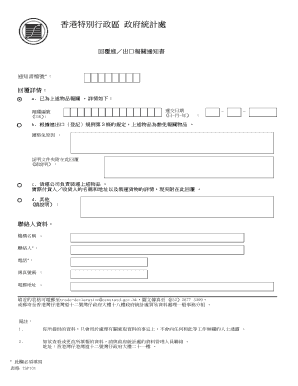
- Click the ‘Get Form’ button to access the Tsp101 form and open it in your document editor.
- Enter the notification document number in the designated field labeled '回覆檔號'. This number is vital for identifying your submission.
- In the '回覆詳情' section, specify whether you have declared the items mentioned. If yes, provide the customs declaration number (UDR) and the submission date in the appropriate fields.
- For items exempt from declaration under section 3 of the import and export registration regulations, indicate the reason for the exemption in the specified space.
- Attach supporting documents that prove the exemption reason as outlined. Be concise and clear in your explanation.
- Provide details about the freight company that is responsible for transporting the mentioned items, including the actual shipper’s or receiver’s name and address. Include details regarding the shipment.
- If there are any additional remarks or information to provide, use the space labeled '其他' for your notes.
- Complete the contact information section by entering your organization’s name, contact person's name, phone number, fax number, and email address. Ensure all mandatory fields are filled, as indicated by an asterisk (*) next to them.
- After you have filled out the form, review all entries for accuracy. You can then save your changes, download, print, or share the completed Tsp101 form as needed.
Start filling out the Tsp101 form online today for efficient management of your customs declarations.
The technique of applying two separate colors of paint simultaneously to provide a speckled finish.