Loading
Form preview
  • US Legal Forms
  • Other Templates
  • More Forms
  • More Multi-State Forms
  • Connecticut Fuel Tax Sticker 2020

Get Connecticut Fuel Tax Sticker 2020-2026

How it works

  1. Open form

    Open form follow the instructions

  2. Easily sign form

    Easily sign the form with your finger

  3. Share form

    Send filled & signed form or save

How to fill out the Connecticut Fuel Tax Sticker online

This guide provides comprehensive instructions for users looking to fill out the Connecticut Fuel Tax Sticker online. By following the outlined steps, users can ensure their application is completed accurately and efficiently.

Follow the steps to complete your Connecticut Fuel Tax Sticker application.

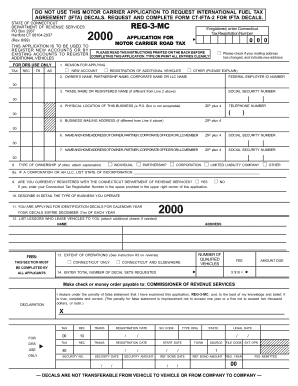
  1. Click ‘Get Form’ button to obtain the Connecticut Fuel Tax Sticker application in your preferred digital format.
  2. Begin by entering your Connecticut Tax Registration Number if you are already registered. If this is a new application, indicate that you are registering a new account or additional vehicles.
  3. Provide the owner’s name, partnership name, corporate name, or LLC name in the designated field. Additionally, enter the Federal Employer ID Number and the trade name if applicable.
  4. Next, input the physical location of your business. A valid street address is required; P.O. Box addresses are not acceptable.
  5. If your business mailing address differs from the physical location, complete that section by providing the relevant information.
  6. List the name and home address of the owner, partner, corporate officer, or LLC member along with their Social Security Number.
  7. Indicate the type of ownership by selecting the appropriate option from the list provided. If your business type is not listed, attach an explanation.
  8. Confirm whether you are currently registered with the Connecticut Department of Revenue Services by selecting 'Yes' or 'No'. If yes, input your Connecticut tax registration number.
  9. Describe in detail the type of business you operate in the appropriate section to provide context for your application.
  10. Indicate the type of identification decals you are applying for, ensuring you know they expire annually on December 31st.
  11. List any lessors who lease vehicles to you; include additional sheets if necessary for extensive listings.
  12. Complete the extent of operations section by selecting the correct option that applies to your operational reach.
  13. Calculate the total number of decal sets requested. The amount due will be calculated by multiplying the number of decals by the fee listed.
  14. Review your entire application for accuracy before signing the declaration at the bottom. This section must be signed by an authorized individual.
  15. Finally, save your changes and proceed to download, print, or share the completed form as required. Ensure all necessary documents and payments are submitted to the Department of Revenue Services.

Complete your Connecticut Fuel Tax Sticker application online today for a smoother registration process.

Get form

Experience a faster way to fill out and sign forms on the web. Access the most extensive library of templates available.
Get form

Related content

Connecticut IFTA
IFTA simplifies fuel tax reporting for interstate carriers. To register in CT, you must...
Learn more
State International Fuel Tax Agreement (IFTA) Data...
by RL Schmoyer · 2003 — IFTA- licensed motor carriers display IFTA decals on both sides...
Learn more
AchiEVe:
VEHICLE REGISTRATION FEES FOR EV. DRIVERS. Connecticut: Offers reduced registration fees:...
Learn more

Related links form

Aq10 Form PROOF OF LOSS Other Than Fire INTERIM IBC CLAIM FORM NO - Ciaa-adjusters Acknowledgement Of TANF Suspicion-based Drug Testing Policy Acknowledgement Of TANF Suspicion-based KS Department Of Health And Environment Presumptive Medical Disability Questionnaire KS Department

Questions & Answers

Get answers to your most pressing questions about US Legal Forms API.

Contact support

Yes, if you operate in California and travel outside the state, you are required to have IFTA stickers. These stickers serve as proof of your fuel tax compliance, and they are essential for your trucking operations. If you are also transporting goods into Connecticut, acquiring a Connecticut Fuel Tax Sticker may enhance your ease in managing fuel taxes across multiple states.

Local trucks typically do not need IFTA stickers if they exclusively operate within state boundaries. However, if a local truck occasionally travels out of state, having a Connecticut Fuel Tax Sticker can be beneficial. It allows for easier tracking of fuel taxes owed, ensuring you remain compliant with both state and federal regulations.

To obtain IFTA stickers in New York, you need to apply through the New York State Department of Taxation and Finance. Ensure you have your vehicle information and IFTA account details ready. Once your application is processed, you will receive your IFTA stickers, which will simplify your fuel tax reporting and help you stay compliant with regulations, much like the Connecticut Fuel Tax Sticker does.

If your local trucking operations involve traveling beyond Connecticut state lines, you may need to comply with the International Fuel Tax Agreement (IFTA). This requirement often applies even for short trips, as it helps ensure appropriate tax collection for fuel usage. To avoid penalties, consider obtaining a Connecticut Fuel Tax Sticker to streamline your fuel tax reporting.

In Massachusetts, you can obtain an IFTA sticker by completing the application available on the Massachusetts Department of Revenue's website. Make sure to have your vehicle details and business information ready for submission. Your Connecticut Fuel Tax Sticker will be dispatched upon successful processing, ensuring adherence to fuel tax regulations across state lines.

To get your IFTA stickers in New York, you should register through the New York State Department of Taxation and Finance. Ensure all required data, such as vehicle identification and mileage records, is accurate. Once your application is processed, your Connecticut Fuel Tax Sticker will be issued, simplifying your fuel tax reporting obligations.

To acquire an IFTA sticker in New Jersey, visit the New Jersey Division of Taxation's website to download and fill out the application. Gather your vehicle information and any required documentation. With the right submission, you'll receive your Connecticut Fuel Tax Sticker, enhancing your compliance when driving through multiple states.

To get an IFTA sticker in South Carolina, you need to apply through the South Carolina Department of Revenue. Prepare necessary documents, such as your vehicle information and mileage records. Applying online is convenient through their website, ensuring you receive your Connecticut Fuel Tax Sticker efficiently.

IFTA refers to the International Fuel Tax Agreement, which is designed to simplify the reporting of fuel taxes by interstate commercial carriers. It allows for a single fuel tax payment to cover multiple jurisdictions. The Connecticut Fuel Tax Sticker is essential for those operating in or through Connecticut while benefiting from IFTA's streamlined process.

In accounting, IFTA stands for International Fuel Tax Agreement. It relates to the fuel tax obligations for interstate commercial vehicle operations. Understanding IFTA is crucial when managing fuel tax records, and having the Connecticut Fuel Tax Sticker helps ensure compliance across different states.

Get This Form Now!

Use professional pre-built templates to fill in and sign documents online faster. Get access to thousands of forms.
Get form
If you believe that this page should be taken down, please follow our DMCA take down processhere.
Get Connecticut Fuel Tax Sticker
Get form
  • Adoption
  • Bankruptcy
  • Contractors
  • Divorce
  • Home Sales
  • Employment
  • Identity Theft
  • Incorporation
  • Landlord Tenant
  • Living Trust
  • Name Change
  • Personal Planning
  • Small Business
  • Wills & Estates
  • Packages A-Z
  • Affidavits
  • Bankruptcy
  • Bill of Sale
  • Corporate - LLC
  • Divorce
  • Employment
  • Identity Theft
  • Internet Technology
  • Landlord Tenant
  • Living Wills
  • Name Change
  • Power of Attorney
  • Real Estate
  • Small Estates
  • Wills
  • All Forms
  • Forms A-Z
  • Other Templates
  • Legal Hub
  • About Us
  • Help Portal
  • Legal Resources
  • Blog
  • Affiliates
  • Contact Us
  • Delete My Account
  • Site Map
  • Industries
  • Forms in Spanish
  • Localized Forms
  • State-specific Forms
  • Forms Kit
  • Real Estate Handbook
  • All Guides
  • Notarize
  • Incorporation services
  • For Consumers
  • For Small Business
  • For Attorneys
  • USLegal
  • FormsPass
  • pdfFiller
  • signNow
  • altaFlow
  • DocHub
  • Instapage
Form Packages
  • Adoption
  • Bankruptcy
  • Contractors
  • Divorce
  • Home Sales
  • Employment
  • Identity Theft
  • Incorporation
  • Landlord Tenant
  • Living Trust
  • Name Change
  • Personal Planning
  • Small Business
  • Wills & Estates
  • Packages A-Z
Form Categories
  • Affidavits
  • Bankruptcy
  • Bill of Sale
  • Corporate - LLC
  • Divorce
  • Employment
  • Identity Theft
  • Internet Technology
  • Landlord Tenant
  • Living Wills
  • Name Change
  • Power of Attorney
  • Real Estate
  • Small Estates
  • Wills
  • All Forms
  • Forms A-Z
  • Other Templates
Customer Service
  • Legal Hub
  • About Us
  • Help Portal
  • Legal Resources
  • Blog
  • Affiliates
  • Contact Us
  • Delete My Account
  • Site Map
  • Industries
  • Forms in Spanish
  • Localized Forms
  • State-specific Forms
  • Forms Kit
Legal Guides
  • Real Estate Handbook
  • All Guides
Prepared for you
  • Notarize
  • Incorporation services
Our Customers
  • For Consumers
  • For Small Business
  • For Attorneys
Our Sites
  • USLegal
  • FormsPass
  • pdfFiller
  • signNow
  • altaFlow
  • DocHub
  • Instapage
Social Media
Call us now toll free:
+1 833 426 79 33
As seen in:
© Copyright 1999-2026 airSlate Legal Forms, Inc. 17 Station Street, Ste. 203, Brookline, MA 02445
  • Your Privacy Choices
  • Terms of Service
  • Privacy Notice
  • Content Takedown Policy
  • Bug Bounty Program