Loading
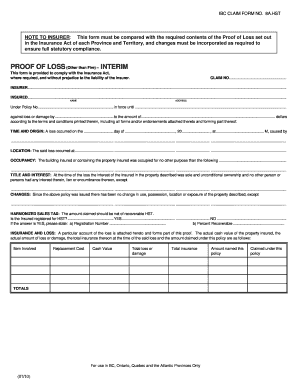
Get Proof Of Loss Other Than Fire Interim Ibc Claim Form No - Ciaa-adjusters
How it works
-

Open form follow the instructions
-

Easily sign the form with your finger
-

Send filled & signed form or save
How to fill out the PROOF OF LOSS Other Than Fire INTERIM IBC CLAIM FORM NO - Ciaa-adjusters online
This guide provides step-by-step instructions on filling out the PROOF OF LOSS Other Than Fire INTERIM IBC CLAIM FORM NO - Ciaa-adjusters online. By following these directions, users can complete the form accurately and efficiently, ensuring a smooth claims process.
Follow the steps to complete the form online effectively.
- Press the ‘Get Form’ button to obtain the form and open it in the document editor.
- In the first section labeled 'CLAIM NO', enter the specific claim number assigned to your insurance claim.
- In the 'INSURER' section, provide the full name of the insurance company handling your claim.
- Fill in the 'INSURED' section with your name and address, ensuring it matches the details in your insurance policy.
- In the 'Under Policy No' field, input your policy number and confirm the policy's expiration date.
- Specify the type of loss in the section that states 'against loss or damage by', detailing the specific cause of the loss.
- In the 'TIME AND ORIGIN' section, clearly state the date and time of the loss along with a brief description of how it occurred.
- Provide the exact 'LOCATION' where the loss happened.
- For 'OCCUPANCY', describe the purpose of the building at the time of the loss.
- In the 'TITLE AND INTEREST' section, affirm your ownership status regarding the property involved in the claim.
- Complete the 'CHANGES' section by mentioning any changes made to the property since your policy was issued.
- Indicate whether you are registered for Harmonized Sales Tax (HST) and, if so, provide the registration number and the percent that is recoverable.
- Attach a detailed account of the loss as referenced in the 'INSURANCE AND LOSS' section, filling in the required values for replacement cost, cash value, and amounts claimed.
- In the 'OTHER INSURANCE' section, disclose if you have any other insurance contracts related to the same property or loss.
- Finally, review the declaration statement, sign it, and ensure all parties involved in the claim authorize the document.
- Save your changes, then download, print, or share the completed form as needed.
Complete your documents online with confidence and ensure your claims process is efficient.
Institutional Biosafety Committee (IBC) - Research.
Industry-leading security and compliance
US Legal Forms protects your data by complying with industry-specific security standards.
-
In businnes since 199725+ years providing professional legal documents.
-
Accredited businessGuarantees that a business meets BBB accreditation standards in the US and Canada.
-
Secured by BraintreeValidated Level 1 PCI DSS compliant payment gateway that accepts most major credit and debit card brands from across the globe.