Get Dor Fiduciary And Partnership Tax Forms And Instructions Mass.... 2020-2025
How it works
-

Open form follow the instructions
-

Easily sign the form with your finger
-

Send filled & signed form or save
How to fill out the DOR Fiduciary and Partnership Tax Forms and Instructions Mass.... online
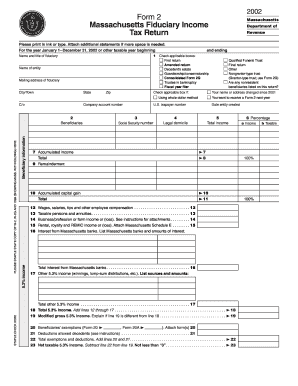
This guide provides comprehensive instructions for completing the DOR Fiduciary and Partnership Tax Forms for Massachusetts online. With a clear step-by-step approach, users can confidently navigate through each section of the form, ensuring compliance and accuracy in their tax reporting.
Follow the steps to complete the tax form successfully.
- Press the ‘Get Form’ button to access the fiduciary and partnership tax form, which you can then open and fill out online.
- Begin by entering the name and title of the fiduciary in the designated fields. Ensure this information is accurate as it is crucial for identification purposes.
- Fill in the name of the entity associated with the fiduciary responsibilities. This is typically the trust or partnership for which taxes are being filed.
- Provide the mailing address of the fiduciary, including city, state, and zip code, to facilitate correspondence.
- Check the box if there has been a change in your name or address since the prior tax year to keep your records current.
- Indicate if you want to receive a Form 2 for the following tax year by checking the appropriate box.
- Enter the U.S. taxpayer number and social security number as required; these identifiers are crucial for processing your return.
- Select if it is a qualified funeral trust or final return, or if any nonresident beneficiaries are listed. This impacts how the return is processed.
- Provide the date the entity was created and indicate its legal domicile for tax jurisdiction purposes.
- Complete the income section by reporting total income, including various types like wages, business income, and interests, ensuring you account for any necessary schedules.
- Continue through the form, entering data for exemptions and deductions accurately, as these will affect your net taxable income.
- Calculate the tax liability based on the total income taxable at 5.3%, attaching any required forms like Massachusetts Schedule F if applicable.
- Review your calculations for any overpayment or balance due and complete this section carefully.
- Finalize the form with your signature, declaring the accuracy of the information provided, and ensure it is dated appropriately.
- Save your changes, and you can choose to download, print, or share the completed form as necessary for your records or submission.
Complete the DOR Fiduciary and Partnership Tax Forms online today to ensure timely and accurate filing.
MA state tax form 2 is the Massachusetts Resident Income Tax Return, used by individuals to report their income for the state tax. This form is essential for individuals living in Massachusetts for most of the year and must be filed to accurately report income and calculate any tax owed. You can find the DOR Fiduciary And Partnership Tax Forms And Instructions Mass to ensure you complete this form correctly.
Industry-leading security and compliance
-
In businnes since 199725+ years providing professional legal documents.
-
Accredited businessGuarantees that a business meets BBB accreditation standards in the US and Canada.
-
Secured by BraintreeValidated Level 1 PCI DSS compliant payment gateway that accepts most major credit and debit card brands from across the globe.