We use cookies to improve security, personalize the user experience, enhance our marketing activities (including cooperating with our marketing partners) and for other business use.
Click "here" to read our Cookie Policy. By clicking "Accept" you agree to the use of cookies. Read less
Read more
Accept
Loading
Form preview
  • US Legal Forms
  • Form Library
  • More Forms
  • More Uncategorized Forms
  • Biodata Format Declaration

Get Biodata Format Declaration

How it works

  1. Open form

    Open form follow the instructions

  2. Easily sign form

    Easily sign the form with your finger

  3. Share form

    Send filled & signed form or save

How to fill out the Biodata Format Declaration online

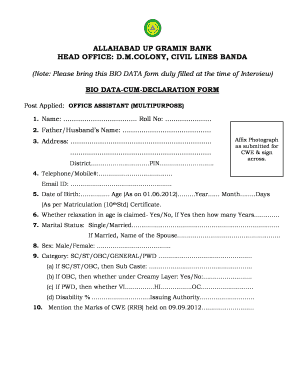
The Biodata Format Declaration is an essential document required for applicants seeking the position of office assistant (multipurpose) at Allahabad UP Gramin Bank. This guide will provide a clear, step-by-step process for completing the form online, ensuring that users submit accurate and complete information.

Follow the steps to accurately complete your Biodata Format Declaration online.

  1. Click ‘Get Form’ button to access the Biodata Format Declaration and open it in your preferred online editor.
  2. Begin filling in your personal details in the designated fields. Start with your name and roll number at the top of the form.
  3. Next, provide your father or partner's name as required, followed by your complete address, including district and PIN code.
  4. Upload a recent photograph that was submitted for the CWE and sign across it as specified.
  5. Enter your contact information, including a telephone or mobile number and email ID.
  6. Fill in your date of birth and calculate your age as of June 1, 2012, based on your matriculation certificate.
  7. Indicate if you are claiming any age relaxation by selecting yes or no, and if yes, specify the number of years.
  8. Select your marital status from the options provided and, if married, include the name of your spouse.
  9. Choose your sex from the given options.
  10. Select your category, such as SC, ST, OBC, General, or PWD, and provide additional details as applicable.
  11. State your marks obtained in the CWE held on September 9, 2012.
  12. List your educational qualifications along with the board or university, marks obtained, and year of passing.
  13. Include any professional qualifications following the same format as the educational qualifications.
  14. Detail your computer degree, diploma, or certificate, including the name of the institution and whether it is government recognized.
  15. Provide information about your previous or current employment along with the designation, service period, and reasons for leaving.
  16. Disclose if there are any pending court cases or charges against you, providing particulars if applicable.
  17. Share information regarding any extracurricular activities, hobbies, and other activities that may be relevant.
  18. In the declaration section, affirm that the information provided is accurate to the best of your knowledge. Ensure to sign and date the form.
  19. Once all fields are filled, review the information for accuracy before saving, downloading, printing, or sharing the completed form.

Complete your Biodata Format Declaration online today to ensure a smooth application process!

Get form

Experience a faster way to fill out and sign forms on the web. Access the most extensive library of templates available.
Get form

Related content

Search - Search
The IRS Form 990 must also contain all appropriate signatures. Electronic IRS Forms 990...
Learn more
Agri Business Incubator- Bio data Format
1 Name & address for communication with telephone number and Email id. 2 Age & Date of...
Learn more
R300 User guide - FCC Report
Each PIN digit appears as *, unless it starts with emergency number digits, for example...
Learn more

Related links form

AMBERLITE PWA5 Resin - Dow Chemical Company YMCA OF SOUTHERN NEVADA Constituency Form Ohio Form Mvf 4 Ind Fill In Wps Gha Non Msp Refund Form

Questions & Answers

Get answers to your most pressing questions about US Legal Forms API.

Contact support

Creating a biodata format involves several key steps. Begin by selecting a clean, professional layout and then fill in essential sections like personal information, objectives, and qualifications. Use a Biodata Format Declaration that includes formatted areas for you to detail your experiences and skills. This structured approach helps you present yourself in an organized, attractive manner.

Filling a declaration letter requires you to begin with your name and address at the top, followed by the date, and the recipient's information. Clearly express the purpose of the letter, and summarize the facts you are declaring. For further guidance, the Biodata Format Declaration can provide a useful structure to follow.

Writing a full biodata involves collecting all necessary information and organizing it coherently. Start with personal details, followed by educational and professional experiences, and conclude with hobbies and references. Adhering to the Biodata Format Declaration will help ensure no vital information gets overlooked.

A declaration statement typically states, 'I hereby declare that the information provided in this biodata is true to the best of my knowledge.' This simple yet powerful statement reaffirms your integrity and can strengthen your application. Aligning it with the Biodata Format Declaration enhances its formal tone.

Formatting your biodata requires an organized layout. Start with heading titles for each section, use bullet points for key information, and maintain consistent font styles throughout. By following the Biodata Format Declaration, you ensure that your biodata is professional and visually appealing.

Writing a declaration involves clearly stating your intentions and authenticity. Begin with a brief introduction, followed by a clear affirmation of the information provided in your biodata. This statement serves as a formal agreement and can enhance the credibility of your submission, in line with the Biodata Format Declaration.

An example of biodata includes essential details like your name, date of birth, address, and educational history. It often includes sections on family background, hobbies, and interests as well. Utilizing the Biodata Format Declaration ensures that you highlight your strengths effectively and engage the reader's interest.

To fill a biodata format effectively, follow a structured approach. Begin by outlining sections such as personal details, educational qualifications, and work history. Use bullet points or tables for easy readability. This layout helps present your information clearly while adhering to the Biodata Format Declaration standards.

Filling the biodata form is a straightforward process. Start by providing your personal information, such as your name, contact details, and educational background. Be sure to include any relevant work experience and skills. Remember, clarity is essential, so use the Biodata Format Declaration to arrange your information neatly.

The format to write a biodata typically includes several key sections: personal information, education, experience, skills, and a declaration. Start with your name and contact details, then move to your educational background followed by work experiences. Clearly labeling each section enhances readability. A concise Biodata Format Declaration can facilitate clear communication of your essential information.

Get This Form Now!

Use professional pre-built templates to fill in and sign documents online faster. Get access to thousands of forms.
Get form
If you believe that this page should be taken down, please follow our DMCA take down processhere.

Industry-leading security and compliance

US Legal Forms protects your data by complying with industry-specific security standards.
  • In businnes since 1997
    25+ years providing professional legal documents.
  • Accredited business
    Guarantees that a business meets BBB accreditation standards in the US and Canada.
  • Secured by Braintree
    Validated Level 1 PCI DSS compliant payment gateway that accepts most major credit and debit card brands from across the globe.
Get Biodata Format Declaration
Get form
Form Packages
Adoption
Bankruptcy
Contractors
Divorce
Home Sales
Employment
Identity Theft
Incorporation
Landlord Tenant
Living Trust
Name Change
Personal Planning
Small Business
Wills & Estates
Packages A-Z
Form Categories
Affidavits
Bankruptcy
Bill of Sale
Corporate - LLC
Divorce
Employment
Identity Theft
Internet Technology
Landlord Tenant
Living Wills
Name Change
Power of Attorney
Real Estate
Small Estates
Wills
All Forms
Forms A-Z
Form Library
Customer Service
Terms of Service
Privacy Notice
Legal Hub
Content Takedown Policy
Bug Bounty Program
About Us
Help Portal
Legal Resources
Blog
Affiliates
Contact Us
Delete My Account
Site Map
Industries
Forms in Spanish
Localized Forms
State-specific Forms
Forms Kit
Legal Guides
Real Estate Handbook
All Guides
Prepared for You
Notarize
Incorporation services
Our Customers
For Consumers
For Small Business
For Attorneys
Our Sites
US Legal Forms
USLegal
FormsPass
pdfFiller
signNow
airSlate WorkFlow
DocHub
Instapage
Social Media
Call us now toll free:
+1 833 426 79 33
As seen in:
  • USA Today logo picture
  • CBC News logo picture
  • LA Times logo picture
  • The Washington Post logo picture
  • AP logo picture
  • Forbes logo picture
© Copyright 1997-2025
airSlate Legal Forms, Inc.
3720 Flowood Dr, Flowood, Mississippi 39232
Form Packages
Adoption
Bankruptcy
Contractors
Divorce
Home Sales
Employment
Identity Theft
Incorporation
Landlord Tenant
Living Trust
Name Change
Personal Planning
Small Business
Wills & Estates
Packages A-Z
Form Categories
Affidavits
Bankruptcy
Bill of Sale
Corporate - LLC
Divorce
Employment
Identity Theft
Internet Technology
Landlord Tenant
Living Wills
Name Change
Power of Attorney
Real Estate
Small Estates
Wills
All Forms
Forms A-Z
Form Library
Customer Service
Terms of Service
Privacy Notice
Legal Hub
Content Takedown Policy
Bug Bounty Program
About Us
Help Portal
Legal Resources
Blog
Affiliates
Contact Us
Delete My Account
Site Map
Industries
Forms in Spanish
Localized Forms
State-specific Forms
Forms Kit
Legal Guides
Real Estate Handbook
All Guides
Prepared for You
Notarize
Incorporation services
Our Customers
For Consumers
For Small Business
For Attorneys
Our Sites
US Legal Forms
USLegal
FormsPass
pdfFiller
signNow
airSlate WorkFlow
DocHub
Instapage
Social Media
Call us now toll free:
+1 833 426 79 33
As seen in:
  • USA Today logo picture
  • CBC News logo picture
  • LA Times logo picture
  • The Washington Post logo picture
  • AP logo picture
  • Forbes logo picture
© Copyright 1997-2025
airSlate Legal Forms, Inc.
3720 Flowood Dr, Flowood, Mississippi 39232