Loading
Get Shelby County Schhool Allergy Forms 2020-2026
How it works
-

Open form follow the instructions
-

Easily sign the form with your finger
-

Send filled & signed form or save
How to fill out the Shelby County School Allergy Forms online
Filling out the Shelby County School Allergy Forms online is a straightforward process that ensures your child's medical needs are communicated effectively. This guide provides clear instructions to help you complete the form accurately and efficiently.
Follow the steps to successfully complete the allergy form
- Press the ‘Get Form’ button to access the Shelby County School Allergy Forms online and open it in your preferred editor.
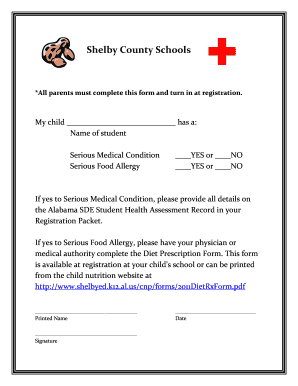
- Begin by entering your child’s name in the designated field where it states 'My child ____________________________ has a:'. Make sure to write clearly to avoid any misunderstandings.
- Next, indicate whether your child has a serious medical condition by selecting either the 'YES' or 'NO' option. If you select 'YES', you will need to provide detailed information on the Alabama SDE Student Health Assessment Record included in your registration packet.
- Then, determine if your child has a serious food allergy. Again, select either the 'YES' or 'NO' option. If 'YES', it's essential to have your physician or medical authority complete the Diet Prescription Form. This form can be found at your child's school during registration or downloaded from the child nutrition website.
- After filling in the necessary information, sign the form by providing your printed name and signature where indicated. Also, be sure to include the date in the specified field.
- Once all fields are completed, review the form for any errors or missing information. After verifying everything, you can save changes, download a copy for your records, print, or share the form as required.
Complete your Shelby County School Allergy Forms online today to ensure your child's health needs are met.
The Optional Schools and General Choice Transfer application window is open. Apply online anytime, anywhere using any device with Internet access. Must have a valid email address to apply. ... Parents of current MSCS students should apply using their PowerSchool ID, which is the same as the student's lunch number.