Loading
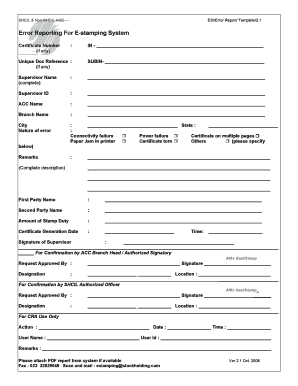
Get E Stamping Error Reporting Form 2020-2026
How it works
-

Open form follow the instructions
-

Easily sign the form with your finger
-

Send filled & signed form or save
How to fill out the E Stamping Error Reporting Form online
This guide provides clear instructions on how to complete the E Stamping Error Reporting Form online. Follow these steps to ensure your form is filled out accurately and efficiently, helping to facilitate smooth error reporting.
Follow the steps to complete the E Stamping Error Reporting Form online.
- Press the ‘Get Form’ button to access the E Stamping Error Reporting Form and open it for completion.
- Begin by entering the certificate number, if applicable, in the designated space.
- Next, provide the unique document reference number, if available.
- Fill in the supervisor's complete name and supervisor ID in the corresponding fields.
- Include the ACC name and the branch name in the designated fields.
- Enter the city and state related to the error being reported.
- Select the nature of the error encountered by checking the appropriate box, detailing it in the remarks section if necessary.
- In the remarks section, provide a complete description of the issue to give context to the error.
- Enter the names of the first and second parties involved in the transaction.
- Specify the amount of stamp duty on the form as required.
- Indicate the certificate generation date and time in the specified fields.
- The supervisor must provide their signature to authorize the report.
- For further confirmation, the ACC branch head or authorized signatory should also sign and affix their seal or stamp.
- Lastly, for CRA use only, fill in the specified action, date, time, user name, and user ID. Attach the PDF report from the system if available before submission.
Complete your documents online to streamline the error reporting process.
Please get your e-stamp paper of correct value prepared by visiting the nearest Stock Holding Corporation of India Ltd. (SHCIL) centre or their Authorised Collection Centre(ACC). The address of nearest SHCIL/ACCs can be checked on the website .shcilestamp.com .
Industry-leading security and compliance
US Legal Forms protects your data by complying with industry-specific security standards.
-
In businnes since 199725+ years providing professional legal documents.
-
Accredited businessGuarantees that a business meets BBB accreditation standards in the US and Canada.
-
Secured by BraintreeValidated Level 1 PCI DSS compliant payment gateway that accepts most major credit and debit card brands from across the globe.