Loading
Get Ah 216 2020-2026
How it works
-

Open form follow the instructions
-

Easily sign the form with your finger
-

Send filled & signed form or save
How to fill out the Ah 216 online
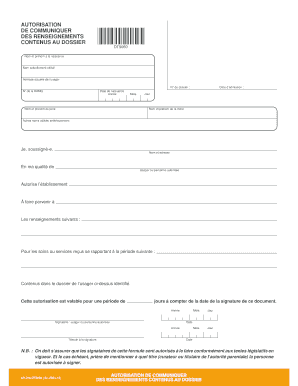
The Ah 216 is a crucial document used for authorizing the release of personal information contained in a user’s file. This guide will provide you with a step-by-step approach to efficiently complete the form online, ensuring that you provide all necessary details accurately.
Follow the steps to successfully complete the Ah 216 form online.
- Click the ‘Get Form’ button to access the form and open it in your preferred online editor.
- Begin by entering your full birth name in the designated field, as required.
- Next, input the name you currently use in the appropriate section.
- Provide your current address in the specified area to ensure accurate communication.
- Enter your file number and RAMQ number, which are essential for identifying your record.
- Fill in your date of birth by selecting the year, month, and day from the dropdown menus.
- Input the full names of your parents in the designated fields.
- If applicable, list any other names you have previously used.
- As the signer, indicate your name and address in the specified field, clarifying your role as the user or authorized person.
- Authorize the establishment to send the specified information by detailing it in the corresponding section.
- Select the relevant date period for which the information pertains.
- Sign the document as the user or authorized individual and include the date of your signature.
- Have a witness sign and date the document as required.
- Once you have completed all fields, make sure to review your entries before saving, downloading, printing, or sharing the form as needed.
Complete your documents online with confidence and ease!