Loading
Get Fire Drill Report 2020-2026
How it works
-

Open form follow the instructions
-

Easily sign the form with your finger
-

Send filled & signed form or save
How to fill out the Fire Drill Report online
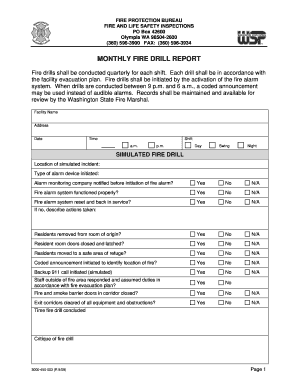
The Fire Drill Report is an essential document for recording the details surrounding fire drills conducted at facilities. This guide provides step-by-step instructions on how to accurately complete the online form, ensuring compliance with safety regulations.
Follow the steps to complete the Fire Drill Report online
- Click ‘Get Form’ button to obtain the Fire Drill Report and open it in the online editor.
- Fill in the facility name and address in the specified fields.
- Enter the date of the fire drill.
- Specify the exact time of the drill, indicating whether it occurred in the morning or evening by selecting 'a.m.' or 'p.m.'.
- Select the shift during which the drill was held: Day, Swing, or Night.
- Indicate the location of the simulated incident in the designated text box.
- Select the type of alarm device that was initiated from the dropdown menu.
- Answer whether the alarm monitoring company was notified before the initiation of the fire alarm by marking 'Yes', 'No', or 'N/A'.
- Provide responses to the questions about the fire alarm system's functionality and reset status by selecting the appropriate options.
- Confirm whether residents were removed from the room of origin and if their doors were closed and latched, marking the relevant options.
- Indicate if residents were moved to a safe area of refuge and whether a coded announcement was initiated to identify the location of the fire.
- Select whether a backup 911 call was initiated, even if simulated.
- Confirm if staff outside the fire area responded according to the fire evacuation plan.
- Indicate if fire and smoke barrier doors in the corridor were closed and whether exit corridors were clear of obstructions.
- If any questions require further clarification, please describe actions taken in the provided field.
- Record the time the fire drill concluded.
- Provide a critique of the fire drill in the allocated section.
- Complete the employee participation log by entering names, titles, and shifts of participating staff.
- After filling out all sections, save your changes, download, print, or share the Fire Drill Report as needed.
Complete your Fire Drill Report online to ensure compliance and enhance safety!
A fire drill includes the practice of evacuation procedures, communication of alarms, and response to simulated emergencies. It typically involves everyone from employees to safety coordinators participating in designated roles. Capturing the entire process in a fire drill report will provide critical insights into readiness and areas for enhancement.