Loading
Form preview
  • US Legal Forms
  • Other Templates
  • Tax Forms
  • Alaska Tax Forms
  • Ak Dor 544 2015

Get Ak Dor 544 2015-2026

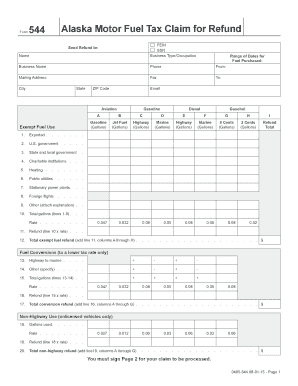
Tion Exempt Fuel Use Gasoline B C D E F G H I Jet Fuel (Gallons) Highway (Gallons) Marine (Gallons) Highway (Gallons) Marine (Gallons) 8 Cents (Gallons) 2 Cents (Gallons) Refund Total 0.047 0.032 0.08 0.05 0.08 0.05 0.08 0.02 . . . . . 2. U.S. government . . . . 3. State and local government . 4. Charitable institutions . . . 5. Heating . . . . . . . 6. Public utilities . . . . . 7. Stationary power plants. . . 8. Foreign flights .

How it works

  1. Open form

    Open form follow the instructions

  2. Easily sign form

    Easily sign the form with your finger

  3. Share form

    Send filled & signed form or save

How to fill out the AK DoR 544 online

The AK DoR 544 form, known as the Alaska Motor Fuel Tax Claim for Refund, allows individuals and businesses to claim refunds on fuel taxes. This guide will provide you with a clear, step-by-step approach to filling out the form online, ensuring that all necessary information is accurately submitted.

Follow the steps to complete the AK DoR 544 form successfully.

  1. Click the ‘Get Form’ button to access the AK DoR 544 document and open it in your preferred editor.
  2. Begin filling in your personal details, including your name, FEIN or SSN, business type or occupation, business name, phone number, mailing address, city, state, ZIP code, and email address. Ensure accuracy in all entries.
  3. Indicate the type of fuel for which you are claiming a refund (e.g., aviation, exempt fuel use, gasoline, diesel) and enter the corresponding gallon amounts for each category.
  4. Complete the sections for fuel conversions, listing any conversions from highway to marine or other specified uses, along with the respective amounts and rates.
  5. Fill out the non-highway use section, providing details on gallons used and the applicable rate for unlicensed vehicles.
  6. Proceed to the refined fuel surcharge exempt use section, detailing gallons used and calculating the refund amounts for each fuel type.
  7. Ensure you complete the total claim for refund section accurately by adding up all relevant lines from previous sections.
  8. Sign and date the form on Page 2 to validate your claim. Ensure all required attachments, such as original invoices, are included.
  9. Once all fields are filled, save your changes, then download, print, or share the completed form as necessary.

Start filling out your AK DoR 544 form online today to ensure you secure your fuel tax refund.

Get form

Experience a faster way to fill out and sign forms on the web. Access the most extensive library of templates available.
Get form

Related content

Diretrizes Brasileiras de Hipertensão Arterial...
by WKS Barroso · 2021 · Cited by 1420 — Este capítulo tem por objetivo demonstrar o...
Learn more
NOCICEPTORES: As células que sentem dor
As sensações chemestéticas são definidas como aqueles que ocorrem em qualquer lugar no...
Learn more
Society for Immunotherapy of Cancer (SITC)...
Atezolizumab therapy was associated with fewer grade 3 or 4 AEs and numerically longer DOR...
Learn more

Related links form

AZ ADOR Form 200 (10180) 2017 AZ ADOR Form 200 (10180) 2011 AZ ADOR Instructions 10872 2016 AZ ADOR Instructions 10872 2015

Questions & Answers

Get answers to your most pressing questions about US Legal Forms API.

Contact support

The commissioner of the Department of Public Safety (DPS) in Alaska oversees public safety, law enforcement, and emergency services statewide. This position is pivotal in ensuring that safety measures and regulations align with state needs. Knowing who holds this position can help you understand how public safety initiatives can intertwine with business regulations, including those governed by AK DoR 544. Keep updated with their activities to ensure your business aligns with public safety protocols.

Alaska does not impose a state-level sales tax; however, certain business taxes apply, depending on your industry and revenue. It's important to understand the various tax reporting requirements as outlined in AK DoR 544 to avoid penalties. The Department of Revenue provides resources for businesses to navigate these tax obligations effectively. By staying informed, you can optimize your tax strategy and ensure compliance.

The commissioner of Revenue in Alaska is the individual responsible for overseeing all state revenue collections, including taxes and various financial initiatives. They ensure that businesses and citizens adhere to the regulations of AK DoR 544. Understanding their role can help you navigate your obligations more efficiently. The Department of Revenue offers guidance, making it easier to comply with state tax policies.

Commissioner Ryan Anderson leads the Alaska Department of Revenue with a focus on effective financial management and strategic planning. He has a wealth of experience in revenue systems, which benefits the state's fiscal policies, particularly those outlined in AK DoR 544. Under his leadership, the department aims to improve transparency and efficiency in tax administration. Engaging with the commissioner’s directives can help you make informed decisions about your business taxes.

The Alaska Department of Revenue is responsible for collecting state taxes, managing state funds, and administering various financial programs. It plays a key role in maintaining the state's fiscal health and promoting economic stability. Familiarizing yourself with the services they provide can greatly assist in understanding requirements related to business operations, including those involving AK DoR 544. The department also offers resources to help you comply with state regulations.

The commissioner of Revenue services oversees the Alaska Department of Revenue, ensuring efficient tax administration and revenue collection. They play a critical role in shaping the state's fiscal policies and managing financial resources. This position is vital for the implementation of regulations related to the AK DoR 544, impacting businesses and individuals alike. Staying informed about the commissioner’s directives can help you navigate tax responsibilities with ease.

For withholding allowance, it is essential to consider your personal circumstances carefully. The AK DoR 544 provides a framework for determining your allowances based on your income, tax credits, and dependents. Therefore, using this form will help you make a more informed decision, ensuring the right amount is withheld from your paycheck.

On your W4 form, you should place a 0 or 1 in the allowances section based on your tax situation. If you have a higher income and want to withhold more taxes, consider claiming 0. Conversely, claiming 1 might result in fewer taxes withheld, which could be beneficial if you expect a refund when filing your taxes.

When completing Form 8949 for the sale of a home, the AK DoR 544 offers helpful guidance. Make sure to report the details of your sale, including the date acquired, date sold, proceeds, and any adjustments. Accurate reporting is essential to reflect the gains or losses correctly, ensuring compliance with tax regulations.

Filling out a withholding allowance form is straightforward when you use the AK DoR 544. Begin by placing your personal details at the top of the form. Next, calculate your allowances based on your filing status and the number of dependents you have, making sure to refer to the specific guidelines applicable to your situation.

Get This Form Now!

Use professional pre-built templates to fill in and sign documents online faster. Get access to thousands of forms.
Get form
If you believe that this page should be taken down, please follow our DMCA take down processhere.
Get AK DoR 544
Get form
  • Adoption
  • Bankruptcy
  • Contractors
  • Divorce
  • Home Sales
  • Employment
  • Identity Theft
  • Incorporation
  • Landlord Tenant
  • Living Trust
  • Name Change
  • Personal Planning
  • Small Business
  • Wills & Estates
  • Packages A-Z
  • Affidavits
  • Bankruptcy
  • Bill of Sale
  • Corporate - LLC
  • Divorce
  • Employment
  • Identity Theft
  • Internet Technology
  • Landlord Tenant
  • Living Wills
  • Name Change
  • Power of Attorney
  • Real Estate
  • Small Estates
  • Wills
  • All Forms
  • Forms A-Z
  • Other Templates
  • Legal Hub
  • About Us
  • Help Portal
  • Legal Resources
  • Blog
  • Affiliates
  • Contact Us
  • Delete My Account
  • Site Map
  • Industries
  • Forms in Spanish
  • Localized Forms
  • State-specific Forms
  • Forms Kit
  • Real Estate Handbook
  • All Guides
  • Notarize
  • Incorporation services
  • For Consumers
  • For Small Business
  • For Attorneys
  • USLegal
  • FormsPass
  • pdfFiller
  • signNow
  • altaFlow
  • DocHub
  • Instapage
Form Packages
  • Adoption
  • Bankruptcy
  • Contractors
  • Divorce
  • Home Sales
  • Employment
  • Identity Theft
  • Incorporation
  • Landlord Tenant
  • Living Trust
  • Name Change
  • Personal Planning
  • Small Business
  • Wills & Estates
  • Packages A-Z
Form Categories
  • Affidavits
  • Bankruptcy
  • Bill of Sale
  • Corporate - LLC
  • Divorce
  • Employment
  • Identity Theft
  • Internet Technology
  • Landlord Tenant
  • Living Wills
  • Name Change
  • Power of Attorney
  • Real Estate
  • Small Estates
  • Wills
  • All Forms
  • Forms A-Z
  • Other Templates
Customer Service
  • Legal Hub
  • About Us
  • Help Portal
  • Legal Resources
  • Blog
  • Affiliates
  • Contact Us
  • Delete My Account
  • Site Map
  • Industries
  • Forms in Spanish
  • Localized Forms
  • State-specific Forms
  • Forms Kit
Legal Guides
  • Real Estate Handbook
  • All Guides
Prepared for you
  • Notarize
  • Incorporation services
Our Customers
  • For Consumers
  • For Small Business
  • For Attorneys
Our Sites
  • USLegal
  • FormsPass
  • pdfFiller
  • signNow
  • altaFlow
  • DocHub
  • Instapage
Social Media
Call us now toll free:
+1 833 426 79 33
As seen in:
© Copyright 1999-2026 airSlate Legal Forms, Inc. 17 Station Street, Ste. 203, Brookline, MA 02445
  • Your Privacy Choices
  • Terms of Service
  • Privacy Notice
  • Content Takedown Policy
  • Bug Bounty Program