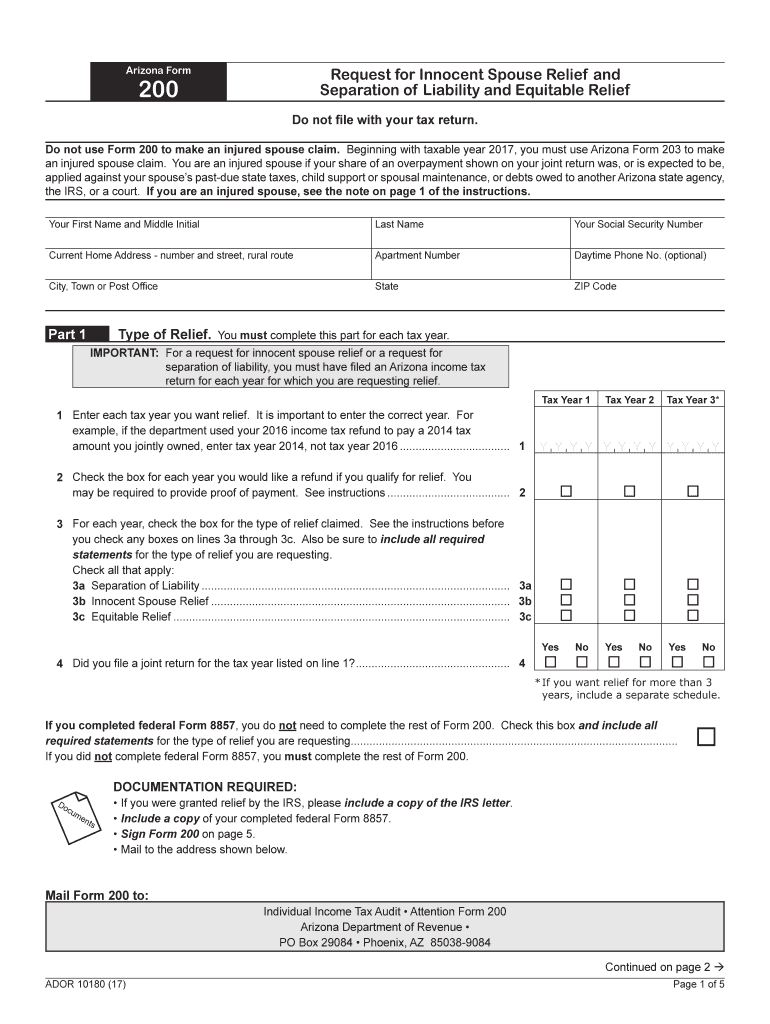
G with taxable year 2017, you must use Arizona Form 203 to make an injured spouse claim. You are an injured spouse if your share of an overpayment shown on your joint return was, or is expected to be, applied against your spouse s past-due state taxes, child support or spousal maintenance, or debts owed to another Arizona state agency, the IRS, or a court. If you are an injured spouse, see the note on page 1 of the instructions. Your First Name and Middle Initial Last Name Your Social Securi.
Loading

Open form follow the instructions

Easily sign the form with your finger

Send filled & signed form or save
How to fill out the AZ ADOR Form 200 (10180) online
This guide provides clear instructions on successfully completing the AZ ADOR Form 200 (10180) online. Designed for individuals seeking innocent spouse relief or separation of liability, this resource aims to simplify the process for users of all experience levels.
Follow the steps to accurately complete the AZ ADOR Form 200 (10180).
- Press the ‘Get Form’ button to access the form and open it in your online editor.
- Begin with your personal information by entering your first name, middle initial, last name, and social security number in the designated fields. Include your current home address, specifying apartment number, city, state, and zip code. Optionally, provide your daytime phone number.
- Navigate to Part 1, 'Type of Relief'. For each tax year you seek relief, enter the year in the provided fields. It is crucial to enter the correct years for your claim.
- Indicate by checking the boxes for each year whether you would like a refund if qualified for relief. Ensure you understand the documentation required before submitting.
- In the same section, check the appropriate box next to the type of relief you are claiming. Review the instructions to determine which types apply: separation of liability, innocent spouse relief, or equitable relief.
- Continue filling out Part 2, providing information about your spouse or former spouse. Complete sections for their name, social security number, and current address. Specify your current marital status using the provided options.
- In Part 3, detail your financial involvement and return preparation. Explain your role in preparing the returns by selecting applicable options and including any necessary explanations.
- Provide any required statements or documentation, especially for claims of spousal abuse or financial hardship, as indicated in the form.
- In Part 4, outline your current financial situation, including household composition, monthly income, and expenses. Use the provided fields to detail your finances meticulously.
- After completing all necessary sections, review the form for accuracy. If you have additional pages, ensure your name and social security number are included on each. Finally, sign and date the form.
- Save your changes, and choose an option to download, print, or share the form as required.
Start completing your AZ ADOR Form 200 (10180) online today for a streamlined process.
Experience a faster way to fill out and sign forms on the web. Access the most extensive library of templates available.
Related content
Arizona Form 200 is a request for innocent spouse relief, separation of liability, and...
All records created prior to. 1912 must be retained permanently. This retention schedule...
A form for reader's comments is provided at the back of this publication. You may use this...
Get answers to your most pressing questions about US Legal Forms API.
What is an AZ 8879 form?
The AZ 8879 form is the Arizona e-file signature authorization form, which allows you to e-file your Arizona state tax returns. This form is essential for electronic filing and must be completed accurately. To simplify your tax preparation, remember to check uslegalforms for the AZ ADOR Form 200 (10180) and any related forms, ensuring you have all necessary documentation.
Does AZ have an extension form?
Yes, Arizona offers an extension form for filing your state tax return, which can give you additional time to complete the process. You can find this extension form on the Arizona Department of Revenue's website. For a seamless experience, use uslegalforms to access relevant forms, including the AZ ADOR Form 200 (10180), along with the extension paperwork.
Does Staples have IRS forms?
Staples may carry some basic IRS forms during tax season, but the selection can be limited. It's recommended to check with your local store for availability. Alternatively, you can always download forms like the AZ ADOR Form 200 (10180) from uslegalforms for comprehensive and instant access.
Can I get IRS tax forms at the post office?
You can often find IRS tax forms at your local post office, especially during tax season. However, availability may vary by location. For immediate needs, consider accessing uslegalforms to download the necessary forms, including the AZ ADOR Form 200 (10180), without the wait.
Where can you pick up IRS tax forms?
IRS tax forms, including crucial documents for federal filing, are available at multiple locations such as post offices and public libraries. Ensure you check the availability at your nearest location. You can also find these forms on uslegalforms, which simplifies acquiring the necessary documentation, including the AZ ADOR Form 200 (10180).
Where can I get physical copies of tax forms?
Physical copies of tax forms are available at the Arizona Department of Revenue offices and select libraries. Additionally, you may receive them via mail if you request them online. For quick access, uslegalforms provides downloadable versions of the AZ ADOR Form 200 (10180) that you can print at home.
Where can I pick up tax forms to fill out?
You can find tax forms, such as the AZ ADOR Form 200 (10180), at local libraries or government offices. Many community centers also provide these forms during tax season. Consider visiting uslegalforms for online access to these documents to streamline your process.
Where can I get AZ tax forms?
You can obtain AZ tax forms, including the AZ ADOR Form 200 (10180), from the Arizona Department of Revenue's official website. This resource typically provides downloadable versions for convenience. Additionally, you can explore platforms like uslegalforms, which offer access to various tax-related forms.
What form do I need to file my Arizona state taxes?
To file your Arizona state taxes, you will need the AZ ADOR Form 200 (10180). This form captures critical information regarding your income, deductions, and tax credits. Completing it accurately is essential for ensuring compliance and optimizing your tax situation.
Does Arizona recognize out of state power of attorney?
Arizona does recognize out-of-state Power of Attorney documents, but they must comply with Arizona laws. For tax purposes, it is wise to check that your out-of-state POA covers necessary forms, such as the AZ ADOR Form 200 (10180), to ensure proper handling of your state tax matters.
Use professional pre-built templates to fill in and sign documents online faster. Get access to thousands of forms.
If you believe that this page should be taken down, please follow our DMCA take down process here.
This form is available in several versions. Select the version you need from the drop-down list below.