Loading
Get Wv Dor It-101q
How it works
-

Open form follow the instructions
-

Easily sign the form with your finger
-

Send filled & signed form or save
How to fill out the WV DoR IT-101Q online
The West Virginia Department of Revenue IT-101Q form is essential for employers to report quarterly income tax withholding. This guide provides clear, step-by-step instructions to help you navigate the online form effectively.
Follow the steps to fill out the WV DoR IT-101Q online with ease.
- Click ‘Get Form’ button to access the IT-101Q form and open it in your preferred editor.
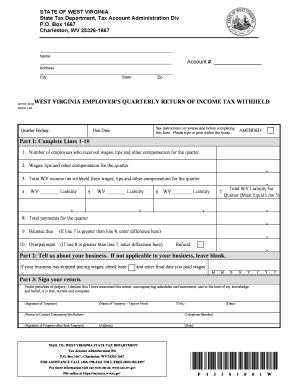
- Complete Part 1 by filling in Lines 1-10 with accurate information about your employees, wages, and withheld taxes for the quarter.
- In Line 1, enter the number of employees who received compensation during the quarter. If there were none, enter zero.
- For Line 2, input the total wages, tips, and compensation paid to employees in that quarter. Enter zero if no compensation was provided.
- In Line 3, record the total amount of West Virginia income tax withheld during the quarter. If there was no withholding, enter zero.
- Fill in Box 4-6 with the total tax liability due for each month in the quarter. If no liability was accrued during those months, enter zero.
- Line 7 should contain the total tax liability for the quarter, having calculated the sum of liability amounts from Boxes 4, 5, and 6. This must equal Line 3.
- Enter the total payments made for the quarter in Line 8. If no payments were made, enter zero.
- For Line 9, compare your entries from Line 7 and Line 8. If Line 7 exceeds Line 8, input the difference. If Line 8 exceeds Line 7, proceed to Line 10.
- In Line 10, if Line 8 is greater than Line 7, enter the difference. Indicate if you wish to apply for a refund by checking the box.
- Move to Part 2 and complete it if applicable, otherwise leave it blank.
- In Part 3, ensure that the return is signed by an appropriate representative. Include a contact number for any follow-up if necessary.
- Once your entries are complete, save your changes, and download or print the form for your records.
Complete your WV DoR IT-101Q form online today to ensure timely filing and compliance with state tax regulations.
Related links form
An Employer Identification Number (EIN) serves as a type of federal tax ID number for businesses. However, a tax ID number can refer to various identifiers used for tax purposes, including individual identification numbers. To clarify the distinctions and learn more about these terms, the WV DoR IT-101Q offers reliable information.