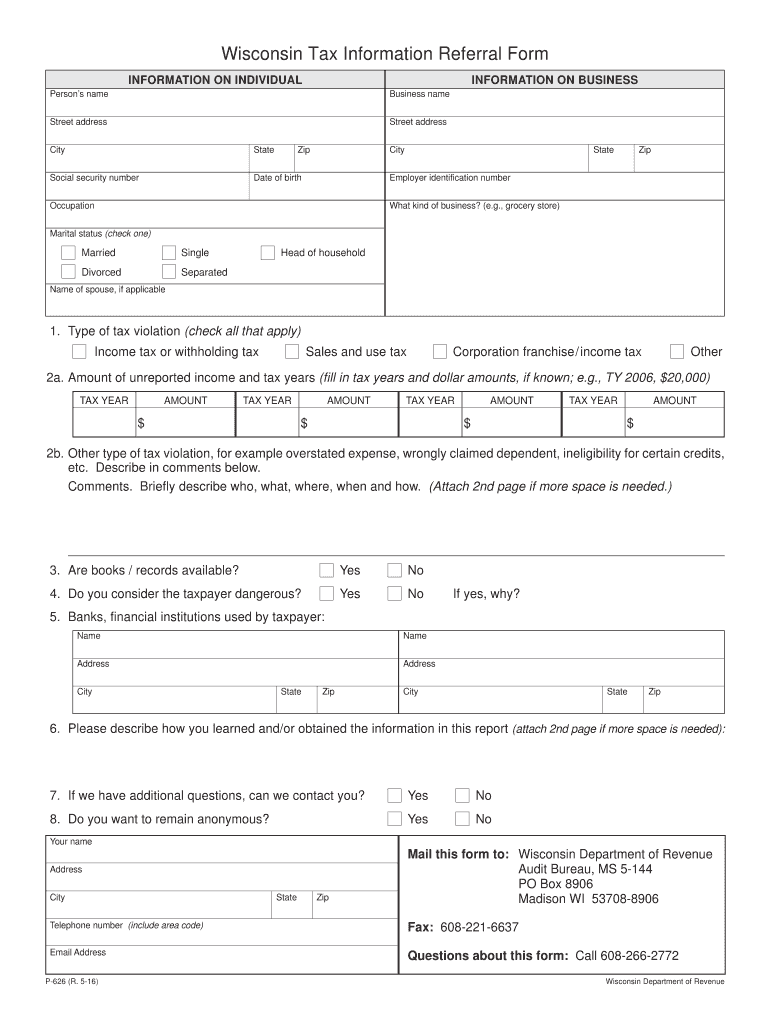
Ed to DOR using the contact information at the bottom of the page. Email Save Print Clear Wisconsin Tax Information Referral Form INFORMATION ON INDIVIDUAL INFORMATION ON BUSINESS Person s name Business name Street address Street address City State Zip City Social security number Date of birth Employer identification number Occupation State Zip What kind of business? (e.g., grocery store) Marital status (check one) Married Single Divorced Separated Head of household.
Loading

Open form follow the instructions

Easily sign the form with your finger

Send filled & signed form or save
How to fill out the WI P-626 online
The Wisconsin Tax Information Referral Form, commonly known as WI P-626, is used to report tax-related information to the Wisconsin Department of Revenue. This guide provides a clear, step-by-step approach to assist users in completing the form online.
Follow the steps to successfully fill out the WI P-626 online.
- Use the ‘Get Form’ button to access the WI P-626 document and open it in the designated editor.
- Begin filling in the individual's information section. Enter the person's name, social security number, date of birth, occupation, and address details including street, city, state, and zip.
- Next, proceed to the business information section. Enter the business name, employer identification number, business type, and business address details.
- Indicate the marital status by checking the appropriate box: married, single, divorced, separated, or head of household. If applicable, provide the name of the spouse.
- In section 1, identify the type of tax violation by checking all relevant options such as income tax, sales tax, or corporation franchise tax.
- For section 2a, provide the amount of unreported income. Fill in the applicable tax years and corresponding amounts. Enter additional details in section 2b to describe other tax violations if necessary.
- Confirm whether books and records are available by checking yes or no.
- In section 4, indicate if you consider the taxpayer dangerous and provide a reason if applicable.
- List the names and addresses of any banks or financial institutions used by the taxpayer.
- Describe how you obtained information for the report in section 6 and indicate if you can be contacted for additional questions in section 7.
- Decide whether you wish to remain anonymous and fill in your contact details if not.
- Once all sections are complete, you can save the document, or choose to print it for submission. To submit via email, simply click the ‘Email’ button or refer to the mailing address listed for faxing or mailing the form to the Wisconsin Department of Revenue.
Complete the WI P-626 online today to report tax information efficiently.
Experience a faster way to fill out and sign forms on the web. Access the most extensive library of templates available.
Related content
Briefly describe who, what, where, when and how. P-626 (R. 1-22). - 2 -. Wisconsin...
by I Queiroz · 2019 · Cited by 1 — No presente trabalho, utilizou-se um sistema de...
Informações para usuários sobre a coleta e o descarte de equipamentos antigos. Este...
Get answers to your most pressing questions about US Legal Forms API.
How to fill out the Employee's withholding Allowance Certificate?
To fill out the Employee's Withholding Allowance Certificate, provide the employee's basic information, including their name, address, and Social Security number. Then, the employee should list the number of allowances and any additional adjustments. Sticking to the WI P-626 procedures will help ensure accuracy in withholding tax calculations.
How to fill out an employee's withholding certificate?
To complete an employee’s withholding certificate, begin with the employee's full name and address. Then, they should state their Social Security number and indicate the marital status and number of allowances claimed. Properly completing this certificate with WI P-626 guidelines helps ensure accurate tax withholding.
How to fill out a withholding exemption form?
Filling out a withholding exemption form requires you to provide personal details such as your name, address, and taxpayer identification number. Next, indicate the appropriate exemptions you are claiming. It's essential to follow the WI P-626 standards to ensure the form is correctly processed by the IRS.
What should I put for my withholding allowance?
Your withholding allowance directly affects your paycheck and tax refund at the end of the year. Generally, you can claim one allowance for yourself and additional allowances for dependents. Keep in mind, when using the WI P-626 guidelines, the more allowances you claim, the less tax will be withheld from your paycheck.
How to fill out a w8ben form?
To properly fill out the W-8BEN form, start by entering your name and country of citizenship. Next, provide your permanent address and mailing address, and then offer your taxpayer identification number if applicable. Completing the W-8BEN correctly is crucial for US tax compliance, especially for those dealing with international income.
What do I put on my employee's withholding exemption certificate?
When filling out your employee's withholding exemption certificate for WI P-626, include the employee's personal information, such as name and Social Security number. Additionally, specify the number of allowances the employee claims. This information helps determine the correct amount of tax withheld from their paycheck.
What is the penalty for underpayment of estimated taxes in Wisconsin?
If you underpay your estimated taxes in Wisconsin, you may face penalties and interest charges. The penalty typically accrues at a rate of 1% per month on the amount underpaid. To avoid these penalties, ensure you make timely payments and accurately calculate your obligations for your WI P-626.
What is the non-resident tax return form for Wisconsin?
The non-resident tax return form for Wisconsin is known as Form 1NPR. This form is used by non-residents who earn income in Wisconsin and need to report it. If you are filing a WI P-626 as a non-resident, it's important to complete this form correctly to comply with state regulations.
Where can I get Wisconsin state tax forms?
You can find Wisconsin state tax forms on the Wisconsin Department of Revenue's website. These forms are available for download or can be requested by mail. For tailored documents specific to your needs, such as those related to the WI P-626, consider using US Legal Forms as a reliable resource.
At what age do you stop paying property taxes in Wisconsin?
In Wisconsin, there is no specific age at which you stop paying property taxes. However, certain exemptions may apply to senior citizens. If you are 65 or older, it’s wise to check for potential tax relief programs that can help with your property taxes related to your WI P-626.
Use professional pre-built templates to fill in and sign documents online faster. Get access to thousands of forms.
If you believe that this page should be taken down, please follow our DMCA take down process here.