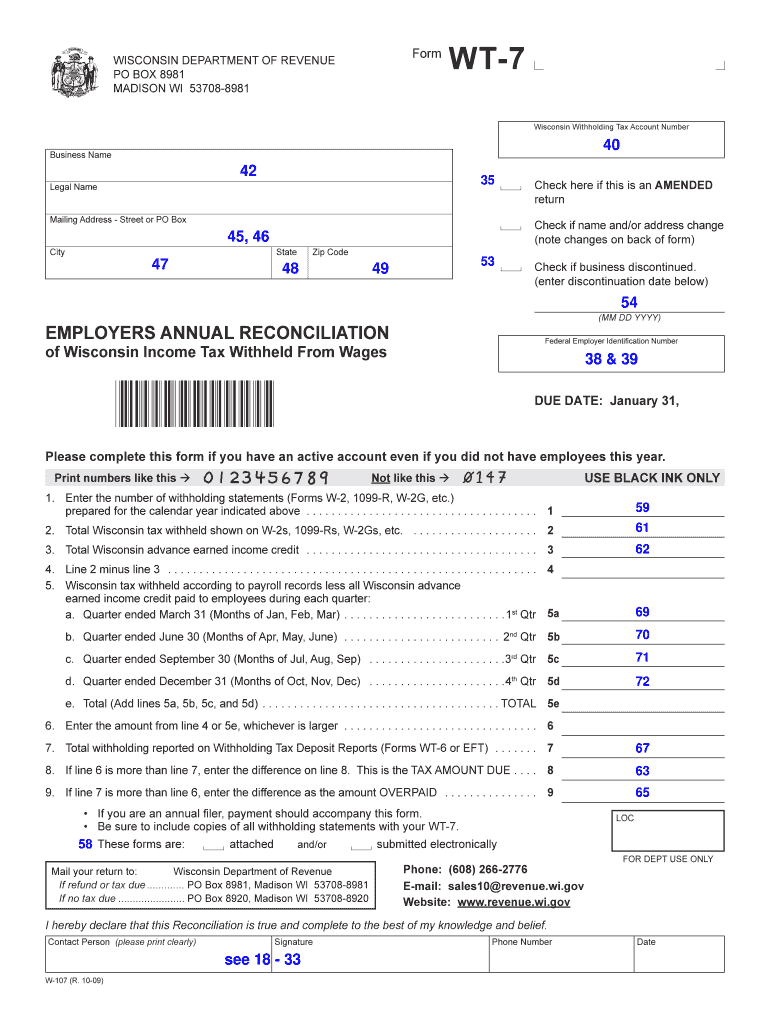
Form WISCONSIN DEPARTMENT OF REVENUE PO BOX 8981 MADISON WI 53708-8981 WT-7 Wisconsin Withholding Tax Account Number 40 Business Name 42 35 Legal Name Mailing Address - Street or PO Box Check if name.

Open form follow the instructions

Easily sign the form with your finger

Send filled & signed form or save
How to fill out the WI DoR WT-7 online
The Wisconsin DoR WT-7 form is essential for businesses to report their withholding tax obligations accurately. This guide provides a step-by-step approach to help you navigate and complete the form online with confidence.
Follow the steps to successfully complete the WI DoR WT-7 form.
- Press the ‘Get Form’ button to obtain the form and open it for editing.
- Enter your Wisconsin withholding tax account number in the designated field.
- Provide your business name in the corresponding section.
- Input your legal name, ensuring that it accurately reflects your business registration.
- Fill in your mailing address, including street or PO Box, city, state, and zip code.
- Check the box if there are any changes to your name or address and note those changes on the back of the form.
- Indicate if this is an amended return by checking the appropriate box.
- If applicable, check the box to signify that your business has been discontinued, and enter the discontinuation date.
- Complete the employers' annual reconciliation section by entering your Federal Employer Identification Number and total Wisconsin income tax withheld from wages.
- List the number of withholding statements prepared for the calendar year, along with total Wisconsin tax withheld.
- Calculate subsequent lines as instructed, including total amounts from each quarter and determine any tax amount due or overpaid.
- Ensure to attach copies of all withholding statements before submitting.
- Review the form for accuracy, then save changes, download, print, or share the completed form as necessary.
Complete the WI DoR WT-7 form online today for efficient tax reporting.
Experience a faster way to fill out and sign forms on the web. Access the most extensive library of templates available.
Related content
It is a secure process developed by the Department of Revenue (DOR) for employers and/or...
Form WT-7 (Fill-In Form), Employers Annual Reconciliation of Wisconsin Income Tax Withheld...
Conecte essa TV LED Smart Philips à Internet e descubra um novo mundo de televisão...
Get answers to your most pressing questions about US Legal Forms API.
How to file WT 7 Wisconsin?
To file the WT-7 form in Wisconsin, you need to complete it accurately and submit it to your employer. Make sure you provide all required information, including your allowances and exemption claims. After filing, keep a copy for your records and track the status, as it impacts your withholding. If you encounter any issues, platforms like uslegalforms can offer assistance and resources.
What is Wisconsin form WT 7 for?
The Wisconsin form WT-7 is a withholding exemption certificate used to claim exemptions from the state's withholding tax. It serves as a formal request to your employer to adjust the amount withheld from your paycheck. Understanding how to properly complete the WT-7 can lead to accurate tax withholding. Detailed instructions provided by the WI DoR can guide you through this process.
How long does it take for a w7 to be approved?
Approval times for the W-7 form can vary based on several factors. Generally, you can expect processing to take several weeks, especially during peak tax season. Using the WI DoR WT-7 may help avoid common pitfalls that delay approval. For timely results, consider submitting your forms early and double-checking your details.
Who fills out a w7?
Individuals who wish to claim specific withholding exemptions or allowances fill out the W-7 form. Typically, this includes employees who believe they will not owe state tax. If you fall into this category, using the WI DoR WT-7 can streamline the process. Make sure to provide complete and accurate information for effective processing.
What is a w7 tax form used for?
The W-7 tax form serves various purposes, primarily concerning withholding allowances and exemptions. This form helps taxpayers communicate their withholding preferences. Using the correct form, like the WI DoR WT-7, ensures that you align with Wisconsin tax regulations. Carefully review the criteria to see if this form applies to your situation.
What is a w7 form in Wisconsin?
The W-7 form in Wisconsin is often confused with other forms but primarily refers to documentation needed for certain withholding allowances. It is crucial to clearly differentiate it as you prepare your tax filings. The WI DoR WT-7 form is more relevant for claiming exemptions and allowances. Ensure you have the correct form to avoid delays.
How to fill out a withholding allowance form?
Filling out a withholding allowance form involves providing basic information such as your name, address, and Social Security number. Then, indicate the number of allowances you want to claim. For a comprehensive approach, utilize the WI DoR WT-7 form as a reference. If you have questions during the process, online resources and expert guidance can assist you.
How do I know if I am exempt from Wisconsin withholding?
To determine if you are exempt from Wisconsin withholding, review your financial situation. If you expect to owe no Wisconsin tax for the year, you may qualify for exemption. Completing the WI DoR WT-7 form can help clarify your tax obligations. Always consider consulting with a tax professional for personalized guidance.
Do I need to file 1099-NEC with the state of Wisconsin?
Yes, you are required to file the 1099-NEC with the state of Wisconsin if you meet the filing thresholds. This form must detail payments made to contractors and freelancers. Keeping track of these filings is vital to adhering to WI DoR WT-7 guidelines.
Where do I file my Wisconsin tax return?
You can file your Wisconsin tax return online through the WisTax system or via traditional mail. If you e-file, ensure you receive confirmation of submission. It's essential to follow the correct filing procedures stated in WI DoR WT-7 to avoid delays.
Use professional pre-built templates to fill in and sign documents online faster. Get access to thousands of forms.
If you believe that this page should be taken down, please follow our DMCA take down process here.
This form is available in several versions. Select the version you need from the drop-down list below.