Loading
Form preview
  • US Legal Forms
  • Other Templates
  • Tax Forms
  • Wisconsin Tax Forms
  • Wi Dor Schedule 3k-1 2018

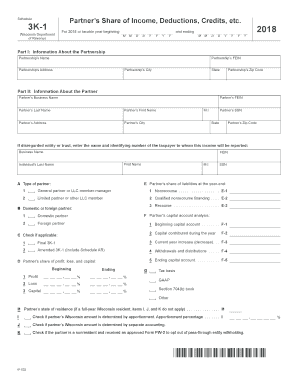
Get Wi Dor Schedule 3k-1 2018

Ttributable to gains on sales of farm assets . . . . . . . . . . . . . . . . . . . . . . . . . . . . . . . . . . . . . . . . . . . . . . . . . . . . . . . . . . . . . . . . 10b 11 Other income (loss) (list) a 11a 11a b 11b 11b c Total (add lines 11a and 11b) . . . . 11c 11c 12 Section 179 deduction . . . . . . . . . 12 12 13 Other deductions (list): a 13a b 13b c Total (add lines 13a and 13b) . . . 13c 14 13a 13b 13c Self-employment earning (loss).

How it works

  1. Open form

    Open form follow the instructions

  2. Easily sign form

    Easily sign the form with your finger

  3. Share form

    Send filled & signed form or save

How to fill out the WI DoR Schedule 3K-1 online

Filling out the WI DoR Schedule 3K-1 online is an essential step for partners in a partnership to report their share of income, deductions, and credits. This guide provides a clear and supportive step-by-step approach to ensure you complete the form accurately and efficiently.

Follow the steps to successfully complete the form online.

  1. Click ‘Get Form’ button to obtain the form and open it in the editor.
  2. In Part I, provide the partnership's name, FEIN, address, city, state, and zip code. Ensure all information is accurate and matches official records.
  3. In Part II, enter the partner's business name, FEIN, last name, first name, address, city, and SSN. If applicable, include the name and identifying number of the taxpayer for disregarded entities or trusts.
  4. Indicate the partner's type and residency. Select whether the partner is a general partner, limited partner, or other types, and specify if they are domestic or foreign.
  5. Fill out the partner’s share of liabilities at year-end, capital account analysis including beginning capital account and contributions, and check applicable boxes regarding the type of Schedule 3K-1.
  6. In Part III, report the partner’s share of current year income, deductions, and credits. Enter the federal amounts and any necessary adjustments for each category of income and deductions.
  7. In Part IV, for partners that are corporations, partnerships, or LLCs, complete the apportionment factors if applicable. Fill out the designated sections accordingly.
  8. In Part V, note any additions and subtractions related to income. This section captures state-specific adjustments that affect the taxable income.
  9. Review all entries for accuracy. Ensure that numbers are entered correctly without commas and check all required fields.
  10. Once you have completed and reviewed the form, save your changes. You have the option to download, print, or share the form as needed.

Start filling out your documents online for a seamless experience.

Get form

Experience a faster way to fill out and sign forms on the web. Access the most extensive library of templates available.

Related content

Instructions for 2024 Schedule 3K-1
Schedule 3K-1 shows each partner's share of the partnership's income, deductions, credits...
Learn more
2019 I-111 Form 1 Instructions - Wisconsin Income...
Dec 31, 2019 — It will be used for identification purposes throughout the processing...
Learn more
Tumble Dryers
Installation must conform with local codes or, in the absence of local codes, with: In the...
Learn more

Related links form

FL HSMV 90510 2019 NJ CN 10517 2022 CA Hosted Homestay Affidavit - Redding City 2021 UK Form SA100 2021

Questions & Answers

Get answers to your most pressing questions about US Legal Forms API.

Contact support

The Schedule 3K-1 form in Wisconsin provides detailed information regarding income, deductions, and credits passed through from partnerships, S corporations, or estates to individual taxpayers. This form helps ensure that all income is accurately reported on personal tax returns. Understanding how to read and fill out the Schedule 3K-1 is vital for compliance with state tax laws. Tools like USLegalForms can guide you in managing this form effectively.

Schedule Line 1 refers to the first line on various tax schedules, indicating where specific types of income should be reported. Each schedule serves a distinct purpose, so understanding what goes in this line is crucial for accurate tax reporting. Make sure that your entries correspond with the details on your tax documents. If you need detailed instructions, resources like USLegalForms can assist in clarifying this.

Schedule A, Line 1 is used to report medical and dental expenses that exceed a certain threshold of your adjusted gross income. You’ll need to keep accurate records of your qualifying expenses throughout the year. This line allows taxpayers to itemize and potentially reduce their taxable income if their total deductions exceed the standard deduction. For specific guidance, you might want to explore the resources available on the USLegalForms platform.

To fill out Schedule 1, Line 1, you need to report your total additional income from all sources as stated on your supporting documents. Accuracy in this entry is crucial for calculating your overall income correctly. Ensure that you total all relevant amounts from your business earnings or any additional income sources. If you’re using the WI DoR Schedule 3K-1, follow the form closely to ensure everything aligns.

Wisconsin state tax exemptions allow certain taxpayers to reduce their taxable income, which can lead to lower state tax bills. Exemptions may apply to various categories, including personal exemptions for you and your dependents. It's important to be aware of which exemptions you can claim to maximize your tax efficiency. If you need assistance, platforms like USLegalForms provide valuable guidance in navigating these exemptions.

Line 1 of Schedule 1 is designated for reporting additional income such as business income or capital gains not included on your main 1040 form. This section helps in capturing all income components before computing your adjusted gross income. Correctly filling out this line is vital, especially if you have income reported on the WI DoR Schedule 3K-1. The USLegalForms platform can help simplify this process.

Pass-through withholding in Wisconsin refers to the state's requirement for certain entities to withhold taxes on income passed through to partners or shareholders. This type of withholding is essential for ensuring state taxes are collected at the source of income. Understanding these regulations is important for compliance, particularly when working with forms like the WI DoR Schedule 3K-1. Consulting with tax professionals or resources can clarify your obligations.

On line 1 of the 1040 form, you typically enter your total wages, salaries, tips, and any other compensation you received. This amount is crucial for calculating your taxable income. Ensure that the details align with your W-2 and other income statements, as accuracy is key in tax filing. If you're unsure, utilizing resources like the USLegalForms platform can guide you through the process.

Box 1 of the Schedule K-1 indicates your share of ordinary business income from a partnership or S corporation. This income is essential for reporting on your individual tax return, particularly on the WI DoR Schedule 3K-1. Accurate completion of this box directly impacts your overall tax liability. Be sure to report this income correctly to ensure compliance with Wisconsin tax regulations.

Yes, Wisconsin levies state income tax on retirees, but there are specific exclusions and exemptions available. For instance, some retirement incomes, such as Social Security benefits, may not be taxed. Be sure to include all relevant income on your WI DoR Schedule 3K-1 to avoid complications. Consulting a tax advisor may help clarify how these rules apply to your situation.

Get This Form Now!

Use professional pre-built templates to fill in and sign documents online faster. Get access to thousands of forms.
If you believe that this page should be taken down, please follow our DMCA take down processhere.
Get WI DoR Schedule 3K-1
  • Adoption
  • Bankruptcy
  • Contractors
  • Divorce
  • Home Sales
  • Employment
  • Identity Theft
  • Incorporation
  • Landlord Tenant
  • Living Trust
  • Name Change
  • Personal Planning
  • Small Business
  • Wills & Estates
  • Packages A-Z
  • Affidavits
  • Bankruptcy
  • Bill of Sale
  • Corporate - LLC
  • Divorce
  • Employment
  • Identity Theft
  • Internet Technology
  • Landlord Tenant
  • Living Wills
  • Name Change
  • Power of Attorney
  • Real Estate
  • Small Estates
  • Wills
  • All Forms
  • Forms A-Z
  • Other Templates
  • Legal Hub
  • About Us
  • Help Portal
  • Legal Resources
  • Blog
  • Affiliates
  • Contact Us
  • Delete My Account
  • Site Map
  • Industries
  • Forms in Spanish
  • Localized Forms
  • State-specific Forms
  • Forms Kit
  • Real Estate Handbook
  • All Guides
  • Notarize
  • Incorporation services
  • For Consumers
  • For Small Business
  • For Attorneys
  • USLegal
  • FormsPass
  • pdfFiller
  • signNow
  • altaFlow
  • DocHub
  • Instapage
Form Packages
  • Adoption
  • Bankruptcy
  • Contractors
  • Divorce
  • Home Sales
  • Employment
  • Identity Theft
  • Incorporation
  • Landlord Tenant
  • Living Trust
  • Name Change
  • Personal Planning
  • Small Business
  • Wills & Estates
  • Packages A-Z
Form Categories
  • Affidavits
  • Bankruptcy
  • Bill of Sale
  • Corporate - LLC
  • Divorce
  • Employment
  • Identity Theft
  • Internet Technology
  • Landlord Tenant
  • Living Wills
  • Name Change
  • Power of Attorney
  • Real Estate
  • Small Estates
  • Wills
  • All Forms
  • Forms A-Z
  • Other Templates
Customer Service
  • Legal Hub
  • About Us
  • Help Portal
  • Legal Resources
  • Blog
  • Affiliates
  • Contact Us
  • Delete My Account
  • Site Map
  • Industries
  • Forms in Spanish
  • Localized Forms
  • State-specific Forms
  • Forms Kit
Legal Guides
  • Real Estate Handbook
  • All Guides
Prepared for you
  • Notarize
  • Incorporation services
Our Customers
  • For Consumers
  • For Small Business
  • For Attorneys
Our Sites
  • USLegal
  • FormsPass
  • pdfFiller
  • signNow
  • altaFlow
  • DocHub
  • Instapage
Social Media
Call us now toll free:
+1 833 426 79 33
As seen in:
© Copyright 1999-2026 airSlate Legal Forms, Inc. 17 Station Street, Ste. 203, Brookline, MA 02445
  • Your Privacy Choices
  • Terms of Service
  • Privacy Notice
  • Content Takedown Policy
  • Bug Bounty Program
WI DoR Schedule 3K-1
This form is available in several versions.
Select the version you need from the drop-down list below.
2020 WI DoR Schedule 3K-1
Select form
  • 2020 WI DoR Schedule 3K-1
  • 2018 WI DoR Schedule 3K-1
  • 2017 WI DoR Schedule 3K-1
  • 2016 WI DoR Schedule 3K-1
  • 2015 WI DoR Schedule 3K-1
  • 2014 WI DoR Schedule 3K-1
  • 2013 WI DoR Schedule 3K-1
  • 2012 WI DoR Schedule 3K-1
  • 2011 WI DoR Schedule 3K-1
Select form