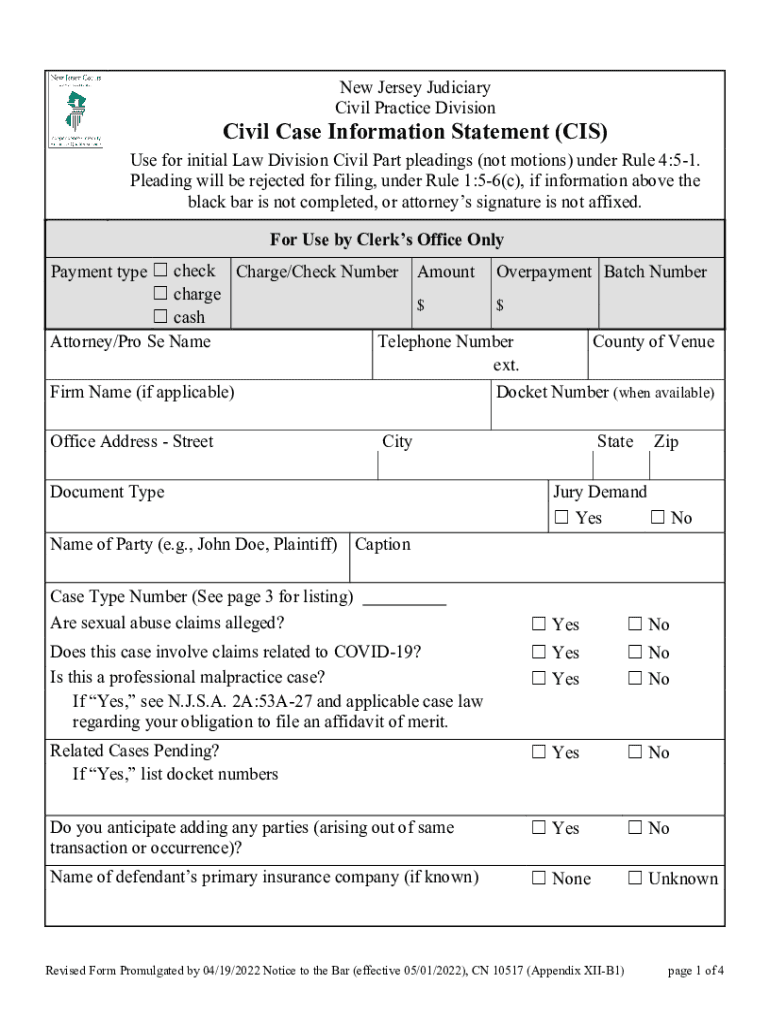
SavePrintClearNew Jersey Judiciary Civil Practice DivisionCivil Case Information Statement (CIS) Use for initial Law Division Civil Part pleadings (not motions) under Rule 4:51. Pleading will be rejected.
Loading

Open form follow the instructions

Easily sign the form with your finger

Send filled & signed form or save
How to fill out the NJ CN 10517 online
The NJ CN 10517 form, known as the civil case information statement, is vital for initiating Law Division Civil Part pleadings. This guide provides straightforward steps on how to accurately complete the form online, ensuring all required information is provided to avoid rejection.
Follow the steps to effectively fill out the NJ CN 10517 form online.
- Press the ‘Get Form’ button to access the NJ CN 10517 and open it in your preferred online editor.
- Enter the attorney or pro se name in the designated field, providing the full name of the individual representing the party.
- Fill in the telephone number, including the area code, alongside the county of venue where the case will be filed.
- If applicable, detail the firm name in the appropriate field. If you are not affiliated with a firm, you may leave this field blank.
- Enter the docket number in the specified section if available, this will assist in categorizing your case.
- Provide your office address, including street, city, state, and zip code in the designated fields.
- Mark 'Yes' or 'No' for the jury demand question, indicating whether a jury trial is requested.
- In the caption section, write the name of the party involved in the case, such as 'John Doe, Plaintiff'.
- Select the appropriate case type number from the provided list and enter it in the specified section.
- Indicate whether sexual abuse claims are alleged by selecting 'Yes' or 'No'.
- Answer the questions regarding claims related to COVID-19 and professional malpractice, responding with 'Yes' or 'No' as applicable.
- If relevant, indicate if there are related cases pending and provide the corresponding docket numbers.
- Complete the section about anticipated additional parties by marking 'Yes' or 'No'.
- If known, provide the name of the defendant’s primary insurance company or select 'None' or 'Unknown'.
- Use the space for special case characteristics to alert the court if there are any unique considerations.
- Indicate any disability accommodations needed and, if needed, provide the language for an interpreter.
- Review the completed form for accuracy and completeness before submitting it.
- Finally, save changes, and choose to download, print, or share the completed form as needed.
Complete your civil case information statements online today for a smoother filing process.
Experience a faster way to fill out and sign forms on the web. Access the most extensive library of templates available.
Related content
Revised Form Promulgated by 04/19/2022 Notice to the Bar (effective 05/01/2022), CN 10517...
N.J.. Const. Art. 4, $ 3, fl 1. This work is to be done "by an ... Revised Form...
The King's Birthday Honours 1943 were appointments by King George VI to various orders and...
Get answers to your most pressing questions about US Legal Forms API.
What is the CIS document?
A Condominium Information Statement (CIS) is the packet of documents provided to buyers purchasing a condo unit that is newly constructed or recently converted from a different use.
What is NJ Court Rule 5 5 2?
The court may prohibit a party from introducing into evidence any information not disclosed or it may enter such other order as it deems appropriate.
What is a NJ matrimonial case information statement?
What is a Case Information Statement (CIS) in NJ? This is the basic worksheet the court looks at when deciding things like child support, alimony, and the division of the estate. It lists all the income, assets and expenses that the spouses typically have on average.
What does CIS mean in legal terms?
Primary tabs. Cisgender (abbreviated as cis) is a type of gender identity in which the gender that the person identifies matches the gender assigned at birth. The prefix “cis” means “on the side of” in Latin.
What is a CIS form?
A Certificate of Immunization Status (CIS) form printed with the vaccination dates from the Washington State Immunization Information System (IIS), MyIR, or another state's IIS.
What is the CIS number?
CIS individual number. A unique identifying number assigned to each person when authorized in CIS.
What is a Case Information Statement in New Jersey divorce?
What is a Case Information Statement (CIS) in NJ? This is the basic worksheet the court looks at when deciding things like child support, alimony, and the division of the estate. It lists all the income, assets and expenses that the spouses typically have on average.
Use professional pre-built templates to fill in and sign documents online faster. Get access to thousands of forms.
If you believe that this page should be taken down, please follow our DMCA take down process here.
This form is available in several versions. Select the version you need from the drop-down list below.