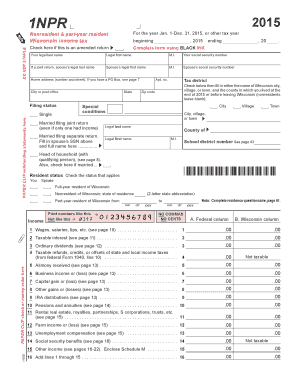
13 .00 .00 14 Social security benefits (see page 16) . . . . . . . . . . . . . . . . . . . . . . . . . . . 14 .00 15 Other income (see pages 16-22). Enclose Schedule M . . . . . . . . . . . . . 15 I-050i .00 2 Taxable interest (see page 11) . . . . . . . . . . . . . . . . . . . . . . . . . . . . . . . . . 2 PAPER CLIP check or money order here 1 Wages, salaries, tips, etc. (see page 10) . . . . . . . . . . . . . . . . . . . . . . . . . 1 .00 .00 16 Add lines 1 thro.
Open form follow the instructions
Easily sign the form with your finger
Send filled & signed form or save
How to fill out the WI DoR 1NPR online
Filing your Wisconsin income tax return can seem challenging, especially for nonresidents and part-year residents. This guide provides clear, step-by-step instructions for completing the WI DoR 1NPR form online, ensuring a smooth and efficient process.
Follow the steps to fill out the WI DoR 1NPR form online successfully.
- Press the ‘Get Form’ button to access the form and open it in your preferred online platform.
- Begin filling out the form using black ink. Start with your legal last name, first name, and middle initial. Include your social security number in the designated field.
- If applicable, enter your spouse's legal last name, first name, middle initial, and social security number in the appropriate areas.
- Complete your home address, including the street number, city, and zip code. If you use a PO Box, refer to the provided guidelines on page 7 of the form.
- Select your filing status: choose between single, married filing jointly, married filing separately, or head of household. Make sure to check the corresponding box.
- Indicate your resident status by selecting whether you are a full-year resident, nonresident, or part-year resident of Wisconsin. Provide the name of your county and school district number, if applicable.
- In the income section, enter the required amounts in both the federal and Wisconsin columns. Follow the instructions for each income type to ensure accuracy. Remember to print numbers without commas or cents.
- As you progress through the form, remember to use the questionnaire regarding your residence, if prompted.
- Towards the end of the form, review all completed sections for accuracy. You may have options for deductions, credits, and tax calculations.
- After verifying that all information is correct, you can save your completed form, download it for your records, print a copy, or share it as needed.
Complete your Wisconsin income tax return online today with ease and confidence.
Experience a faster way to fill out and sign forms on the web. Access the most extensive library of templates available.
Related content
It will be used for identification purposes throughout the processing, filing, and...
Apr 15, 2025 — FREE electronic filing system that nonresidents can use to file the WI...
Get answers to your most pressing questions about US Legal Forms API.
What is a 1NPR form for Wisconsin state taxes?
The 1NPR form is a specific form used for filing nonresident income tax returns in Wisconsin. It is essential for individuals who earn income in Wisconsin but reside elsewhere. Completing this form accurately ensures that you fulfill your tax obligations without issues. For assistance with this form, consider utilizing resources from uslegalforms, which can guide you through the filing process.
How do I register for Wisconsin withholding?
To register for Wisconsin withholding, you need to fill out the necessary forms through the Wisconsin Department of Revenue. This process can be completed online or via paper forms, depending on your preference. Ensure you have your business details handy to streamline registration. Uslegalforms can assist you in finding the right forms and understanding the registration steps.
Is Wisconsin a mandatory withholding state?
Yes, Wisconsin is a mandatory withholding state. Employers must withhold state income taxes from employees' wages, ensuring that the correct amount is remitted to the state on their behalf. This withholding helps maintain tax compliance for individuals earning income in Wisconsin. The uslegalforms platform can be an excellent resource for understanding your withholding obligations.
Is a sales tax ID number the same as an EIN?
No, a sales tax ID number is not the same as an Employer Identification Number (EIN). The sales tax ID number is specifically for collecting sales tax in Wisconsin, while an EIN is used for tax identification purposes with the IRS. Both numbers serve different functions but are essential for different aspects of your business operation. Familiarizing yourself with these distinctions can help ensure proper compliance.
How to get a Wisconsin sales tax ID number?
To acquire a Wisconsin sales tax ID number, go to the Wisconsin Department of Revenue's online registration portal. You will need to provide information about your business, including its structure and type. Once registered, you will be issued a sales tax ID, allowing you to collect sales tax on taxable transactions. Using uslegalforms can streamline this process for you.
How do I register for Wisconsin withholding tax?
To register for Wisconsin withholding tax, visit the Wisconsin Department of Revenue's website and complete the necessary registration process. You will need your business information and employment details. After your application is processed, you will be assigned a withholding tax account number. This step is vital for correctly withholding employee taxes, so consider using uslegalforms for easy access to the required forms.
How do I set up withholding?
Setting up withholding in Wisconsin requires registering your business with the Wisconsin Department of Revenue. You will need to complete the necessary forms, which may include the WI DoR 1NPR form if applicable. After registration, you must calculate and withhold the appropriate amounts from your employees' wages. Resources like uslegalforms can simplify this setup by offering clear instructions and templates.
Do I need to register for sales tax in Wisconsin?
Yes, if you sell goods or services in Wisconsin, you must register for sales tax. This registration is particularly important for businesses that make taxable sales within the state. By registering, you can ensure compliance and avoid penalties. For the best guidance, consider using the uslegalforms platform to navigate this process smoothly.
How do I get a Wisconsin tax ID number?
Getting a Wisconsin tax ID number involves applying through the Wisconsin Department of Revenue. You can easily do this online, where you will enter necessary details about your business. It's essential to provide accurate information to avoid delays. After you complete the registration, your tax ID will be issued quickly.
How to get a Wisconsin tax ID number?
To obtain a Wisconsin tax ID number, visit the Wisconsin Department of Revenue's website. You can complete the registration process online using their secure portal. This process typically requires basic business information, including your business structure and type. After submission, you will receive your tax ID number shortly.
Use professional pre-built templates to fill in and sign documents online faster. Get access to thousands of forms.
If you believe that this page should be taken down, please follow our DMCA take down process here.
This form is available in several versions. Select the version you need from the drop-down list below.