Loading

Open form follow the instructions

Easily sign the form with your finger

Send filled & signed form or save
How to fill out the VA Substitute W-9 online
Filling out the VA Substitute W-9 form online is a straightforward process that provides the necessary information to certify your taxpayer identification number. This guide will walk you through each section of the form, ensuring you complete it accurately and efficiently.
Follow the steps to complete the VA Substitute W-9 online
- Click the ‘Get Form’ button to access the VA Substitute W-9 and open it for editing.
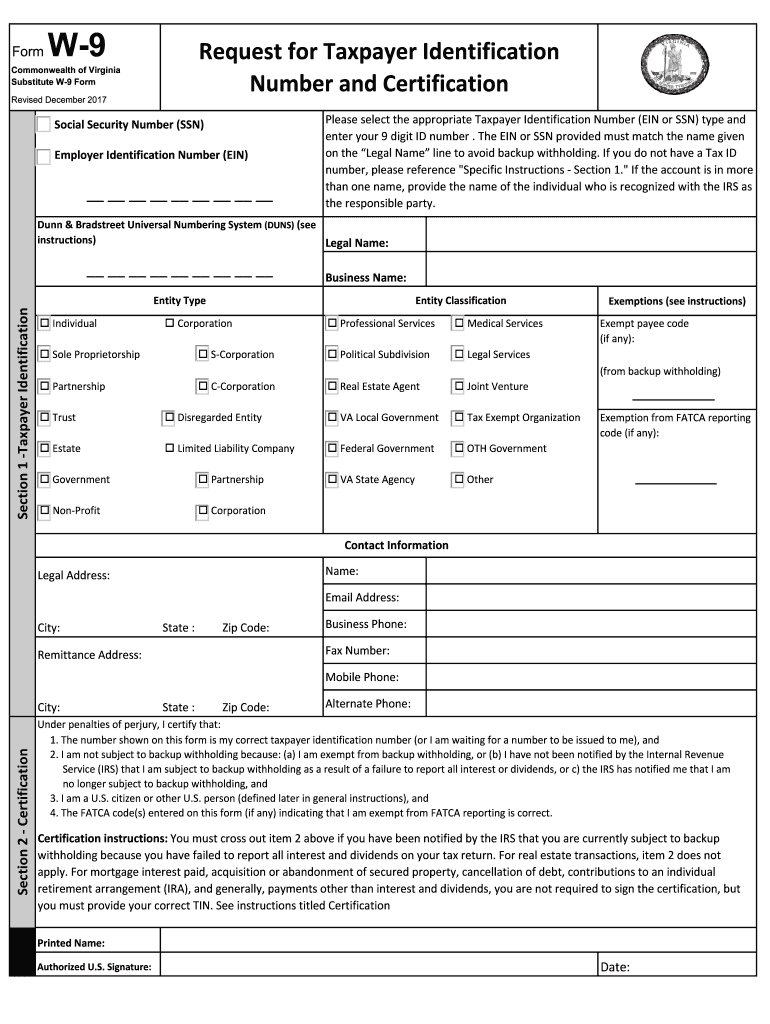
- Select the appropriate taxpayer identification number type by checking either the box for 'Social Security Number (SSN)' or 'Employer Identification Number (EIN)'. Enter your 9-digit identification number in the provided field.
- Fill out the 'Legal Name' section with your name as it appears on your official documents.
- If applicable, provide your 'Business Name', if you operate under a business or DBA name.
- In Section 1, indicate your entity type from the list provided, checking one option like 'Individual', 'Corporation', or 'Sole Proprietorship'.
- If you have any exemptions, complete the exemptions section by entering the appropriate exemptions codes.
- Fill out your contact information, including your legal address, email address, and phone numbers.
- In Section 2, certify the information by reviewing the statements and signing your name where indicated. Make sure to date your signature.
- Once completed, save your changes, then download, print, or share the form as needed.
Complete your VA Substitute W-9 online today and ensure you meet your tax reporting obligations.
Experience a faster way to fill out and sign forms on the web. Access the most extensive library of templates available.
Related content
This is a substitute W-9 form for Virginia, requiring a Taxpayer ID (EIN or SSN) and legal...
This is a substitute W-9 form for Virginia, requiring a Taxpayer ID (EIN or SSN) and legal...
Jan 19, 2017 — This publication discusses common business expenses and explains what is...
Get answers to your most pressing questions about US Legal Forms API.
Should I fill out a W9 for reimbursement?
Yes, you should fill out a W9 for reimbursement to ensure that the payment process goes smoothly and complies with tax regulations. This step confirms your taxpayer identification and helps the entity manage financial records effectively. The VA Substitute W-9 can be a helpful tool in completing this requirement effortlessly.
Do I legally have to fill out a W9?
Legally, you are not required to fill out a W9 unless asked by a payer who needs it for tax reporting purposes. However, refusing to complete a W9 can result in withholding of payments at a higher tax rate. Therefore, filling out a VA Substitute W-9 is often the best choice to prevent issues.
Why do I need to fill out a W9 for reimbursement?
Completing a W9 for reimbursement is important because it confirms your identity and allows the reimbursing entity to report your income accurately to the IRS. This documentation protects both you and the organization, ensuring proper compliance. The VA Substitute W-9 offers a straightforward approach to fulfill this requirement.
Why am I being asked to fill out a W9?
You are usually asked to fill out a W9 to provide necessary identification for tax reporting purposes. This helps the entity handling your payment verify your taxpayer information and comply with IRS requirements. Utilizing a VA Substitute W-9 makes this step easier and more efficient for you.
What happens if I don't fill out a W9 form?
If you do not fill out a W9 form, you may face significant delays in receiving payments or refunds. Furthermore, without this documentation, the payer may be required to withhold taxes at a higher rate. It is wise to complete a VA Substitute W-9 to avoid these complications and streamline your transactions.
Who is exempt from providing a W9?
Certain entities, such as government organizations and tax-exempt entities, may be exempt from providing a W9. Additionally, foreign individuals or organizations typically do not need to submit a W9. Always check specific requirements to ensure compliance when using the VA Substitute W-9.
What is a substitute for W9?
A substitute for a W9 is a document that serves a similar purpose but fits specific needs. It collects the required taxpayer information while complying with IRS regulations. The VA Substitute W-9 is tailored for those who need a simplified solution while meeting all necessary criteria.
Why do I need to fill out a W9 for a refund?
Filling out a W9 for a refund is crucial because it helps the entity processing your refund verify your identity and ensure accurate reporting to the IRS. This documentation is necessary for tax purposes and allows for smooth transactions. Using a VA Substitute W-9 simplifies this process, providing a clear structure for the information required.
Can a W9 be submitted electronically?
Yes, a W9 can often be submitted electronically, depending on the recipient's preferences. It is crucial to check if the payer accepts electronic submissions as part of their process. Using services such as US Legal Forms can facilitate the electronic submission of your VA Substitute W-9, ensuring that you adhere to modern filing practices.
What is the difference between a W9 and a substitute W9?
The main difference between a W9 and a substitute W9 lies in the format and structure. A standard W9 is a specific IRS form used to report taxpayer information. In contrast, a substitute W9 may be a similar document created by a payer that gathers the same information but may include additional customization. Opting for a VA Substitute W-9 can simplify compliance while still meeting all necessary requirements.
Use professional pre-built templates to fill in and sign documents online faster. Get access to thousands of forms.
If you believe that this page should be taken down, please follow our DMCA take down process here.