Loading
Get Va Dot St-12 2016-2026
How it works
-

Open form follow the instructions
-

Easily sign the form with your finger
-

Send filled & signed form or save
How to fill out the VA DoT ST-12 online
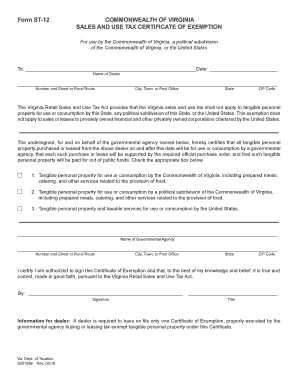
The VA DoT ST-12 form is essential for governmental agencies in Virginia to certify exemption from sales and use tax. This guide provides clear instructions on how to complete the form online, ensuring that users can navigate the process with confidence.
Follow the steps to successfully complete the VA DoT ST-12 form.
- Press the ‘Get Form’ button to retrieve the VA DoT ST-12 form and open it in your chosen editor.
- In the 'To' section, fill in the name of the dealer you are purchasing from. Make sure to include the complete name as it appears in their records.
- Provide the dealer's address. This includes the number and street or rural route, city or town, state, and ZIP code.
- Identify the type of governmental agency making the purchase. You need to select one of the options provided, indicating whether the tangible personal property is for use by the Commonwealth of Virginia, a political subdivision, or the United States.
- Fill in the name of the governmental agency that is purchasing the tangible personal property. Ensure accuracy to help validate the exemption.
- Complete the agency's address details as you did for the dealer, providing all required location information.
- Sign in the designated space, certifying that you are authorized to sign the Certificate of Exemption on behalf of the agency.
- Include your title below your signature to clarify your position within the agency.
- Review all information to ensure it is complete and accurate. Save your changes to the completed form before exporting.
- You can download, print, or share the form as needed after completing it.
Complete your VA DoT ST-12 form online today for a smooth exemption process.
Related links form
To achieve farm tax exemption in Virginia, you need to declare your agricultural activities and meet specific criteria established by the state. Application through the VA DoT ST-12 can significantly facilitate this process. It is beneficial to prepare all required documents to streamline your tax-exempt status.