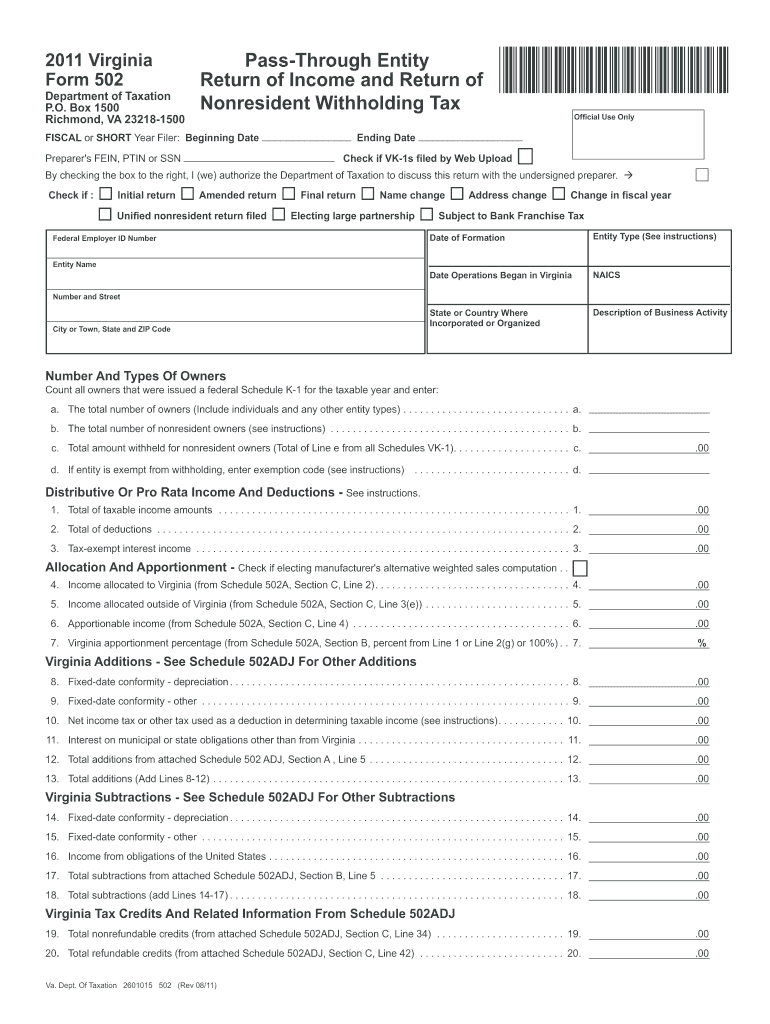
Ng Date *VA0PTE111888* Official Use Only Ending Date Check if VK-1s filed by Web Upload Preparer's FEIN, PTIN or SSN By checking the box to the right, I (we) authorize the Department of Taxation to discuss this return with the undersigned preparer. Check if : Initial return Amended return Unified nonresident return filed Final return Name change Electing large partnership Federal Employer ID Number Entity Name Address change Change in fiscal year Subject to Bank Franchise.
Loading

Open form follow the instructions

Easily sign the form with your finger

Send filled & signed form or save
How to fill out the VA DoT 502 online
Filling out the VA DoT 502 form accurately is essential for pass-through entities to report income and nonresident withholding tax. This guide provides step-by-step instructions to help users navigate the form online.
Follow the steps to successfully complete your VA DoT 502 form.
- Press the ‘Get Form’ button to access the VA DoT 502 form and open it in your online editor.
- Begin by entering the beginning and ending dates for the fiscal or short year in the designated fields.
- Indicate whether VK-1s were filed by checking the appropriate box.
- Provide the preparer's FEIN, PTIN or SSN in the corresponding field.
- Select any applicable return type by checking the relevant boxes for initial, amended, unified, final, name change, or electing large partnership.
- Fill in the Federal Employer ID Number and the entity name in the specified sections.
- Complete the address change section if applicable, entering any needed updates to the entity's address.
- For the number and types of owners, count all owners issued a Federal Schedule K-1 for the year and enter the totals in the designated fields.
- Report total distributive or pro-rata income and deductions, filling out the respective fields with the required amounts.
- Complete the allocation and apportionment section, ensuring to check if you are electing the manufacturer's alternative weighted sales computation.
- After completing all sections, review your entries carefully for accuracy.
- Once you are satisfied, save your changes, and choose to download, print, or share the completed form.
Ensure you complete your VA DoT 502 form online today to meet your filing requirements.
Experience a faster way to fill out and sign forms on the web. Access the most extensive library of templates available.
Related content
Include a copy of your federal return with Form 502. Important: do not include a federal...
Robley Rex Department of Veterans Affairs Medical Center ; Main phone: 502-287-4000Main...
s Inclui uma tela “full-dot” com iluminação (Painel LCD). s Compatível com a...
Get answers to your most pressing questions about US Legal Forms API.
Who must file Virginia Form 502?
Individuals and businesses that earn income sourced from Virginia are required to file Virginia Form 502. This includes residents, part-year residents, and nonresidents who have Virginia income. Make sure to review the specific requirements applicable to your situation to ensure compliance.
How do I file an extension for Virginia state taxes?
Filing an extension for Virginia state taxes involves submitting Form 502 to the Virginia Department of Taxation. This form not only requests an extension but also allows you to make any necessary payments. By following this process, you can effectively manage your tax deadlines and responsibilities.
How do I extend my Virginia 502?
To extend your Virginia Form 502, complete the form and mail it to the Virginia Department of Taxation before the due date. Ensure you include any necessary payments as outlined in the instructions. This proactive step will give you the additional time you need without incurring penalties.
Where do I mail my VA Form 502?
You must mail your VA Form 502 to the Virginia Department of Taxation. The mailing address is usually specified on the form itself. To avoid delays, ensure you send it to the correct address based on the most current instructions provided by the VA tax department.
What is Virginia Form 502V?
Virginia Form 502V is a payment voucher that accompanies your Virginia Form 502, allowing you to make a payment when you file for an extension. This form helps you remit the amount you owe, ensuring that you stay compliant with Virginia tax obligations. Using this voucher can streamline the payment process.
Where do I mail my Virginia Form 502?
You should mail your Virginia Form 502 to the Virginia Department of Taxation at the address listed on the form itself. Typically, this location is Richmond, Virginia. Always double-check the latest mailing instructions to ensure timely processing of your tax return.
How to fill out form 502?
To fill out Form 502 for your Virginia income tax return, gather all necessary financial documents, including W-2s, 1099s, and information about deductions. Carefully follow the instructions provided with the form to report your income and calculate your tax liability. Additionally, ensure that you have the most recent updates regarding the VA DoT 502 to avoid errors and comply with state tax laws.
How to fill out a withholding allowance form?
Filling out a withholding allowance form, like the IRS Form W-4, involves providing your personal details and determining how many allowances you qualify for based on your tax situation. Accurate allocation of allowances is important, as it influences how much tax your employer withholds from your paycheck. For clarity on your withholding obligations and using the VA DoT 502, consider reviewing the latest tax guidelines or consulting resources.
What is the schedule 502A apportionment method?
The Schedule 502A apportionment method is used by multi-state businesses to allocate income to Virginia correctly. This method considers factors such as sales, property, and payroll within the state compared to the total across all locations. Properly using Schedule 502A ensures accurate reporting on Form 502, which is essential for fulfilling your tax obligations under VA DoT 502.
What is the form 502 for taxes?
Form 502 is the Virginia Individual Income Tax Return, designed for residents to report their income and calculate tax liability. This form includes information on income sources, adjustments, and credits, and ultimately determines the amount due or refund owed. When completing your tax return, ensure you have all necessary documents, as accurate information is crucial for compliance with VA DoT 502.
Use professional pre-built templates to fill in and sign documents online faster. Get access to thousands of forms.
If you believe that this page should be taken down, please follow our DMCA take down process here.
This form is available in several versions. Select the version you need from the drop-down list below.