Get Ca Ftb 593-e 2015
How it works
-

Open form follow the instructions
-

Easily sign the form with your finger
-

Send filled & signed form or save
How to fill out the CA FTB 593-E online
Filling out the CA FTB 593-E form online can be streamlined with clear guidance. This comprehensive guide provides step-by-step instructions to help you accurately input the necessary information for your real estate withholding computation.
Follow the steps to correctly complete the CA FTB 593-E form online.
- Click ‘Get Form’ button to access the CA FTB 593-E form. This will allow you to open the document in your preferred editing tool.
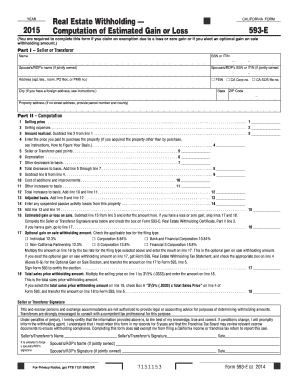
- In Part I – Seller or Transferor, enter the name of the seller or transferor, along with their social security number (SSN) or individual taxpayer identification number (ITIN). If the property is jointly owned, include the spouse's or registered domestic partner's name and identification number.
- Provide the address details, including any apartment or suite numbers as well as the city, state, and ZIP code. If applicable, indicate your foreign address following the necessary format.
- In Part II – Computation, start with line 1: enter the total selling price of the property, which includes all forms of compensation received.
- Proceed to line 2 and enter selling expenses, such as commissions and fees related to the sale.
- Calculate the amount realized by subtracting line 2 from line 1 on line 3.
- On line 4, input the purchase price of the property, ensuring it reflects all costs incurred for obtaining the property.
- Continue to line 5 and enter any seller or transferor-paid points applicable at the time of purchase.
- For line 6, enter the total depreciation taken on the property over the course of ownership.
- List any other decreases to basis on line 7, including casualty loss deductions.
- Total the decreases on line 8 and subtract from the value in line 4 on line 9.
- Next, detail any cost of additions or improvements on line 10, followed by any other increases to basis on line 11.
- Calculate the total increases to basis by adding line 10 and line 11 on line 12.
- Finally, add the values in line 9 and line 12 to find the adjusted basis on line 13.
- Complete line 14 with any suspended passive activity losses applicable before moving to line 15 to calculate the total.
- Determine the estimated gain or loss on sale on line 16, and if applicable, confirm selection for optional gain on sale withholding amount on line 17.
- Lastly, input the total sales price withholding amount on line 18. Ensure all calculations align with the requirements of your filing type.
- Review all fields for accuracy. Once complete, save your changes, and download or print the form as necessary.
Start completing the CA FTB 593-E online today to ensure your real estate transactions are properly documented.
Get form
Related links form
When filling out California withholding allowance, you must estimate your annual income, filing status, and applicable deductions. The CA FTB 593-E form provides a structured approach to calculate the correct number of allowances. By providing accurate information, you can optimize your withholding and potentially reduce your tax liability. Regularly revisit this to ensure it aligns with any changes in your income or financial situation.