Must supply us with a power of attorney giving us the authority to release confidential information to them. Contact Persons For Registration: Name Phone Number E-mail Address Power of Attorney r Yes* r No ( ) - For Reporting: Other Tobacco Phone Number E-mail Address Power of Attorney No r Yes* r ( ) - Cigarette Phone Number E-mail Address Power of Attorney No r Yes* r ( ).
Loading

Open form follow the instructions

Easily sign the form with your finger

Send filled & signed form or save
How to fill out the MO DoR 2175 online
This guide provides a comprehensive overview of how to complete the MO DoR 2175 form online, ensuring a smooth and efficient application process for obtaining a Missouri Cigarette or Other Tobacco Products Tax License. Follow these steps to ensure all required information is accurately submitted.
Follow the steps to fill out the MO DoR 2175 form online.
- Click ‘Get Form’ button to obtain the form and open it in the document editor.
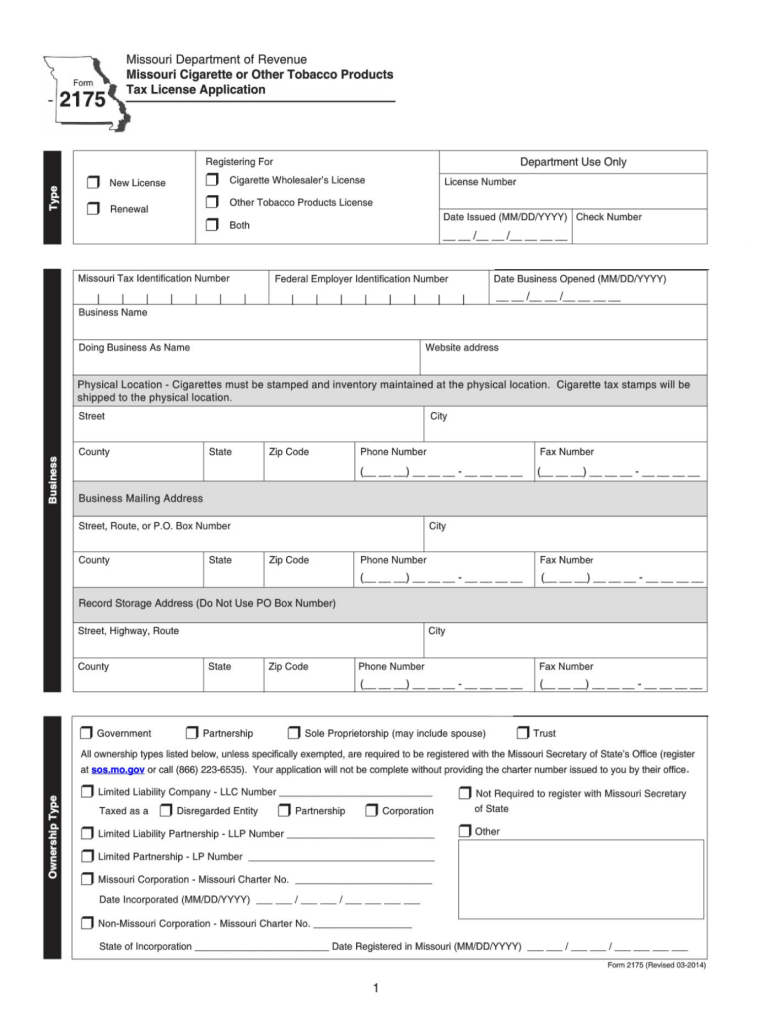
- Select the type of application you are submitting by indicating either 'New License' or 'Renewal'. Ensure that you check the appropriate boxes for either Cigarette Wholesaler’s License or Other Tobacco Products License.
- Enter your License Number and Date Issued in the respective fields. If you are a new applicant, leave the License Number blank.
- Input your Missouri Tax Identification Number, Business Name, and Federal Employer Identification Number. Ensure these are entered accurately to prevent processing delays.
- Provide the Date Business Opened, Doing Business As Name, and Website Address if applicable. Double-check that the date is in MM/DD/YYYY format.
- Fill out the Physical Location address where cigarettes must be stamped. Include city, street, state, and zip code. This location is crucial as it is where tax stamps will be sent.
- Input the Business Mailing Address. This is where any correspondence related to your application will be sent. Ensure all fields, including phone and fax numbers, are filled out clearly.
- Select your Ownership Type from the options provided. Each type may have different compliance requirements, so ensure you select accurately.
- List any previous ownership details, titles, and effective dates if applicable. Include any previous business names and license numbers if you have operated under different arrangements before.
- Indicate your primary business activities and specify the percentage of retail, wholesale, manufacturing, or other activities involved in your business.
- Complete any applicable sections related to your business operations, including supplying names and addresses of manufacturers, suppliers, and licenses held in other states.
- Final step involves reviewing all information entered for accuracy. Once confirmed, save revisions, download a copy for your records, and prepare to print if necessary.
Complete your application for the Missouri Cigarette or Other Tobacco Products Tax License online today!
Experience a faster way to fill out and sign forms on the web. Access the most extensive library of templates available.
Related content
r Buy or sell tobacco products by catalog sales. Please attach a copy of your catalog...
Non-taxable sales will be calculated automatically once gross sales and taxable sales have...
Oct 27, 2014 — Convection is a heat transfer mode where a fluid is brought into mo...
Get answers to your most pressing questions about US Legal Forms API.
How do I fill out a sales tax exemption form?
Filling out a sales tax exemption form requires you to specify the reason for the exemption, such as being a nonprofit organization or purchasing for resale. Be sure to provide accurate information about your business and the items you are purchasing. Once completed, submit the form to the vendor from whom you are buying. For assistance, the MO DoR 2175 resources can guide you through the steps of obtaining an exemption.
How to fill out a Missouri sales tax form?
To fill out a Missouri sales tax form, start by entering your sales information, including types of goods sold and total sales amounts. Next, make sure to accurately calculate the sales tax due based on your total sales. Finally, review the form completely before submission to catch any errors. The MO DoR 2175 offers valuable insights to facilitate the completion of your sales tax forms.
How to fill out EZ tax form?
The EZ tax form simplifies the filing process for many individuals. When completing it, ensure that you include all required personal information, such as your Social Security number and income details. Follow each section carefully, making use of the examples provided on the form. For any additional help, resources like the MO DoR 2175 will clarify any uncertainties you may have.
How to apply for a tobacco license in Missouri?
To apply for a tobacco license in Missouri, you need to complete the appropriate application form provided by the state. Ensure that you gather all necessary documentation, such as identification and proof of compliance with your local tobacco regulations. After submission, be prepared for processing times before receiving your license. Utilizing the MO DoR 2175 can help streamline your application process.
How do you enter sales tax information on taxes?
When preparing your tax return, you will typically need to list your sales and the sales tax collected separately. Ensure that you have all records of sales tax amounts collected throughout the year. Then, enter these figures on the relevant lines of your tax forms as specified. For more guidance, the MO DoR 2175 provides detailed instructions that simplify this process.
Where can I get MO tax forms?
You can get MO tax forms from multiple sources, including the Missouri Department of Revenue's website. Additionally, many local offices, such as libraries or tax preparation services, carry physical copies. Ensure you have the necessary forms, like the MO DoR 2175, to meet your tax filing requirements.
What is dor in Missouri?
The 'DoR' in Missouri stands for the Department of Revenue. This agency is responsible for managing tax collections and ensuring compliance with state tax laws. If you have questions or need assistance regarding forms like the MO DoR 2175, the Missouri Department of Revenue is your primary resource.
What Missouri tax form should I use?
The specific Missouri tax form you should use depends on your individual tax situation. For instance, if you are filing as a business, you may need the MO DoR 2175. It’s important to review the instructions on the Missouri Department of Revenue website to choose the correct form that aligns with your needs.
Can I download and print tax forms?
Yes, you can easily download and print Missouri tax forms from the Missouri Department of Revenue's website. This makes it simple to access the necessary documents, including the MO DoR 2175, from the comfort of your home. Just make sure your printer is set up and ready to go to ensure a smooth printing process.
Where can I pick up tax forms?
You can pick up Missouri tax forms at various locations, such as local Department of Revenue offices and public libraries. These forms are essential for accurate tax filing, including important documents like the MO DoR 2175. You might also want to consider visiting community centers that often provide access to these resources.
Use professional pre-built templates to fill in and sign documents online faster. Get access to thousands of forms.
If you believe that this page should be taken down, please follow our DMCA take down process here.