9 Subtract line 8 from line 4 . . . . . . . . . . . . . . . . . . . . . . . . . . . . . . . . . . . . . . . . . . . . . . . . . . . . . . . . . . . . . . . . . . . . . . . . . . . . 9 10 Cost of additions and improvements . . . . . . . . . . . . . . . . . . . . . . . . . . . . . . . . . . . . . . . . . . . . . . . . . 10 11 Other.
Loading

Open form follow the instructions

Easily sign the form with your finger

Send filled & signed form or save
How to fill out the CA FTB 593-E online
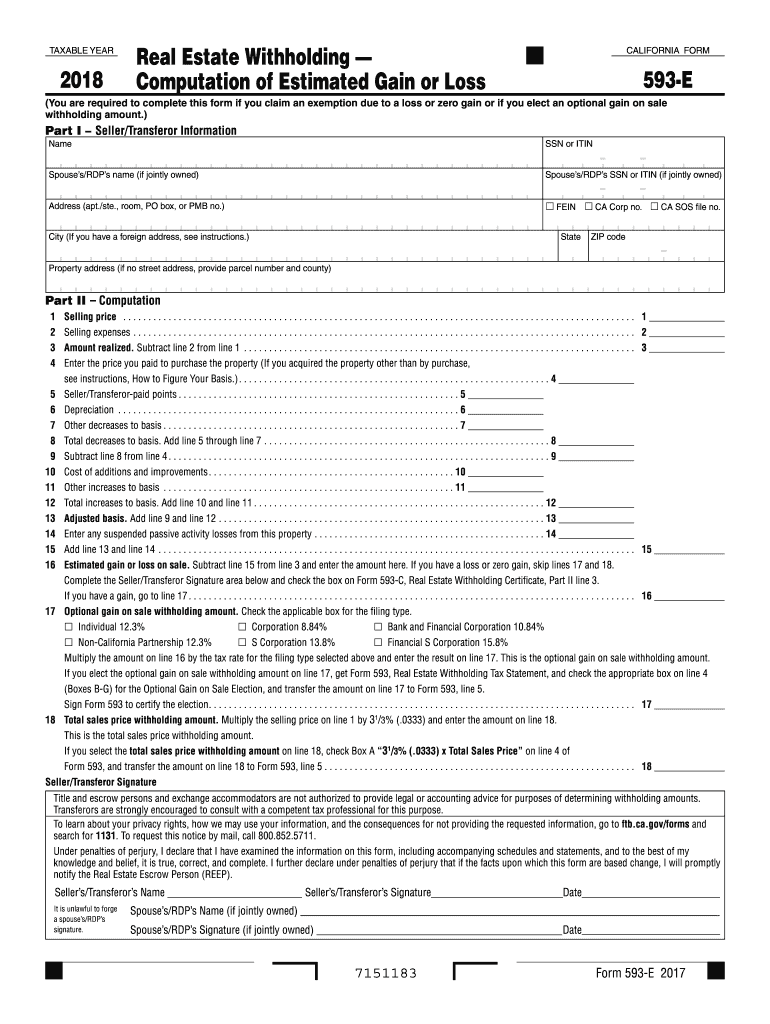
This guide provides clear and detailed instructions on how to complete the CA FTB 593-E form online. Whether you are claiming an exemption or electing an optional gain on sale withholding amount, this step-by-step approach will assist you in submitting the form accurately.
Follow the steps to fill out the CA FTB 593-E form online effectively.
- Click ‘Get Form’ button to access the CA FTB 593-E form and open it in the online editor.
- In Part I, enter the seller or transferor information. Fill in the name, social security number or individual taxpayer identification number, and if the property is jointly owned, include the spouse’s or registered domestic partner’s name and identification number. Provide the address details, including city, state, and ZIP code.
- Proceed to Part II for computation. Start by entering the selling price on line 1. List all applicable selling expenses on line 2, and calculate the amount realized by subtracting line 2 from line 1 in line 3.
- On line 4, record the price you paid for the property. If acquisition was not through purchase, refer to the guidelines for calculating your basis.
- Fill out line 5 for any seller or transferor-paid points. On line 6, note down the depreciation amounts. If there are any other decreases to basis, enter those on line 7, and sum these on line 8.
- Subtract the total decreases on line 8 from the purchase price on line 4, recording this value on line 9. Enter costs for additions and improvements on line 10, and other increases to basis on line 11. Sum these increases and record on line 12.
- Add lines 9 and 12 to calculate the adjusted basis and record this value on line 13. If applicable, enter any suspended passive activity losses on line 14, and add this to line 13 on line 15.
- Calculate your estimated gain or loss on sale by subtracting line 15 from line 3, entering the result on line 16. If you have zero gain or loss, you may skip the following lines.
- If there is a gain, select the appropriate optional gain on sale withholding amount on line 17, indicating your filing type and calculate accordingly.
- On line 18, determine the total sales price withholding amount by multiplying the selling price on line 1 by 31/3%. After completing the form, remember to click save changes, and then you may download, print, or share the completed form.
Complete your CA FTB 593-E form online today for a smooth filing experience.
Experience a faster way to fill out and sign forms on the web. Access the most extensive library of templates available.
Related content
If you have a loss or zero gain, skip lines 17 and 18 . Complete the Seller/Transferor...
Sellers of California real estate use Form 593, Real Estate Withholding ... For...
Ontario, CA 91764. Tel: (909) 593-2100. Fax: (909) 593-2500. Hours of Operation. 7:30 a.m...
Get answers to your most pressing questions about US Legal Forms API.
What is California form 593 used for?
California form 593 is used to report withholding tax that applies to real estate transactions. When sellers of California real estate either are nonresidents or foreign entities, they often must complete this form to report the withholding amount. Completing the CA FTB 593-E accurately is essential for both buyers and sellers to manage their withholding obligations. This form helps streamline tax processes and ensure all parties fulfill their legal requirements.
What makes you exempt from California withholding?
You may qualify for an exemption from California withholding if you meet specific criteria set by the state. For instance, if you are a nonresident who does not earn income from California sources, you might not need to withhold taxes. Additionally, individuals can file the CA FTB 593-E form to claim an exemption if they meet the required conditions. Understanding these exemptions helps ensure compliance while minimizing unnecessary tax payments.
How do I file an exemption in California?
To file an exemption in California, utilize the CA FTB 593-E form, which guides you through the necessary steps. Complete the form accurately, noting the reasons for your exemption, and submit it to your employer or payer. Taking this straightforward action can protect you from unwanted withholdings and serve your financial interests.
How many California withholding allowances should I claim?
The number of California withholding allowances you should claim varies based on your financial situation, dependents, and tax filing status. Typically, you can use the CA FTB 593-E form to calculate the appropriate number of allowances. Providing accurate information allows for optimal tax withholding tailored to your needs.
Is it better to claim 1 or 0 in California?
Whether to claim 1 or 0 in California depends on your personal financial situation. Claiming 1 will result in a smaller withholding amount and a potentially larger paycheck, while claiming 0 maximizes your withholding, which may lead to a larger refund at tax time. The CA FTB 593-E form can help clarify your options and impact.
Can I claim exempt from California withholding?
Yes, you can claim exempt from California withholding if you meet specific criteria outlined in the CA FTB 593-E form. Review the requirements carefully, as only those who qualify based on their tax situation can claim this status. It is crucial to understand your eligibility to ensure compliance and avoid penalties.
How do I claim exemption from California withholding?
To claim an exemption from California withholding, complete the CA FTB 593-E form and mark the box that indicates your exemption status. Ensure you provide all necessary details, including your name and identification information. Submitting this form to your employer or payer will help prevent unnecessary withholding from your earnings.
What should I put for exemption from withholding?
When claiming an exemption from withholding, clearly state the applicable reasons on the CA FTB 593-E form. You should include any relevant situations that qualify you for an exemption, such as not owing taxes for the previous year. Make sure to provide accurate information, as this helps in preventing any future tax liabilities.
How do I fill out a California state withholding form?
To fill out the California state withholding form, begin by gathering your personal information, such as your name, address, and Social Security number. Next, determine your filing status and the number of allowances you want to claim. The CA FTB 593-E form will guide you through the process, ensuring you understand how to complete each section accurately.
Is there a penalty for filing an amended tax return?
Filing an amended tax return may attract penalties, especially if you owe additional taxes. The California Franchise Tax Board may impose interest on unpaid taxes, but generally, there is no penalty if you file the amendment before the original due date. It is wise to reference CA FTB 593-E for any potential implications related to your specific situation.
Use professional pre-built templates to fill in and sign documents online faster. Get access to thousands of forms.
If you believe that this page should be taken down, please follow our DMCA take down process here.
This form is available in several versions. Select the version you need from the drop-down list below.