Loading
Get Mo 53-v 2014
How it works
-

Open form follow the instructions
-

Easily sign the form with your finger
-

Send filled & signed form or save
How to fill out the MO 53-V online
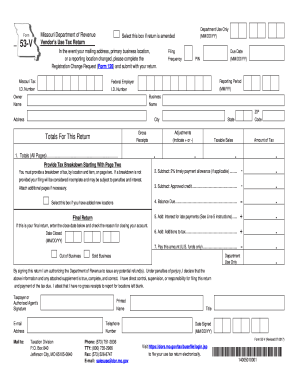
The MO 53-V is the Vendor's Use Tax Return, necessary for reporting use tax obligations. This guide will provide you with concise, step-by-step instructions on how to complete the form accurately and efficiently.
Follow the steps to fill out the MO 53-V form online effectively.
- Press the ‘Get Form’ button to access the MO 53-V form and open it in the editor.
- Complete the Missouri Tax I.D. Number by entering your eight-digit number issued by the Missouri Department of Revenue. If you are not registered, follow the necessary registration process.
- Input the Federal Employer I.D. Number, which is a nine-digit identification number issued by the IRS, to identify your business.
- Fill in the Filing Frequency and PIN. These fields are optional; you may leave them blank if you do not have this information.
- Specify the Due Date for the return, ensuring it aligns with the correct period’s requirements.
- Enter the Reporting Period in the correct MM/YY format, indicating the tax period you are filing for.
- Provide the Owner and Business Name, along with your Address, City, State, and ZIP Code.
- Navigate to Line 1 and enter the totals for gross receipts, adjustments, taxable sales, and tax due for all pages.
- If applicable, select the box to indicate that you are adding new locations and provide the required information on subsequent pages.
- Carry out the calculations for Lines 2 through 7, ensuring to accurately subtract allowances and credits and add any necessary fees.
- Authorize the return by signing, printing your name, title, and providing your contact information including email and telephone.
- Upon completing the form, save changes, and opt to download, print, or share your returns as needed.
Complete your MO 53-V form online today to meet your tax obligations efficiently.
Get form
Experience a faster way to fill out and sign forms on the web. Access the most extensive library of templates available.
Related links form
To legally avoid sales tax when purchasing a car in Missouri, consider options like gifting the vehicle or purchasing it for charity purposes. Keep in mind that specific guidelines must be followed, as these exemptions are strictly regulated. The MO 53-V form can assist you in understanding these conditions thoroughly.
Get This Form Now!
Use professional pre-built templates to fill in and sign documents online faster. Get access to thousands of forms.