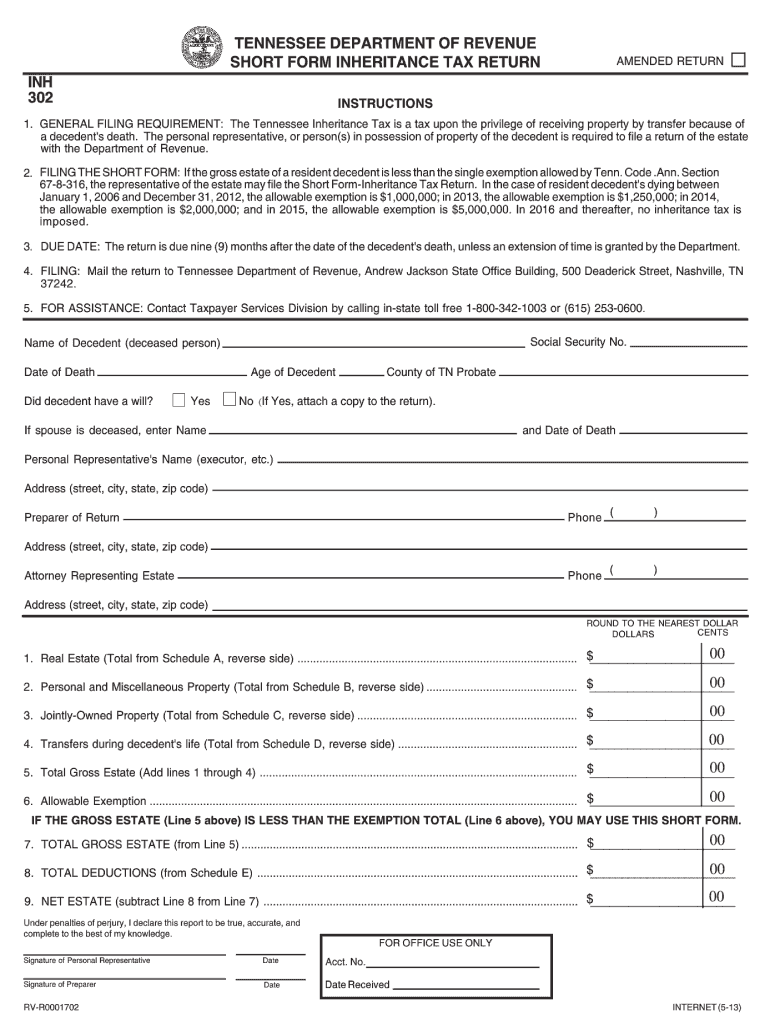
Print TENNESSEE DEPARTMENT OF REVENUE SHORT FORM INHERITANCE TAX RETURN INH Reset AMENDED RETURN INSTRUCTIONS 1. GENERAL FILING REQUIREMENT The Tennessee Inheritance Tax is a tax upon the privilege of receiving property by transfer because of a decedent s death. The personal representative or person s in possession of property of the decedent is required to file a return of the estate with the Department of Revenue. 2. FILING THE SHORT FORM If th.
Loading

Open form follow the instructions

Easily sign the form with your finger

Send filled & signed form or save
How to fill out the TN DoR INH 302 online
Welcome to this comprehensive guide on filling out the TN DoR INH 302 online. This guide is designed to assist users of all experience levels in completing the necessary information accurately and effectively.
Follow the steps to complete your form successfully.
- Click the ‘Get Form’ button to obtain the form and open it in your preferred editor.
- Begin by filling in your personal information. Enter your full name, address, and contact details in the designated fields carefully.
- Next, provide any relevant identification numbers as requested. This may include a social security number or other applicable identifiers.
- Review any specific section pertaining to the purpose of the form. Check the boxes or fill in the necessary details that apply to your situation.
- Double-check all entered information for accuracy. Ensure that all fields are completed as required to prevent delays in processing.
- Once completed, you may save your changes, download the form for your records, or print it directly from your editor.
- If necessary, share the form as instructed, or submit it according to the typical filing procedures of your jurisdiction.
Take the next step and complete your TN DoR INH 302 online today!
Experience a faster way to fill out and sign forms on the web. Access the most extensive library of templates available.
Related content
This guide provides the rules, procedures, and technical requirements for the electronic...
by L Norci · 1995 · Cited by 15 — We present in this paper a spatial and spectral...
VTIXX-CA. Field Maintenance. Print Set. DOr-JD~wl [Eq~D~mGrrot. Co~~o~8Ru@71. Print Set...
Get answers to your most pressing questions about US Legal Forms API.
How much is business tax in Tennessee?
Business tax rates in Tennessee vary based on the classification and gross receipts of the business. Generally, the tax can range from $22.50 to a percentage of gross receipts above a certain threshold. It's beneficial to reference the TN DoR INH 302 for specific rates and compliance requirements related to your business tax obligations.
Where do I file probate in Tennessee?
Probate cases in Tennessee are filed in the probate court located in the county where the deceased resided. This court oversees the administration of the estate and the distribution of assets. Ensure that you adhere to the TN DoR INH 302 guidelines for proper documentation and filing procedures within the probate process.
How to file a business tax return in Tennessee?
To file a business tax return in Tennessee, you need to determine your business type and gather the necessary financial documentation. You can complete the process online through the Tennessee Department of Revenue or via paper forms. Be sure to follow the TN DoR INH 302 regulations for accurate reporting and timely submissions.
How to file TN business tax?
Filing TN business tax involves completing the appropriate forms, depending on your business structure and revenue. You can file online through the Tennessee Department of Revenue's website or submit paper forms by mail. Utilizing resources like USLegalForms can streamline this process, ensuring compliance with TN DoR INH 302 for your business tax filings.
Who must file Tennessee FAE 170?
The Tennessee FAE 170 must be filed by limited partnerships, limited liability companies, and corporations that generate income from sources in Tennessee. This form is essential for reporting the applicable franchise and excise taxes. Familiarity with the TN DoR INH 302 will help in accurately completing the FAE 170 form to meet state requirements.
How is an LLC taxed in Tennessee?
In Tennessee, an LLC is typically taxed as a pass-through entity, meaning that the profits and losses pass through to the owners' individual tax returns. However, the LLC may be subject to the state's business tax, depending on its revenue. It is important to understand the TN DoR INH 302 guidelines to ensure compliance and avoid penalties.
How much can you inherit without paying taxes in TN?
In Tennessee, you can inherit any amount without paying inheritance tax, thanks to the absence of such a tax under TN DoR INH 302. While this is beneficial, it’s important to keep in mind other potential estate-related obligations. Understanding your overall estate planning is vital to ensure compliance with all regulations. The uslegalforms platform can assist you in managing these forms and clarifying any related concerns.
Why am I getting a letter from Tennessee Department of Revenue?
Receiving a letter from the Tennessee Department of Revenue can be concerning, but it often relates to issues regarding your estate or inheritance tax compliance as outlined in TN DoR INH 302. This letter could be a notification about required documentation or a request for further information. It's essential to respond promptly to avoid complications. If unclear, consider legal advice to address the situation effectively.
What is the most you can inherit without paying taxes?
In Tennessee, there's no inheritance tax, so technically, you could inherit any amount without facing tax consequences. However, the TN DoR INH 302 focuses on other estate-related concerns that may impact your estate planning. While there's no direct tax on inheritance, reviewing your overall estate value and its distribution is crucial. Always ensure you understand the laws to maximize your benefits.
How do I avoid inheritance tax in TN?
To avoid inheritance tax in Tennessee, you should understand the TN DoR INH 302 regulations. Planning your estate carefully can help minimize tax liabilities. Consider strategies like gifting assets while you are alive or setting up a trust. Consulting with an estate planning professional can guide you through these options effectively.
Use professional pre-built templates to fill in and sign documents online faster. Get access to thousands of forms.
If you believe that this page should be taken down, please follow our DMCA take down process here.
This form is available in several versions. Select the version you need from the drop-down list below.