Loading
Get Nz Ir433 2019-2026
How it works
-

Open form follow the instructions
-

Easily sign the form with your finger
-

Send filled & signed form or save
How to fill out the NZ IR433 online
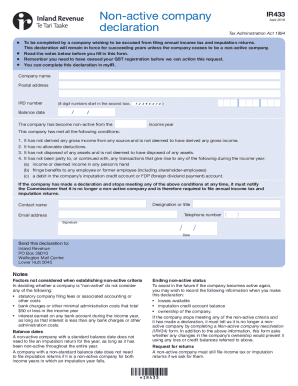
The NZ IR433 form is essential for companies wishing to declare their non-active status and be excused from filing annual income tax and imputation returns. This guide provides step-by-step instructions to assist users in accurately completing the form online.
Follow the steps to complete the NZ IR433 form online.
- Click 'Get Form' button to access the NZ IR433 form and open it in your chosen editor.
- Enter the company name in the designated field. Ensure that the name matches exactly as registered.
- Fill in the postal address where the company receives mail. This should be the current address where communication will be sent.
- Input the IRD number, which consists of 8 digits. Make sure to enter the number accurately, starting in the second box.
- Specify the balance date. This is the date used for tax purposes, usually the end of the company's financial year.
- State the date from which the company has become non-active for the income year.
- Confirm that the company meets all conditions for non-active status by checking the applicable boxes regarding gross income, allowable deductions, disposals of assets, and transactions related to income or fringe benefits.
- Provide the designation or title, contact name, telephone number, and email address of the person completing the form. This information is essential for any follow-up communication.
- Sign and date the form to verify the information provided is correct and complete.
- Once completed, you can save changes, download, or print the form as necessary. Ensure that all information is accurate before submitting.
Complete your NZ IR433 declaration online today to ensure your company remains compliant.